
Voice AI Latency: Causes and Fixes
Measure caller-to-audio delay, cut the biggest bottlenecks, stream stages, and validate under load to reduce voice AI latency.

To reduce voice AI latency, I start by measuring the wait from the caller’s last word to the first sound they hear - not just model response time. I track p50 (the median) and p95 (the point at or below which 95% of turns fall), then fix the slowest steps holding up the answer.
My checklist covers the full call:
- Measure first: Trace speech detection, transcription, model output, lookups, safety checks, audio delivery, and playback.
- Cut waiting: Trim model context, reduce API work, and run independent steps together.
- Tune the conversation: Stream audio, limit playback queues, and test pauses and interruptions.
- Check the infrastructure: Test service regions, connections, queues, provider delays, and fallbacks.
I track acknowledgments and completed tasks separately. Then I test under peak traffic: <u>less waiting only counts if accuracy, safety, and call quality hold up</u>.
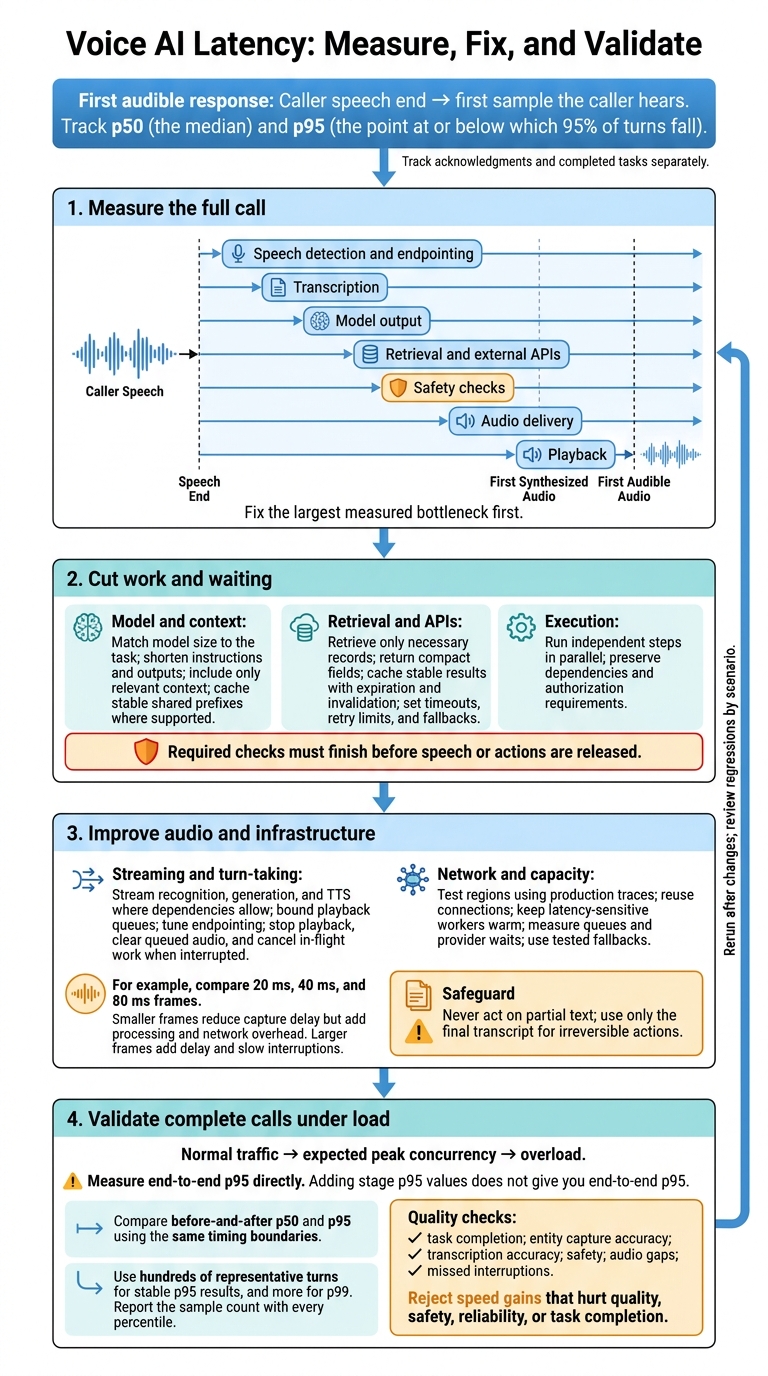
Voice AI Latency: Measure, Fix, and Validate
How to crack 500ms latency in AI voicebots? - Nikhil Gupta
sbb-itb-f123e37
Reduce Model, Retrieval, and Safety Check Delays
Start with the slowest measured stage: the model, retrieval, or safety checks. Once you find the bottleneck, cut unnecessary work that other steps must wait for.
Match Model Size and Context to the Task
Use a small or medium model for routing, extraction, intent classification, simple policy questions, and tool calls. Save larger models for ambiguous requests, complex reasoning, or high-value exceptions. Smaller models usually respond faster and cost less, but test them on representative calls before putting them into production.
Set acceptance criteria first, including intent accuracy, tool-call accuracy, and escalation rate. Keep instructions short, remove repeated rules, summarize older turns, and include only context that affects the decision. Put stable instructions, examples, and tool definitions first so the shared prefix can be cached.
Shorter outputs and smaller models usually reduce time to first audio. Check every change against the same accuracy and latency metrics.
If the model isn't the bottleneck, retrieval and tool calls usually are.
Reduce Retrieval and External API Work
Retrieve only the records needed for the current turn. Index frequent queries, filter by tenant and authorization before retrieval, and return compact fields. Cache stable or frequently requested results with an explicit policy for how long they remain current.
Don't cache volatile or sensitive data unless the cache has strict tenant isolation, encryption, access checks, expiration, and invalidation.
Set timeouts and retry limits for each service, plus a fallback for when a dependency is slow or unavailable.
For appointment changes, verify identity and collect the date or time range before checking availability. Acknowledge that the lookup is underway without promising a slot. Offer only confirmed results. Finalize changes only after authorization, tool confirmation, and any required caller confirmation.
After cutting unnecessary work, run the remaining independent steps in parallel.
Run Independent Checks and Lookups in Parallel
Run steps in parallel only when they don't depend on one another. Use tiered safety checks: start with fast deterministic checks, use light classifiers for common risks, and add deeper review when the request or tool action calls for it.
Required checks must finish before speech or actions are released. Cancel work that's no longer needed when the caller interrupts or changes intent.
Choose the simplest execution pattern that meets your safety and speed needs.
| Approach | Latency | Complexity | Resource use | Best fit |
|---|---|---|---|---|
| Sequential | Adds the duration of each step | Low | Lower peak concurrency | Dependent steps and ordered transaction checks |
| Parallel | Usually matches the slowest independent step plus orchestration overhead | High; needs timeouts, cancellation, and result joining | Higher concurrency and potential API cost | Independent lookups and checks with available inputs and permissions |
| Hybrid | Runs safe work together, then validates before release | Moderate; needs explicit dependencies | Moderate to high | Fast acknowledgments with authorization and safety gates |
Improve Streaming, Audio, and Turn-Taking
Once you’ve trimmed delays in model, retrieval, and safety work, the next bottleneck is usually how audio moves through each turn.
Stream Speech Recognition, Generation, and Playback
Send caller audio to speech recognition continuously instead of waiting for a complete recording. Keep an interim transcript for display and a final transcript for actions. Never act on partial text, and use only the final transcript for irreversible actions.
Start text-to-speech (TTS) as soon as there’s enough text for a usable audio chunk. Begin playback while generation continues.
| Approach | First-audio delay | Interruption handling | Implementation needs |
|---|---|---|---|
| Batch | Highest: waits for complete recognition, generation, and usually synthesis | Simple, but large responses can delay playback and stopping | Complete audio upload, final transcript, full response, then synthesis |
| Partial streaming | Medium to low: uses early transcripts and model output | Requires transcript revision handling and response cancellation | Streaming speech recognition, incremental generation, and chunked TTS |
| End-to-end streaming | Lowest when dependencies allow stages to overlap | Requires coordinated cancellation and queue clearing | Full-duplex audio, streaming APIs, bounded buffers, state management, and safety gates |
Streaming cuts waiting, but the model, endpointing, network, and safety checks still add delay. Once streaming works, buffer size helps determine whether the call feels immediate or sluggish.
Tune Audio Chunks and Playback Buffers
Test at least three provider-compatible frame sizes under real network conditions.
For example, compare 20 ms, 40 ms, and 80 ms frames.
Smaller frames reduce capture delay but add processing and network overhead. Larger frames add delay and slow interruptions. Compare first partial transcript time, first audio time, packet loss, CPU usage, speech quality, and interruption response.
Split TTS text at natural phrase or sentence boundaries. Keep names, numbers, and abbreviations intact.
Use only enough playback buffering to mask normal network variation. Set a queue limit and apply backpressure: slow synthesis when playback can’t keep up, or drop stale speculative audio. Too much buffering delays interruptions. Track queue depth, underruns, and overruns instead of blindly increasing the buffer.
Tune Speech Endpointing and Interruptions
Endpointing determines when the caller has finished speaking. Test silence thresholds with short answers, long explanations, hesitant and fast speech, accented speech, speaker changes, office noise, music, and telephone compression.
Shorter thresholds cut delay but risk false cutoffs. Longer thresholds leave room for pauses but add waiting. Measure false endpointing, missed endpoints, and p50/p95 first-audio latency by call type.
Even fast streaming falls short if the assistant can’t stop cleanly when the caller speaks. Detect caller speech with voice activity detection or streaming speech recognition. Then stop playback, clear queued audio, and cancel in-flight work where supported. Mark the response as canceled so late audio can’t restart playback. Track what the caller actually heard separately from unplayed text. Measure barge-in time from the caller’s first detectable syllable to audible silence.
If the call is still slow after these streaming fixes, the remaining delay is usually region, queue, or provider wait time.
Reduce Network and Vendor Delays
If calls are still slow after model and streaming changes, the remaining delay is usually in the network or on the vendor’s side.
Choose Service Regions and Reduce Network Hops
Choose regions based on production traces, not geography. Test U.S. regions with East Coast, Central, and West Coast callers across carrier networks. Compare the full route through the media gateway, speech recognition, language model, text-to-speech, and business APIs. Keep application processing steady while comparing p50 and p95 transport times. Treat data residency and security requirements as routing constraints.
Reuse authenticated WebSocket, HTTP/2, or HTTP keep-alive connections where supported. Set up sessions during call setup instead of opening a new connection for every audio chunk.
Packet loss can trigger retransmissions or leave gaps in audio. Jitter can make receivers wait for late packets. Use a small transport jitter buffer that grows only when packet timing calls for it. Before increasing its limit, measure late packets and the playback delay the buffer adds.
Isolate transport delay first. Then separate vendor queueing from local work.
Manage Cold Starts, Queues, and API Wait Times
Track local initialization, internal queue wait, outbound request time, first response, and first audio separately in your traces. Use provider timing headers when available. A slow response alone doesn’t prove vendor queueing.
Keep latency-sensitive workers warm, move setup out of the call path where possible, and check that connections are ready before sending audio. Traffic above prepared capacity can still trigger cold starts.
Monitor active concurrency, queue depth, rate-limit responses, and time to first audio. Reserve capacity for active calls, and defer nonurgent work before reaching limits. Set per-stage timeouts and a single total retry cap. Retry only transient failures, with bounded backoff, jitter, and idempotency controls to prevent duplicate business actions.
Switch to a tested fallback when repeated latency breaches, throttling, or errors cross your thresholds. Before changing regions or providers, test full calls to verify authentication, audio formats, streaming, pronunciation, interruption handling, and data-processing rules.
Use these traces to connect each slow call to its cause before testing full-call behavior under load.
Troubleshoot and Test Complete Calls
Match Symptoms to Measurements and Fixes
After finding a bottleneck, check whether the fix changed the critical path. Treat each symptom as a lead, not proof. Use one trace per turn to compare what the caller hears with the timing of each internal stage.
| Symptom | Possible causes | Measurements to confirm | Corrective actions |
|---|---|---|---|
| Delayed first audio | Slow endpointing, first-token latency, retrieval or safety checks, queueing, region distance, or playback buffering | Speech end to endpoint decision; transcript readiness; tool and check spans; first token; first synthesized versus first audible audio | Tune the confirmed bottleneck; stream input and output; trim prompt and retrieval work; parallelize independent checks; test regions; reduce initial buffering without clipping speech |
| Choppy playback | Small or irregular chunks, jitter, packet loss, CPU saturation, unstable chunk timing, or an undersized jitter buffer | Chunk sizes and intervals; packet loss; jitter; bitrate; CPU; underruns; stream gaps | Stabilize chunk timing; use a modest adaptive buffer; prioritize audio; improve network quality; remove blocking playback work |
| Slow interruptions | VAD delay, conservative endpointing, a playback queue that cannot be canceled, transport delay, or continued generation | Caller speech onset to audible silence; VAD delay; queued audio duration; cancellation acknowledgment; RTT | Detect speech earlier; cancel generation and playback; flush queued audio; test local or nearer detection |
| Uneven response times | Variable retrieval or APIs, cold starts, queueing, provider throttling or route variation, or cache misses | p50/p95/p99 by stage; queue depth; cold-start rate; provider status; tool-path distribution | Parallelize independent work; cache stable data; set deadlines and fallbacks; keep workers warm; select capacity and regions by tail latency |
Once you connect a symptom to a likely stage, test it under real traffic and degraded conditions.
Test Call Quality and Latency Under Load
Use hundreds of representative turns for stable p95 results, and more for p99. Report the sample count with every percentile.
Include short and long utterances, fast and slow speakers, relevant accents, code-switching, overlapping speech, pauses, self-corrections, background noise, speaker distance, telephone-bandwidth audio, quick and delayed interruptions, silence, and degraded networks.
Keep the test mix aligned with actual caller intent across easy, retrieval-heavy, guardrail-sensitive, transfer, and failure scenarios. Test the full call path at normal traffic, expected peak concurrency, and overload - not just a text-only loopback. Report ramp-up, sustained-load, and burst results separately.
Compare before-and-after p50 and p95 using the same timing boundaries:
- Endpointing: Speech end to endpoint decision.
- First transcript: Audio-frame availability to usable transcript.
- First model token: Request submission to token arrival.
- First audible response: Caller speech end to the first sample the caller hears.
- Completion: Caller speech end to playback end.
- Interruption-stop latency: Detected caller speech to audible silence.
Measure end-to-end p95 directly. Adding stage p95 values does not give you end-to-end p95.
Pair timing results with task completion, entity capture accuracy, transcription accuracy, safety, audio gaps, and missed interruptions. Listen to recordings for clipped words, awkward pauses, and lost context after barge-in. Reject speed gains that hurt these outcomes, even if p95 improves. Also track connection failures, abandonment, and cost per completed task under load.
Rerun the same suite after any change to the model, prompt, retrieval, safety, audio chunking, endpointing, TTS, vendor, infrastructure, or region. Save raw per-turn events with the change ID and environment details. Review regressions by scenario rather than relying on an overall score.
Conclusion: Fix Measured End-to-End Delays
Set a latency budget for the caller’s experience - not just the model. Measure the time from the end of the caller’s speech to the first audible response. Track separate p50 and p95 targets. No single target fits every case: acceptable delay depends on the channel, task complexity, user expectations, and quality needs.
Fix the largest measured bottleneck first. Cut model and retrieval work, run independent checks in parallel, stream stages where possible, tune endpointing and interruption handling, and reduce network hops.
Teams that need help applying this framework can work with NAITIVE AI Consulting Agency to redesign their pipeline around measured bottlenecks and load-tested targets.
Treat measured bottlenecks, acceptance criteria, and load-test results as project requirements. A latency fix only counts when it improves end-to-end results under load without hurting quality, safety, reliability, or task completion.
FAQs
What latency target should I set for my voice AI?
Your latency target depends on the interaction quality you want. Under 600 ms is a general end-to-end benchmark, but aim for under 300–400 ms for natural conversation. Once latency exceeds 350–400 ms, conversations can feel disconnected, increasing abandonment rates.
For the most responsive, efficient systems, NAITIVE AI Consulting Agency recommends tuning your infrastructure for response times of 200 ms or less.
How can I tell whether an acknowledgment actually helps callers?
Track caller behavior alongside infrastructure performance. Measure interaction success, user satisfaction, conversation completion, time saved per interaction, and engagement. These metrics help show whether an acknowledgment improves the interaction or interrupts the conversation. Watch latency, too: conversational flow typically starts to suffer and abandonment rates increase when latency exceeds 350 to 400 milliseconds.
How should I balance latency, accuracy, and cost?
Handle simple queries fast, and give complex interactions more processing time. Spread workloads across resources, scale capacity with demand, and run speech recognition, language understanding, and speech generation through a streaming pipeline. To estimate costs, benchmark token usage against audio in the target language.
Set a performance baseline and aim for end-to-end latency below 600 milliseconds. Track word error rate and intent F1 scores, then run load tests to measure performance and cost as traffic grows.