
Hybrid AI Control Planes for GPU Scheduling
Compare Kueue, Volcano, Slurm, and brokers to match GPU admission, gang scheduling, and placement across hybrid clusters.

I’d choose a GPU control plane by the job it needs to do - not GPU count alone. Use Kueue for Kubernetes quota and admission, Volcano for gang scheduling, Slurm for HPC allocation and accounting, and a broker to choose between cloud and on-premises clusters.
These are 4 roles, not 4 interchangeable tools. For example, a job needing 8 GPUs across 4 workers can pass a quota check and still wait if no destination can place all workers together.
Quick Comparison
| Approach | Policy and quotas | Placement and GPU allocation | Visibility | Integration work |
|---|---|---|---|---|
| Kueue | Kubernetes queues, quotas, and borrowing | Admits workloads; Kubernetes handles placement | MultiKueue adds cross-cluster dispatch | Queue setup, workload support, and GPU telemetry |
| Volcano | Batch queues, priorities, and reclaim rules | Schedules gangs within a cluster | Fleet routing needs another layer | Gang configuration, plugins, and startup testing |
| Slurm | Accounts, partitions, QoS, and accounting | Allocates GPUs and nodes for HPC jobs | Federation across Slurm clusters | Identity, GPU configuration, and Kubernetes adapters |
| Broker | Global budgets, cost, and residency rules | Selects a cluster; delegates execution | Combines fleet inventory and job status | Backend adapters, retries, and reconciliation |
My starting rule: <u>give each GPU one allocation owner</u>. Then test topology, data access, cancellation, and recovery before launch. I’d compare queue wait, failed placements, cloud spend, and support effort - not utilization alone.
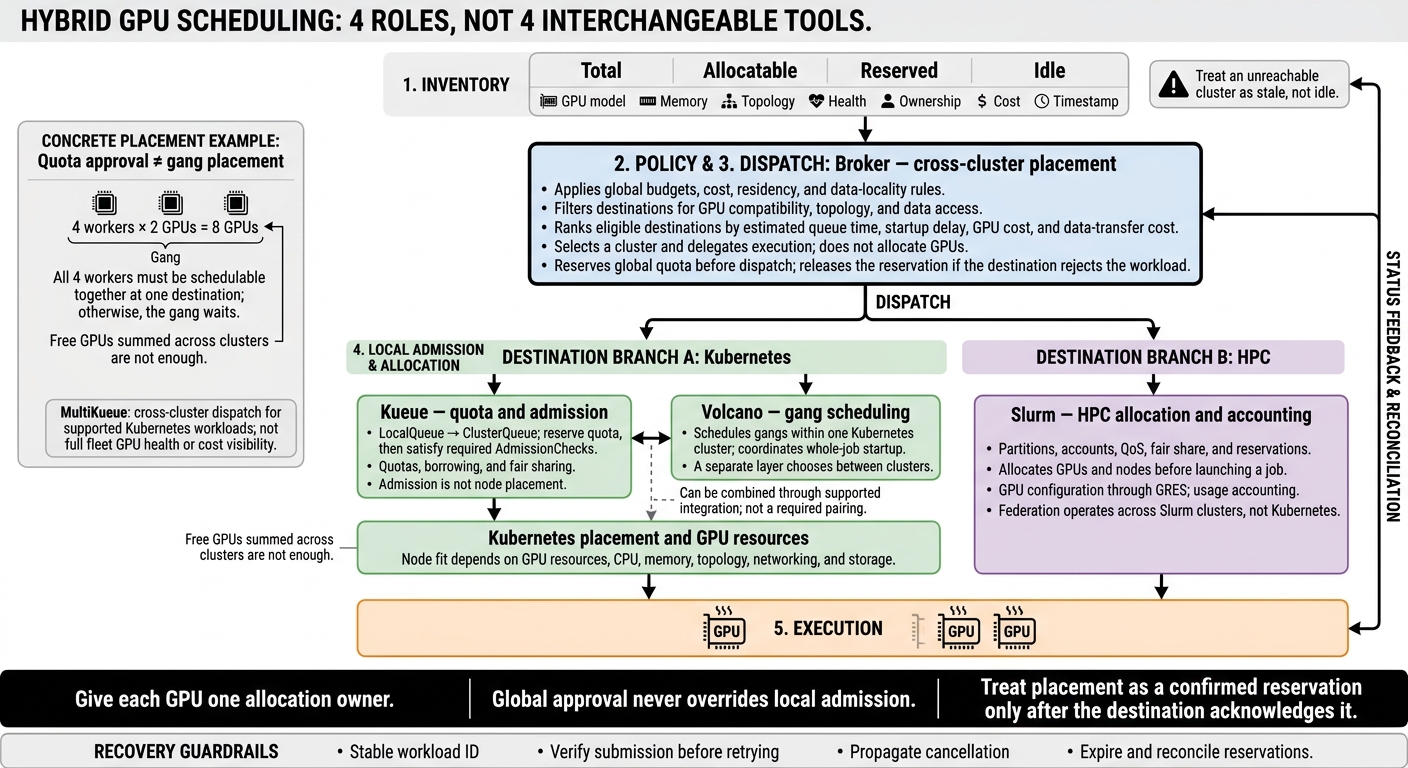
Hybrid GPU Scheduling: Who Controls What?
Running GPU jobs at scale with Slurm on Kubernetes
sbb-itb-f123e37
1. Kubernetes Quota Management with Kueue
Kueue controls admission and quota before workload placement begins.
Policy and Quotas
Kueue routes submissions from a namespace LocalQueue to a ClusterQueue, which defines resource quotas and eligible GPU flavors. Admission happens in two steps: reserve quota, then wait for the required AdmissionChecks.
Configure nominal quotas, cohort borrowing, fair sharing, and preemption together. A nominal quota isn’t always a hard ceiling when borrowing is allowed.
Placement and GPU Allocation
Workloads request GPUs through standard Kubernetes resources. Resource flavors distinguish GPU pools. Labels, affinity, taints, tolerations, and device-plugin resources determine which pools can run a workload.
Check CPU, memory, MIG profiles, and storage requirements - not just GPU count. Where enabled, Topology-Aware Scheduling improves placement for locality-sensitive jobs.
Cross-Cluster Visibility
MultiKueue extends Kueue’s quota model across clusters using a manager-worker model and an AdmissionCheck. After quota reservation, the default AllAtOnce mode sends the workload to eligible worker clusters. The first accepted copy wins.
Incremental tries worker clusters in rounds, using cluster order as a placement preference. The manager tracks workload status, but it doesn’t track full GPU health, drivers, network paths, or cost data. Kueue handles policy and dispatch, not the full scheduling stack.
Platform Integration
Use local Kueue for a single Kubernetes cluster. Add MultiKueue when the same Kubernetes workload API spans cloud and on-premises clusters. Kueue governs admission and fair resource sharing; checking node-level GPU fit remains a separate task.
Before rollout, validate supported controllers, define queues and flavors, label GPU nodes, and test reservation, failure, and retry paths. Monitor pending, admitted, evicted, and completed workloads. Manage worker cluster permissions, secrets, connectivity, and GPU telemetry separately.
2. Batch and Gang Scheduling with Volcano
Kueue decides who may run. Volcano decides whether the whole gang can start together.
Policy and Quotas
Kueue controls admission, while Volcano controls whether a batch job can start as a full gang. Set the gang threshold with minAvailable on the Job or minMember on the PodGroup.
Build queues, priorities, and reclaim rules around the largest gang each queue must admit. Queue capacity must support whole-job startup, not just fair resource sharing.
Placement and GPU Allocation
A 4-worker gang requesting 2 GPUs each - 8 GPUs total - uses
minAvailable: 4andschedulerName: volcano. All four workers must be schedulable together; otherwise, the gang waits.
Gang admission doesn't guarantee that GPU topology, networking, or storage will fit the job's needs. Use binpack to place pods on fewer nodes or spread to distribute them across nodes. Test whether smaller backfilled jobs delay larger gangs.
Cross-Cluster Visibility
Volcano schedules within a single Kubernetes cluster. A separate broker must choose between cloud and on-premises clusters based on capacity, pending demand, data location, and cost.
The broker must check whether one destination can fit the entire gang. Adding up free GPUs across clusters isn't enough. Evaluate Volcano Global separately from the core scheduler.
This split also defines where cluster integration and team ownership come into play.
Platform Integration
The platform team owns installation, CRDs, controllers, plugins, queues, observability, and upgrades. Setup requires compatible Kubernetes workloads, advertised GPU resources, and explicit scheduler selection.
Application or ML teams own GPU requests, gang size, retry settings, and placement constraints. Don't rely on schedulerName: volcano alone; gang scheduling requires PodGroup support. Before production, test insufficient capacity, startup failures, cancellation, and scheduler restarts.
3. HPC Scheduling with Slurm
Kueue controls admission, and Volcano handles Kubernetes gangs. Slurm manages queued HPC jobs through explicit resource allocation and accounting. In hybrid deployments, it serves as the control plane when on-premises GPU allocation and accounting must follow HPC rules.
Policy and Quotas
Slurm groups nodes into partitions and links users to project accounts. Quality of Service (QoS) policies set resource limits, priorities, and preemption rules. Fair-share priorities can also account for historical usage. Unlike Kubernetes namespace quotas, Slurm makes project ownership and resource consumption explicit.
Placement and GPU Allocation
Configure GPU types and counts through GRES in gres.conf and slurm.conf, usually with select/cons_tres. Slurm reserves the full resource set before launching a job.
Use typed GPU requests and task binding. Then check GPU visibility and NCCL or MPI communication inside the allocation. A job starting doesn't confirm that its GPUs and communication paths work as expected.
Cross-Cluster Visibility
Slurm federation lets clusters evaluate job copies against local capacity and policy. It does not create a single global scheduler or extend to Kubernetes. Keep one global job ID to avoid duplicate runs and accounting entries. Federation is therefore useful only when all target sites run the same Slurm model.
Platform Integration
Slurm manages batch queues and allocations; Kubernetes manages pods and the container lifecycle. Keep those roles separate during integration: use Slurm for batch governance and Kubernetes for container orchestration.
Define which system controls node lifecycle, GPU discovery, preemption, logging, and recovery. Running Slurm on Kubernetes does not remove the need to configure partitions, GRES, accounts, or QoS.
Within Slurm, slurmctld assigns resources, slurmd runs work on compute nodes, and slurmdbd stores usage records. Enable GPU accounting where supported, keep project IDs consistent across platforms, and reconcile GPU-hours with cloud bills for chargeback.
4. Cross-Cluster Placement with a Broker
When a workload can run in more than one cluster, a broker chooses where to send it. The broker applies fleet-wide placement policies; local control planes still decide whether and how the work runs. Local schedulers retain control over admission, gang scheduling, and GPU allocation.
Policy and Quotas
Keep global budgets separate from local quotas, and track usage by tenant and GPU class. Reserve global quota before dispatch, then confirm admission at the target cluster. If that cluster rejects the workload, release the reservation.
Placement and GPU Allocation
After reserving quota, consider only clusters that meet the job’s topology and data-access rules. Filter for GPU compatibility and residency, then rank eligible clusters by estimated queue time, startup delay, GPU cost, and data-transfer cost.
Distributed jobs need matching topology and connectivity - not just spare GPUs. Pass those requirements to the target queue. A fleet reservation does not guarantee local admission.
Cross-Cluster Visibility
Track total, allocatable, reserved, and idle GPUs separately. Time-stamp capacity reports so the broker can check how current they are, and retain local queue reasons so users can tell a policy hold from a capacity shortage. Use short-lived reservations and reconciliation to prevent stale inventory from causing overcommitment.
Platform Integration
Expose one workload spec and map it to Kueue workloads, Volcano jobs, or Slurm submissions. Keep a stable workload ID alongside the destination job ID.
Make retries idempotent: after a timeout, verify the first submission before retrying. Propagate cancellations and reconcile unreachable clusters so a broker restart does not create duplicate runs or leave reservations stranded.
Comparison Across 4 Scheduling Requirements
Each approach controls a different part of the hybrid workflow, from provisioning and admission to cluster selection, node scheduling, and GPU allocation.
Policy Rules and Quota Models
Compare quota, borrowing, fair sharing, reclaiming, and preemption separately. Each platform exposes these controls differently.
The comparison centers on four questions: who sets policy, where work runs, how GPU inventory is interpreted, and how failures are handled.
| Approach and policy owner | Scope and sharing | Reservations and preemption |
|---|---|---|
| Kueue - Kubernetes admission layer | ClusterQueue quotas; LocalQueue mapping; cohort borrowing. | Quota reservation, not timed hardware reservation; policy-based reclaim and preemption |
| Volcano - Kubernetes batch scheduler | Hierarchical queues; multi-resource quotas; DRF/proportion sharing. | Queue capacity, not timed hardware reservation; explicit reclaim and preemption |
| Slurm - HPC controller | Partitions, accounts, associations, QOS, reservations, and priority. | Native reservations; configurable preemption. |
| Broker - placement policy owner | Global tenant budgets, compliance, cost limits, and cloud/on-premises preferences | Placement orchestration; local enforcement requires integration |
Global approval never overrides local admission. Broker audit records should include the policy version and downstream submission ID. When global and local decisions conflict, reject or retry the workload. Local admission has the final say.
Policy approval does not place work. Each system needs a way to turn that approval into placement.
Cluster Placement and GPU Allocation
| Operation | Kueue | Volcano | Slurm | Broker - placement orchestration |
|---|---|---|---|---|
| Fleet placement | MultiKueue dispatch; destination handles node placement | Not native to the core scheduler | Federation within Slurm; no Kubernetes routing | Fleet coordination through platform adapters |
| Gang execution | Admission alone does not ensure gang startup | Native gang support. | Native multi-node allocation; different startup semantics | Requires a gang-capable destination cluster |
| GPU topology | ResourceFlavors and optional topology-aware admission; Kubernetes handles allocation | Depends on plugins and release | Configured GPU resources and node topology | Filters capability data; does not allocate GPUs |
| Cloud bursting and locality | Dispatch and configured flavors; provisioning remains separate | Fleet policy and provisioning require integration | Cloud-fleet policy requires integration | Coordinates cost, compliance, and data-locality rules |
Labels alone aren't enough for placement. Topology, sharing mode, and interconnect matter too. Compare GPU memory and partitioning mode, not just model names.
On-premises-first and cloud-first policies set preferences. Cost-aware and data-local policies must also account for staging time and transfer charges. Check whether autoscaling provisions capacity before admission or responds to queued demand.
Placement also depends on handling stale inventory and failed dispatch.
GPU Inventory and Failure Recovery
| Requirement | Kueue / Volcano | Slurm | Broker |
|---|---|---|---|
| Inventory scope | Kubernetes resources and workload state; fleet aggregation is separate | Slurm domain only; fleet aggregation is separate | Fleet-wide capability and policy view; integration required |
| Reservation authority | Local platform control plane | Slurm controller | Advisory without confirmed local ownership |
| Telemetry | Separate GPU metrics integration | Separate device telemetry | Aggregates metrics; utilization does not establish ownership |
| Recovery | Kubernetes reconciliation and workload restart behavior | Controller state and job recovery rules | Explicit cross-platform reconciliation |
Inventory must track GPU model, ownership, topology, health, cost, and how current the data is. Treat an unreachable cluster as stale, not idle. Running jobs need checkpoint-based recovery.
These recovery differences affect cost and the work needed to run each system.
Kubernetes and HPC Integration
| Requirement | Kueue | Volcano | Slurm | Broker |
|---|---|---|---|---|
| Kubernetes compatibility | Native APIs, CRDs, queue labels, and workload integrations | Native scheduler, queues, plugins, and device integrations. | Separate control plane; adapter required | API clients and platform adapters |
| HPC compatibility | Does not inherit Slurm account or QOS semantics | Kubernetes-oriented; adapters required | Native partitions, accounts, QOS, and accounting | Must preserve platform-specific semantics |
| Portability dependencies | Images, drivers, identity, storage, and networking | Same dependencies, plus scheduler configuration | Submission environment, containers or modules, and filesystem access | Workload translation and credential mapping |
Keep Kubernetes and Slurm ownership separate. Never assign the same GPUs to both. Follow inventory → policy → admission → execution, with dispatch between policy and admission.
Before deployment, validate release-specific sharing, MultiKueue behavior, Volcano plugins, and GPU integration. The next section compares the cost of running these models, failure handling, and management overhead.
Strengths, Limits, and Management Costs
The key difference is who owns policy, recovery, and integration work. Each control plane puts that work at a different layer. Features are only half the decision; running costs and failure handling determine whether a control plane fits your setup.
| Approach | Main strength | Key limit | Best-fit workloads | Management burden |
|---|---|---|---|---|
| Kueue quota governance | Low-friction tenant quotas and fair sharing in Kubernetes | Admission still depends on downstream GPU placement. | Multi-tenant batch inference and training queues | Queue policy, fair-share tuning, and controller support |
| Volcano gang scheduling | Coordinated startup for gang-dependent workloads | Requires aligned autoscaling and device-plugin behavior. | Distributed training and synchronized batch jobs | Scheduler configuration and gang-behavior integration testing |
| Slurm HPC accounting | Preserves existing HPC governance in hybrid setups | Hybrid use needs an explicit allocation and lifecycle contract with Kubernetes. | MPI, simulations, and research batch workloads | HPC administration, accounting, identity mapping, and adapter support |
| Broker cross-cluster placement | Shared placement policy across heterogeneous clusters | Depends on accurate state mapping and reconciliation. | Workloads that can move across cloud and on-premises pools | Routing policy, high availability, credentials, and recurring backend-adapter maintenance |
Plan for coordination, not just deployment. Fleet-policy changes need a named owner and a release process. Kueue fair sharing takes tuning: half-life and sampling interval control how fast past usage decays. A broker also needs submission, cancellation, status, and retry handling for every backend.
Availability needs a failure contract. Define whether a broker outage pauses new placements while existing jobs continue. Set recovery targets for reconciliation lag and stale placement records. Test interrupted submissions and cancellations so recovery doesn't create duplicate jobs or leave orphaned allocations. Broker, local scheduler, and cloud API failures each need their own response.
Before upgrades, test admission, accounting, gang startup, preemption, cancellation, GPU allocation, and rollback against the supported Kubernetes, scheduler, device-plugin, autoscaler, and workload-controller versions. Slurm integrations also need authentication and accounting-database checks. Adapter maintenance is recurring engineering work - not a one-time integration task.
Compare hybrid operating effort with workload results. When workloads fit more than one control plane, these costs can decide the choice. Staffing estimates should cover 24/7 support, quota administration, capacity planning, onboarding, and chargeback analysis. Track queue wait time, time to first GPU, failed placements, reconciliation lag, and operator hours - not utilization alone. More control-plane components can add latency and failure modes; add them only when their measured gains justify that burden.
Conclusion: Choose by Workload Requirements
Choose based on workload fit across cloud and on-premises clusters, not feature count.
- Choose Kueue for Kubernetes-native quota and admission control.
- Choose Volcano for gang-scheduled distributed jobs.
- Choose Slurm for HPC governance with partitions, accounting, and reservations.
- Use a cross-cluster broker for global placement across these environments.
When combining control planes, keep global placement policy separate from local admission and execution. Assign one owner for each of quotas, retries, and preemption. Treat placement as a confirmed reservation only after the destination acknowledges it.
Before launch, validate these five areas to prevent double allocation and stale placement:
- GPU inventory: Normalize inventory, including memory and topology.
- Identity: Unify identity and tenant mappings.
- Ownership: Name the owners of quotas and reservations.
- Policy-as-code: Keep admission and placement rules under version control.
- Reservation reconciliation: Set expiration times, monitor reservation lifecycles, and reconcile reservations against scheduler records.
Escalate unclear allocations before releasing any GPU that may still be active.
FAQs
How can I tell when I need a GPU broker?
You likely need a GPU broker when Kubernetes GPU scheduling can’t reliably meet demand or keep workloads isolated across your hybrid cluster. Warning signs include GPU shortages that cause scheduling failures, noisy-neighbor contention, and CPU-only autoscaling that misses GPU saturation.
A broker also helps enforce placement rules through dedicated GPU node pools, taints/tolerations, quotas, and priority. It provides consistent visibility across cloud and on-premises resources so you can manage latency, GPU utilization, and memory pressure.
How can I prevent large GPU jobs from waiting indefinitely?
Use PriorityClasses to let critical production services preempt lower-priority experimental pods. Set minimum GPU allocations - such as 10% to 35% per agent type - to prevent job starvation in multi-tenant environments.
Keep large batch jobs separate from production inference with node taints, tolerations, and dedicated node pools. Schedule those batch jobs during off-peak hours. As backlogs grow, automatically scale capacity based on queue depth.
When is cloud bursting worth the added cost?
Cloud bursting can be worth the extra cost when demand varies or follows seasonal peaks, leaving on-premises GPUs idle too often. Reassess the expense when cloud spending reaches roughly 60%–70% of projected on-premises total cost of ownership (TCO).
Factor in cloud egress costs of about 15%–30%, too, and choose workloads that can tolerate intermittent capacity.