
How Cloud Teams Build Human-AI Design Loops
Practical controls for human-in-the-loop cloud workflows: approval gates, versioned releases, monitoring, and incident-driven improvements.

I build human-AI workflows around one rule: people approve high-impact actions before the AI acts. I start with one task, name its owners, and set measurable goals - for example, 95% recommendation accuracy during a 30-day pilot. That’s a target, not a reported result.
Here’s the loop I use:
- Define: Set the task, risks, success metrics, and decision rights.
- Control: Require approval for high-impact actions, save progress, and route unclear cases to a person. <u>Timeouts never mean approval.</u>
- Test and release: Version the full setup, check it against the last approved release, and limit traffic with rollback ready.
- Track and improve: Log decisions, measure results and review errors, address incidents, and test corrections before release.
I expand only when results meet the agreed thresholds - not just because the pilot had few problems.
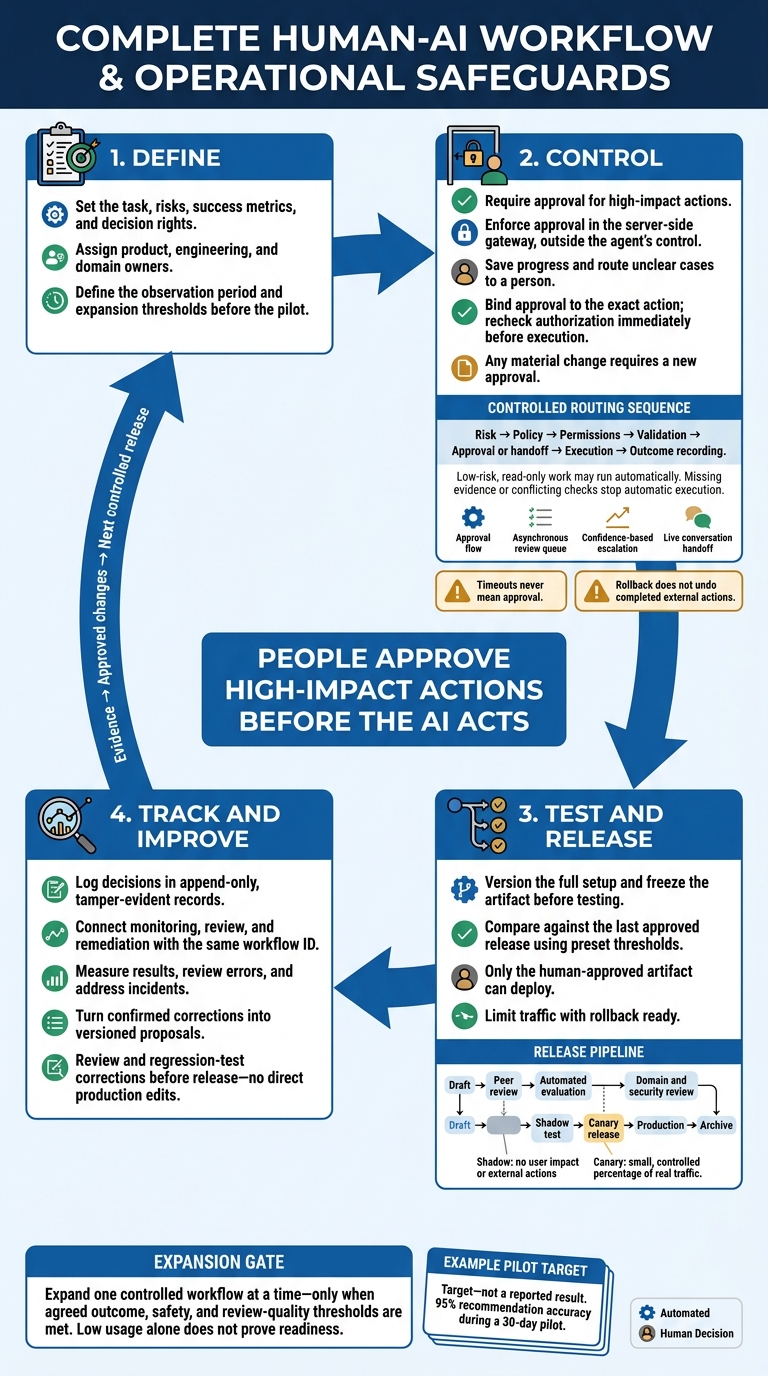
The Human-AI Design Loop: From Approval to Improvement
AWS re:Invent 2025 - Implementing Human-in-the-Loop Controls for Multi-Agent AI Systems (CNS428)
sbb-itb-f123e37
2. Set Up Review Gates and Handoffs
Once you’ve defined workflow states, give each request a controlled path through review or handoff.
Route every proposal through risk, policy, permissions, validation, approval or handoff, execution, and outcome recording. Choose the path based on impact and reversibility. Low-risk, read-only work may run automatically. Missing evidence or conflicting checks should stop automatic execution.
Require Approval Before High-Risk Tool Calls
Require approval before the agent executes any material action. Enforce this in the server-side gateway, outside the agent’s control. This applies to payments, refunds, outbound messages, sensitive-data changes, permission changes, infrastructure changes, and other irreversible actions.
Give reviewers the tool name and complete arguments, affected account or resource, supporting evidence, policy rule, expected result, side effects, and expiration time. Tie each approval to the workflow, requester, reviewer, tool, normalized arguments, policy version, and expiry time - not a broad user_confirmed flag.
Just before execution, recheck authorization and consume the approval atomically. Any material change requires a new approval.
Base confidence signals on grounding, schema validation, policy checks, and tool-specific risk - not the model’s own confidence claim. Measure false approvals and false escalations when setting thresholds.
Choose the Right Review or Handoff Path
Use the lightest review path that fits the risk and required response time.
| Path | Trigger | System behavior | Human responsibility | Final state |
|---|---|---|---|---|
| Approval flow | High-impact tool call meets a policy threshold | Pause execution and show the exact action | Approve, reject, or request changes | Authorized, rejected, or returned for revision |
| Asynchronous review queue | Review may take minutes or days, or requires a specialist | Persist state, queue the request, notify an authenticated reviewer, and enforce a timeout | Inspect evidence and document the decision | Approved, rejected, expired, or escalated |
| Confidence-based escalation | Validated uncertainty, weak grounding, conflicting evidence, or an out-of-distribution case | Stop autonomous progress; route to a named reviewer with the needed expertise | Resolve ambiguity or correct the decision | Resolved, deferred, or blocked |
| Live conversation handoff | A customer or operator needs a person | Transfer the session and context; stop agent responses | Own the conversation and decide next steps | Human-owned, returned to the agent, or closed |
These paths can overlap. An approval request may wait in an asynchronous queue, while specialist review can resolve a domain exception.
Save Workflow State and Transfer Context
Save the proposal and review state before sending the review request. Define explicit outcomes for rejection, cancellation, timeout, failure, and escalation. Timeouts must never auto-approve.
Give the new owner the task, evidence, current state, and next required action. Include proposed arguments, policy results, unresolved questions, and the deadline. Make the recipient’s role clear: edit, review, approve, execute, or communicate.
Stop the original agent from acting after transfer, and recheck permissions before it resumes. Use an idempotency key for each action and store its execution status so retries can’t repeat a completed action. Record the tool result and recovery action.
Before enabling each route, verify the destination owner, required context, timeout behavior, and recovery path. Test changed arguments, expired approvals, unavailable reviewers, duplicate requests, and partial execution. Apply the same checks across routes so approvals, escalations, and handoffs behave consistently.
Version and test prompt, model, and release changes using the same process, often supported by specialized AI consulting to ensure governance.
3. Version, Test, and Release Changes
Move every change through draft → peer review → automated evaluation → domain and security review → shadow test → canary release → production → archive. Promote the configuration you tested - not a prompt edited after approval. Freeze the version before testing, shadowing, and release. Only the human-approved artifact can deploy.
Test each frozen version against the last approved release before promotion. Archive it after release and retention checks.
Version Prompts and Build Regression Tests
Create one release manifest that links the prompt, model version, inference settings, agent instructions, tool schemas, retrieval setup, safety and routing policies, evaluation dataset, and deployment configuration. Record the artifact’s version identifier, author, reviewers, draft and approval status, creation and release dates, intended use, known limitations, and rollback target. Separate variable inputs from stable prompt instructions so you can test the same logic across controlled scenarios.
Build a versioned regression suite that covers normal requests, edge cases, policy-sensitive inputs, adversarial prompts, tool and retrieval failures, ambiguous instructions, and past production incidents. Use versioned scenarios to test the agent’s decisions, tool use, refusals, and recovery.
Score behavior, not just wording. Measure task success, groundedness, policy compliance, refusal quality, tool-argument validity, handoff accuracy, recovery after errors, latency, token usage, and cost per completed task. Compare these results with the currently approved release, using preset thresholds and enough samples to support the decision. This test record becomes the release gate for domain, security, and deployment review.
Check Changes Before Release
Require an evaluation report that identifies dataset and artifact versions, failure cases, severity, and baseline comparisons. Product approves acceptance criteria. Engineering approves readiness to run the release. Domain owners approve behavior changes that affect policy or outcomes.
Security and privacy checks should cover data exposure, prompt injection, permissions and tool authorization, logging, and retention. Before promotion, confirm that limits are configured and the rollback path has been tested.
| Control | Purpose | Owner | Required evidence | Release decision |
|---|---|---|---|---|
| Automated evaluation | Test repeatable quality, safety, tool use, latency, and cost at scale | Engineering and evaluation owner | Versioned tests, preset thresholds, failure report | Continue only if preset gates pass |
| Domain review | Judge policy fit, edge cases, and behavior changes that affect policy or outcomes | Domain owner | Reviewed sample outputs, rationale, unresolved-risk disposition | Approve, revise, or reject |
| Shadow testing | Compare the new version with live traffic without affecting users or executing external actions | Engineering | De-identified inputs, side-by-side metrics, tool-call simulation | Advance only if results meet thresholds |
| Canary release | Expose a small, controlled percentage of real traffic | Product and engineering | Traffic scope, alerts, stop criteria, monitoring dashboard | Expand, hold, or roll back |
| Rollback | Restore the last approved configuration | Authorized engineer | Tested recovery steps, prior artifact, trigger evidence | Stop exposure and restore |
Only after these checks can the release move to limited traffic, with rollback ready.
Deploy With Access Limits and Rollback Controls
Use least-privilege service accounts, spending caps, rate limits, tool-call limits, and a stop control. These let humans pause, inspect, and roll back before errors spread. Expand traffic only after the observation window passes.
Define rollback triggers for policy violations, data leakage, lower task success, latency breaches, unexpected costs, or tool arguments outside approved permissions. Name the authorized engineer and backup responder. Test restoration of the full configuration and record recovery time. Rollback does not undo completed external actions; those require separate reconciliation or incident procedures.
Before promotion, confirm:
- Dataset: Version, provenance, coverage, and sensitive-data handling.
- Thresholds: Quality, safety, latency, and cost gates passed.
- Signoff: Required product, engineering, domain, security, and privacy approvals.
- Limits: Canary scope, access, spending caps, alerts, and stop controls.
- Rollback: Tested target, authorized responder, recovery results, and archived records.
After release, keep the decision log open to track outcomes and collect corrections.
4. Track Outcomes and Review Feedback
Keep Append-Only Decision Records
After release, use the same workflow ID across monitoring, review, and remediation so you can connect observations to fixes. Give every event its own ID and parent event ID. Record the input context, active version, tool arguments, authorization result, reviewer, decision, state, timestamp, and downstream result. For high-impact calls, include the approval binding for the exact action.
Store events in append-only, tamper-evident storage with retention controls. Remove secrets and personal data you don’t need. Use references or hashed identifiers when full content isn’t needed, and apply retention and legal-hold rules. Keep brief decision notes, not hidden model reasoning.
Measure Review Quality and Respond to Incidents
Use these records to check whether live review meets the pre-release gate. Track approvals, rejections, escalations, completion rate, tool errors, latency, and cost by workflow, version, role, and risk tier. Independently sample both approved and rejected cases for domain review. Calculate false-approval rate as unsafe or materially incorrect approvals ÷ sampled approvals. Use adjudicated cases to measure unnecessary escalations, then compare live outcomes with the tested baseline and release thresholds.
Open an incident and assign an owner when you find unsafe output, unauthorized actions, data exposure, or repeated failures. Suspend the affected capability, preserve relevant traces and versions, and assess which users and actions were affected. Bring in security or privacy owners when needed, and record containment time and communications. Restore only a version that fixes the cause. Otherwise, keep the capability disabled until a controlled release. Closing an incident requires root-cause findings, recovery evidence, and assigned follow-up.
Turn Corrections Into Approved Changes
Use repeated failures to propose approved changes - not to make direct production edits. Group corrections by the first failure: model error, missing context, policy ambiguity, reviewer mistake, permissions defect, or tool failure. Turn confirmed patterns into versioned proposals linked to source traces, incidents, and baseline metrics. Require review and regression testing before release.
Close each improvement record with source evidence, old and new versions, deployment time, outcome, and a follow-up owner. Before calling a change successful, compare false approvals, task completion, latency, cost, and incident frequency against the baseline. Use those findings in the next reviewed, tested, and controlled deployment.
5. Conclusion: Start With One Controlled Workflow
Once feedback leads to approved changes, expand one controlled workflow at a time. Before launch, assign product, engineering, and domain owners. Require all launch-gate controls to be in place before proceeding.
Set the expansion gate before the pilot begins. Define the observation period and the evidence needed to meet outcome, safety, and review-quality thresholds. Low usage alone does not prove readiness. Add one adjacent workflow at a time, recheck permissions and domain risk for each, and keep the same observe-and-improve loop.
If a partner such as NAITIVE AI Consulting Agency builds the workflow, require it to follow the same controls. Your team must retain decision authority and accountability for domain risk.
FAQs
How do we prevent reviewer fatigue without weakening oversight?
Match human review to risk. Require real-time approval for high-stakes tasks that can’t be undone. For lower-risk work, use asynchronous audits - reviews that don’t hold up the task. Set confidence thresholds that trigger escalation, such as a score below 90%, and sort alerts into critical, elevated, or informational levels.
Use sampling and automated circuit breakers to monitor AI performance. This lets reviewers focus on edge cases and high-risk scenarios instead of routine, repetitive work.
Who resolves disagreements between product, engineering, and domain reviewers?
Governance committees, often called AI risk councils, set organization-wide decision policies and settle disagreements among product, engineering, and domain teams. They bring together technical, legal, ethical, and business experts to oversee these decisions.
When issues such as excessive bias or high complaint volumes arise, teams follow established escalation paths. Higher-level technical teams or ethics boards make the final decision, keeping accountability clear.
How much pilot data do we need before expanding?
Run a controlled pilot in shadow mode for 2–4 weeks to track performance without affecting actual outcomes. Then switch to supervised mode for another 2–4 weeks, with human reviewers checking every action.
Use both phases to set baseline performance metrics, measure adoption, and estimate potential ROI before granting full autonomy. Adjust thresholds and update baselines before expanding beyond the pilot.