
AI Budget Benchmarks: Enterprise Cost Patterns
Measure enterprise AI spend by cost per successful outcome and build 12-month fully loaded forecasts across seven use cases.

I compare AI budgets by cost per successful outcome - not price per request. At a 40% escalation rate, 10,000 support conversations still produce 4,000 human handoffs. That’s why I count setup, model usage, integrations, review, and support before calling a system cheaper.
Across these seven use cases, no option costs the least in every setting. I compare team size, model class, and pilot versus production costs, while holding quality, volume, and service targets steady.
Quick Comparison
| Use case | Outcome I measure | Main budget pressure |
|---|---|---|
| Employee knowledge assistants | Accepted answer | Content updates, retrieval, and access controls |
| Customer service automation | Verified resolved case | Escalations, reopened cases, and integrations |
| Document extraction | Validated document | Scan quality, failed checks, and reviewer time |
| Software development copilots | Merged pull request | Code review, testing, and rework |
| Analytics and reporting agents | Approved report | Data queries, validation, and analyst review |
| Autonomous workflow agents | Accepted workflow using a multi-agent research team | Tool calls, failed actions, and human oversight |
| Phone and voice AI agents | Resolved call | Call length, transfers, and peak capacity |
My starting rule: <u>keep one-time setup costs separate from monthly spending</u>, then build a 12-month forecast in USD. Track human-assisted and unassisted results separately, and set spending and quality limits before expanding use.
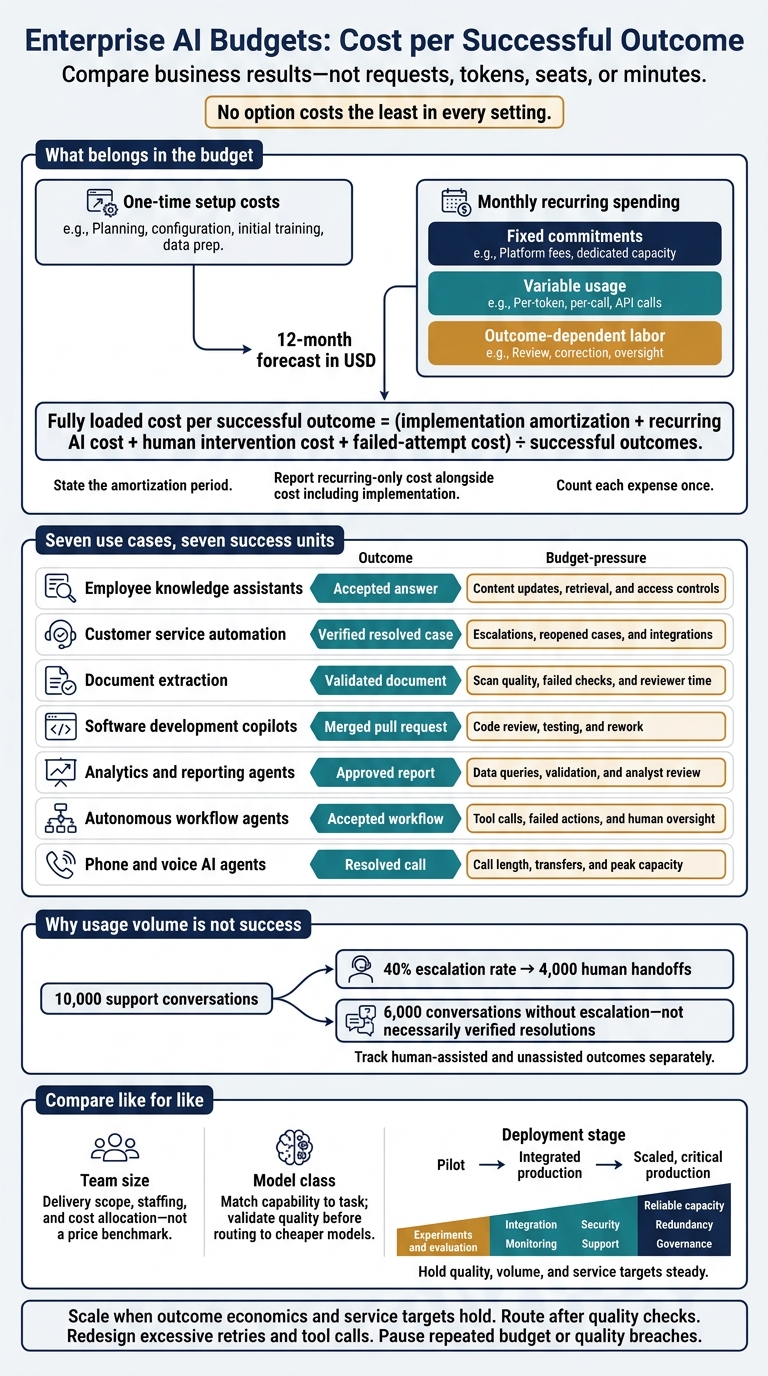
Enterprise AI Budgets: Cost per Successful Outcome
The cost of AI How Enterprises can manage AI demand
sbb-itb-f123e37
Define Your Enterprise AI Cost Baseline
Start with a monthly recurring run rate and a 12-month forecast. Keep launch costs separate, and use the previous 90 days to establish your production baseline. Track pilot, development, and production spending separately. Within recurring spending, distinguish fixed commitments, variable usage, and outcome-dependent labor.
Measure unit economics per request, user, document, conversation, workflow, or - best of all - successful outcome. Apply the same cost categories to every use case so comparisons stay consistent.
| Cost category | Direct consumption cost | Fully loaded cost | Pilot costs often missed |
|---|---|---|---|
| Model usage | Input and output tokens, API calls, embeddings, reranking, fine-tuning, and model-specific charges | Model consumption plus retries, failed generations, fallback models, and unused capacity | Repeated context, tool calls, evaluation traffic, reruns |
| Infrastructure | Compute, GPUs, containers, serverless functions, networking, storage, and backups | Shared cloud overhead, idle capacity, scaling, disaster recovery, and platform engineering | Nonproduction environments, data transfer, logging, capacity commitments |
| Data and retrieval | Data ingestion, parsing, vector storage, indexes, retrieval, and refresh jobs | Data pipelines, quality controls, lineage, retention, synchronization, and source-system access | Cleaning, OCR, permission filtering, re-indexing |
| Licenses | AI SaaS seats, model gateways, observability tools, orchestration platforms, and enterprise software | Contract minimums, administrative overhead, integration fees, and unused seats | Sandbox subscriptions, duplicate tools, premium connectors, seat growth |
| Labor | Engineers, data scientists, product managers, analysts, and operators | Fully burdened compensation, recruiting, management, vendor support, and time spent on incident response | Architecture, procurement, prompt iteration, manual validation |
| Security, governance, compliance, and evaluation | Assessments, policy tooling, testing, red teaming, and audit services | Privacy reviews, legal work, access controls, model risk management, evidence collection, and recurring evaluations | Safety testing, regulatory documentation, penetration testing, approval delays |
| Training and adoption | Training materials, workshops, communications, and change-management tools | Lost productivity during adoption, role redesign, help-desk support, and continued enablement | Low usage, manager coaching, retraining |
| Monitoring, support, updates, and incidents | Logs, traces, dashboards, alerting, help desk, and vendor support | On-call coverage, incident response, model updates, prompt maintenance, retraining, SLA management, and postmortems | Drift detection, rollback, emergency fixes, customer remediation |
The fully loaded column is the complete category total, not another charge to add to direct spending. Count each expense once, and separate launch work from recurring work.
Fully loaded cost per successful outcome = (implementation amortization + recurring AI cost + human intervention cost + failed-attempt cost) ÷ successful outcomes.
Include retries, escalations, rejected outputs, abandoned workflows, fallback calls, and human correction time in the numerator. State the amortization period. Report a recurring-only measure alongside the measure that includes implementation costs.
Define success in business terms before you measure it.
Examples include a correctly resolved customer interaction, an approved document, or a completed workflow that meets the agreed quality threshold.
Track human-assisted and unassisted outcomes separately. Match invoices against application telemetry, including retry rates, tool calls per task, human-review minutes, and successful-outcome rates.
Tag or assign every charge to an owner, cost center, application, environment, model, and use case. Use a documented driver to allocate shared costs.
Allocation drivers include GPU-hours, requests, storage consumed, or proportional usage.
When averages hide cost swings, report median and upper-percentile unit costs. Apply this baseline when comparing cost patterns across the seven use cases that follow.
1. Employee Knowledge Assistants
Compared with the baseline, knowledge assistants depend on retrieval quality and access control - not token price alone. Benchmark cost per accepted answer grounded in current, approved sources. Model tokens, embeddings, reranking, and tool calls account for direct usage, but not the fully loaded cost of an accepted answer.
Retrieval and permission controls drive much of the budget. Connecting internal content systems and databases means paying for connector maintenance and permission synchronization. Budget for changed-document detection, re-embedding, and ingestion repair - not just file storage. Enforce access permissions during retrieval, and assign content owners to keep authoritative policies up to date.
Choose models by query complexity. Use lower-cost models for routine policy lookups, query rewriting, and simple summaries. Send cross-document research and ambiguous questions to stronger models, and require human review for sensitive policy interpretations. Compare acceptance rates and reviewer minutes alongside model charges.
Use a fixed platform charge plus usage-based department billing rather than token-only charges. The platform team should own shared costs, while departments fund content maintenance and specialized review based on query volume and policy complexity. This allocation works in steady state, but the cost mix changes as usage grows and the system enters production.
Production shifts spending from manual curation toward automated synchronization, logging, evaluation, and support. Small, manually curated pilots often skip the fixed integration and compliance overhead that production requires.
2. Customer Service Automation
Budget for verified resolved cases - not conversation count. Don’t compare vendors on conversation price alone. Vendors bill by conversation, action, or resolution, so compare matching units. Use the baseline cost numerator, then divide by verified resolved cases.
Define resolution before calculating savings. A fully automated resolution should require no human transfer and no reopening within seven days. Track escalation and reopen rates separately, and set a threshold for each.
At a 40% escalation rate, 10,000 AI conversations create 4,000 human handoffs.
Include agent handle time and specialist review for refunds, security issues, and complaints.
Scope affects cost. One queue in one language costs less than support across multiple brands, regions, and channels. Budget for integration and support across brands, regions, languages, channels, and handoff complexity. Include CRM, identity, order, and billing connections, plus human handoff.
Spread fixed costs over actual case volume. Low-volume pilots often have high per-case costs. Forecast monthly and annual spending by queue, brand, region, channel, volume, seasonality, escalation, and resolution rate.
Use smaller models for FAQs and order status. Test higher-capability models for ambiguous policies and multi-step troubleshooting. Compare total case cost, not token prices alone, including retries, tool calls, errors, and recontacts. Keep human review for sensitive actions; a low usage price isn’t a reason to automate more of them.
Customer-service pilots need limited integrations, test cases, human oversight, and safety controls. Production adds spending on uptime monitoring, observability, security, capacity planning, and staff training.
Expand only when customer satisfaction matches human support and resolution, error, and reliability measures meet defined limits. Reforecast monthly, and pause intents with rising reopen rates or policy violations. The cost pattern shifts again in document extraction, where exception rates and review time drive unit cost.
3. Document Extraction and Processing
As with customer service automation, document extraction costs climb fastest when exceptions and manual reviews increase. Track fully loaded cost per validated document - not OCR cost per page. Calculate it as (technology + labor + operations + exception handling) ÷ validated documents. Count only files that pass required-field, invoice-math, and downstream acceptance checks.
Published benchmarks put plain OCR at about $1.50 per 1,000 pages, layout-aware extraction closer to $10 per 1,000 pages, and forms or custom extraction roughly $30 to $50 per 1,000 pages, depending on the processor and provider.
These figures are input-price references, not your total processing cost. Use them as starting inputs for your validated-document cost model, and verify region, billing units, and volume tiers before budgeting.
Break down spending by document type, page count, scanned pages, table density, and required fields. Even short documents can be expensive when scans are poor, handwriting is involved, or layouts vary. Include conversion, deskewing, image rendering, storage, and repeat attempts in your costs. Use a tiered stack: OCR for text pages, specialized processors for fields and tables, and multimodal models only for ambiguous cases.
Measure reviewer minutes per exception. Set validation rules before testing. Then track unreadable scans, missing pages, field conflicts, and integration failures separately. Send uncertain fields to reviewers instead of routing every document for a full review. Compare extraction quality, fallback rate, and review minutes - not just API charges.
Shared ingestion, validation, monitoring, security, and review tools spread fixed costs across more documents. Allocate shared ingestion, validation, and monitoring costs by document volume, page count, or exception rate. Track API cost per page, pipeline cost per document, and review cost per exception. When spending climbs, check document length, layout changes, retries, and review time before switching models. The next pattern shifts the cost mix from document validation to developer time and code quality.
4. Software Development Copilots
Copilot costs go beyond seats: review, testing, and rework can cost more than subscriptions. Unlike document processing, the focus here is developer throughput and code quality. Budget separately for licenses, usage, admin, and engineering labor. In high-risk repositories, review, testing, security checks, and rework can outweigh subscription fees. Track cost per assigned seat and usage per active developer, but judge value by accepted changes - not generated code.
Apply the same fully loaded cost approach to merged code:
Fully loaded cost per merged PR = (licenses + model usage + admin and training + review + testing + security review + rework) ÷ merged PRs.
Compare like-for-like work within the same repo. Documentation changes and architecture work aren't comparable. Track reviewer minutes, review rounds, test time, security findings, and fixes made within 30 days after merging. Include engineering labor consistently in both baseline and pilot measurements.
Charge seats to the team receiving them and usage to the team, repo, or project generating it. Divide shared admin and security costs by seat count or engineering headcount.
Separate routine help from complex agent work. Use lower-cost models for autocomplete, documentation, and simple tests. Reserve stronger reasoning models for debugging, migrations, and cross-repo changes. Forecast indexing, tool calls, and test execution alongside model consumption.
Start with a four- to eight-week baseline, followed by a matching pilot. Track merged PRs per engineer-month, cycle time, review hours, escaped defects, and security findings. Expand only when delivery improves without increasing quality-related or review costs. Higher suggestion acceptance alone doesn't mean savings.
Small-team pilots can use limited seats and usage caps. Larger engineering organizations need team-level allocations and caps. Moving to production adds access management, repo access controls, training, CI/CD capacity, support, and usage monitoring beyond the pilot.
For seat-based developer plans, set alerts at roughly 70% and 90% of included usage caps. Require approval for overages and reclaim inactive seats monthly. If agent spending climbs while merged output stays flat, investigate before increasing budgets.
The next pattern moves from developer tools to analytics workloads, where query volume and output quality drive cost.
5. Analytics and Reporting Agents
Fully loaded cost per approved report includes data access, warehouse queries, orchestration, validation, and analyst review. Add the costs of retries and rejected drafts, then divide the total by the number of approved reports. Use that unit to compare costs across team sizes and deployment stages. Track both median and 90th-percentile costs so an average doesn't hide expensive, complex investigations.
Correct answers aren't the same as approved reports. A 2026 analytics-agent benchmark reported about $1.04 per correct answer, but that figure excludes governance, data engineering, and analyst approval. It isn't a fully loaded report cost.
Team size also changes where the money goes. Small teams spend more on manual checking. Larger teams spend more on governance, shared definitions, and automated tests. Allocate shared infrastructure costs by monthly report volume.
Match the model to the task. Use lower-cost models for metric lookups, formatting, and simple summaries. Reserve stronger reasoning models for ambiguous definitions, cross-source analysis, and exceptions. Give agents approved metrics and joins rather than raw schemas. A 2026 comparison reported roughly 25,000 tokens per query with structured context versus 50,000 with a raw 100-table schema.
In production, spending shifts from generating drafts to controls and monitoring. Before launch, enforce read-only access, query limits, retry caps, and caching for recurring reports. Before publication, check that data is up to date and reconciles with approved totals. Require human approval for high-risk reports.
If analyst review time or correction rates increase, fix definitions, retrieval, or validation before increasing the budget. Review spending and quality monthly during rollout, then quarterly once the system stabilizes.
6. Autonomous Workflow Agents
Analytics agents draft recommendations. Workflow agents take action. Measure workflow agents by fully loaded cost per accepted workflow - not action volume. Add up model calls, tools, compute, platform fees, retries, partial or incorrect actions, integration maintenance, human oversight, governance, and support. Then divide that total by the number of workflows that meet defined acceptance criteria.
Partial execution creates hidden costs. Budget for status checks, duplicate-action prevention, and rollback of partial changes. Track tool calls, approvals, failures, and resource use so you can separate model costs from integration failures. Reliability belongs in the budget, not just on the engineering team's task list.
Give each cost category an owner who can control it: business operations handles outcomes and escalations, IT handles reliability and connectors, and security or compliance handles controls. Charge the platform team for shared connectors and controls, then bill business units by workflow volume or outcome. Include time spent on reviews and incident response.
Use cheaper models for routine steps only when action risk stays low. Lower-cost models can handle classification and field extraction; stronger models can handle ambiguous decisions. Use deterministic rules for predictable steps. Optimize for cost per accepted outcome and correction work - not token savings. A cheaper model can increase total spending if it causes more failed actions.
Production requires permissions, approval thresholds, transaction limits, duplicate-action protection, audit trails, rollback, regular evaluation, connector updates, and escalation coverage. One 2026 budgeting analysis estimates annual monitoring and maintenance at 15%–25% of build cost; highly integrated or regulated workflows often exceed that range. Increase budgets as retries, rollbacks, or escalation coverage grow.
7. Phone and Voice AI Agents
Separate direct call charges from resolution cost. Track telephony, audio, speech recognition, text-to-speech, model inference, hosting, storage, and integration as separate expenses. Transfers can add another billable call leg, and some telephony providers round partial minutes up. An advertised low per-minute rate may leave these costs out.
Fully loaded cost per resolved call = (total call expense + infrastructure + support labor + human follow-up + amortized implementation cost) ÷ successfully resolved calls.
For voice agents, the unit that matters is a resolved call, not a connected minute. Define resolution before launch: a verified answer or completed transaction without a transfer, repeat call, or manual correction. Also report cost per attempted call and per connected call so unanswered calls and failed interactions stay visible.
Transfers and concurrent calls can push voice budgets beyond what per-minute pricing suggests. Budget for peak concurrent calls, not just monthly minutes. Long pauses and transfers can cost more than inference, so track call duration, silence, hold time, transfers, and human follow-up minutes. Slow responses can also stretch calls as customers repeat questions or interrupt.
Compare voice stack models using identical scripts. Lighter models suit routing and narrowly defined questions; stronger models earn their higher usage costs only if they reduce transfers. A speech-to-text / LLM / text-to-speech stack spreads charges across three services. Speech-to-speech still involves model, hosting, and telephony costs.
Pilots need controlled traffic, evaluation, and live human fallback. Production adds on-call coverage, maintenance, test-call management, incident response, vendor management, and quality audits. Keep fixed staffing costs separate from usage charges. Test peak capacity during rollout, and add redundancy at scale.
Set budget-control triggers before expanding traffic: investigate a 10% rise in average call duration or a 5-percentage-point increase in transfer rate. Tag escalations by cause: model error, authentication, policy, customer request, outage, or language. Match telephony invoices to call logs each month. Then test prompt, routing, or model-class changes against resolution quality - not minutes alone.
Next, compare these patterns by team size, model class, and deployment stage.
Compare Costs by Team Size, Model Class, and Deployment Stage
These three views explain most differences in enterprise AI budgets. Team size describes delivery scope - not a price benchmark. Keep delivery teams separate from end users: engineering, security, evaluation, and support drive staffing costs, while users drive inference volume and productivity demand. Build forecasts around workloads, not headcount alone.
Table 1. Team size and scope
| Team size and scope | Dominant costs | Allocation method | Forecast cadence | Budget risk |
|---|---|---|---|---|
| Small delivery team; one department or pilot | Delivery labor, API experiments, data preparation, and manual evaluation | Assign project costs directly; use basic showback for shared services | Weekly during experiments | Unproven demand and underestimated review work |
| Cross-functional team; several use cases | Integration, inference, monitoring, security, and user support | Allocate by application, environment, and usage; distribute shared costs consistently | Monthly rolling forecast; more often after major changes | Adoption growth, integration work, and support demand |
| Enterprise platform team; many products and business units | Shared infrastructure, governance, reliability, procurement, and support | Direct attribution plus shared allocation weighted by usage, reserved capacity, and support needs | Monthly operating review; quarterly capacity planning | Cross-unit subsidies, capacity commitments, and compliance costs |
Map each API key or service identity to one team, application, and cost center. Keep training, experimentation, and production separate.
Team size affects who pays and how often budgets get reviewed. Model class determines what drives unit cost.
Table 2. Model class or system type
| Model class or system type | Cost profile | Complexity | Workload fit | Cost controls |
|---|---|---|---|---|
| Hosted frontier-model API | Variable token charges and provider price changes; integration and evaluation still required | Medium | Difficult reasoning and nuanced tasks | Route selectively; limit context and output |
| Smaller or specialized model | Lower inference expense; validation work can offset savings | Low–medium | Classification, extraction, routine requests | Batch, cache, and enforce quality gates |
| Open-weight model on managed infrastructure | Endpoint minimums, compute, engineering, and evaluation | Medium–high | Workloads needing model control without full infrastructure ownership | Right-size endpoints; monitor idle capacity |
| Self-hosted GPU inference | Capacity, operations staff, patching, and reliability | High | High, predictable utilization | Track GPU utilization; limit concurrency; scale capacity |
| Finetuning vs. RAG | Inference plus indexing, retrieval, storage, and index updates | Medium–high | Document-grounded answers | Filter retrieval; tune chunking; update indexes selectively |
| Fine-tuned model | Dataset preparation, training, hosting, and regression testing | High | Stable, repetitive domain tasks | Separate training budgets; validate gains before retraining |
| Agentic system | Repeated model calls, tools, orchestration, review, and support | High | Multi-step workflows | Cap iterations and tool use; require approval for irreversible actions |
These categories overlap. Assess the full stack: platform, usage, quality, support, risk, and compliance, along with failed outputs, rework, and human review.
Costs also shift as the same system moves from prototype to production.
Table 3. Deployment stage
| Deployment stage | Dominant spending | New requirements | Forecast uncertainty | Budget adjustment |
|---|---|---|---|---|
| Prototype or pilot | Discovery, data preparation, experiments, evaluation, and limited infrastructure | Named owner, test data, usage logs, time and spending limits | High: feasibility and demand remain unclear | Review weekly; keep funding flexible within a hard ceiling |
| Integrated production | Integration, recurring inference, monitoring, security, support, and user enablement | Allocation tags, service-level objectives, incident procedures, and launch and run budgets | Adoption and operating costs are still developing | Use rolling forecasts; separate release spending from recurring operations |
| Scaled, critical production | Reliable capacity, redundancy, governance, continuous evaluation, and vendor commitments | Automated allocation, unit-cost reporting, auditability, and continuity planning | Demand may stabilize; capacity commitments add exposure | Review monthly; revisit capacity and commitments quarterly |
Production status doesn't guarantee mature cost tracking. Update forecasts when adoption, model mix, context size, or service requirements change.
Conclusion: Set Budgets and Rules for Adjustments
Across these use cases, budget changes depend most on volume, review load, model tier, and deployment stage. Team size affects how those costs are staffed and allocated.
Fund successful outcomes, not model calls. Track cost per request alongside the result that matters: a resolved case, approved document, completed report, or successful action. Include all direct and fully loaded costs. FinOps guidance recommends reporting AI unit economics because costs can vary from run to run, and business outcomes offer a stronger basis for funding decisions.
Use these hypothetical scenarios to turn usage patterns into budget rules.
| Scenario | Adoption and request volume | Model mix | Human review | Shared capacity | Adjustment trigger |
|---|---|---|---|---|---|
| Conservative | 10%–20% of target users; 25,000 requests per month | Mostly lower-cost models, with premium models reserved for exceptions | 25% of cases reviewed | Limited shared gateway and compute capacity | Investigate if monthly spend exceeds forecast by 15% or quality falls below the approved threshold |
| Expected | 30%–50% of target users; 100,000 requests per month | Tiered routing across standard and premium models | 10%–15% review, focused on high-risk outputs | Shared capacity sized for normal peaks | Reforecast when volume, model mix, or review rate differs from plan by 10% |
| High-growth | 60%–80% of target users; 300,000 requests per month | Higher total usage across all model tiers; premium usage may increase with complex workloads | 10% review, unless risk or error rates increase | Expanded shared capacity, reservations, or dedicated infrastructure evaluated separately | Add capacity only if reliability and outcome metrics stay within target; redesign or route workloads if unit costs increase materially |
Use the table to set thresholds, then adjust budgets as volume, model mix, and review rates change. Set baselines for usage, invoice spend, volume, quality, latency, reliability, and outcome cost. Keep experiment and production budgets separate, and name business, engineering, and finance owners. Update forecasts weekly for volatile pilots and monthly for established workloads.
Once the pattern is clear, define triggers that require a reforecast, routing change, or pause. Set alert thresholds that can be enforced:
For example, daily spend 15% above forecast or a workload cap.
Let unit economics guide each decision: scale when outcome economics and service targets hold; route simpler work to cheaper models only after quality checks; redesign excessive retries, context, or tool calls; or pause workloads that repeatedly breach caps or fail quality requirements. Tie quotas, routing restrictions, and approval gates to those decisions.
FAQs
How can I forecast AI costs without usage history?
Start with parametric models to estimate costs based on project attributes, including model architecture, data pipeline complexity, and integration points. Compare usage scenarios with vendor calculators, and use Monte Carlo simulations to account for technical and market risks.
Keep projections up to date with current cloud compute spot pricing and labor rates. NAITIVE AI Consulting Agency can help design these estimation frameworks as your projects scale.
How do I compare ROI across different AI use cases?
To compare ROI across AI use cases, focus on business value - not raw consumption. Give each initiative a clear, measurable goal, such as higher customer satisfaction or revenue growth.
Use activity-based costing to connect expenses to outcomes. For complex interactions between autonomous agents, track dollars per decision. Then compare costs against performance indicators, such as cost per successful outcome, to find the highest-return investments and decide where to put resources.
When does self-hosting AI become cost-effective?
Self-hosting AI makes financial sense for steady, high-volume workloads, rather than experiments or seasonal use. On-premises infrastructure typically provides better long-term value once utilization passes 60%–70%, often when GPU use exceeds six hours a day or workloads top 10 million queries a month.
For GPU-heavy workloads running at 80%–90% utilization, three-year total cost of ownership is typically 40%–60% lower than cloud options. Cloud services, meanwhile, let you scale capacity up or down as demand changes.