
RPA with AI for Legacy System Integration
Use AI for extraction and RPA for legacy-system actions; prioritize APIs, enforce controls, run a controlled pilot, and measure outcomes.

Use AI to read and classify data, and RPA to carry out approved tasks in legacy systems. Start with supported APIs. Use screen bots only for gaps, and keep AI outputs subject to data checks, business rules, and human approval for high-impact actions.
A controlled rollout comes down to three steps:
- Choose the right connection: APIs for supported transactions, document extraction for files, approved read access for checks, and permitted data feeds for syncing.
- Set limits before bots act: Restrict access, validate inputs, log actions, and check uncertain results before retrying.
- Prove results with one pilot: Collect 2–4 weeks of baseline data where possible, test without live updates, and compare accuracy, processing time, errors, and total cost.
Give each workflow a named owner, a recovery plan, and clear stop rules. Expand only when results and controls meet agreed targets - not because more bots are ready.
Choose a Legacy Integration Method
Before choosing a method, inventory each system’s interfaces, data formats, transaction rules, security constraints, and ownership. Use AI for extraction and classification, and RPA for approved execution. Organizations often partner with an AI consulting agency to design these hybrid workflows. Choose the method by workflow step, not by application.
| Method | Interface and available data | Reliability | Maintenance | Security exposure | Typical latency | Best use |
|---|---|---|---|---|---|---|
| Screen automation | UI, terminal, browser, or remote desktop; visible fields | Depends on layout and session stability | High; selectors and timing | Broad credentials; visible data | Medium to high | Stable transactions without APIs |
| Document extraction | Files, attachments, scans, and images | Depends on quality and validation | Medium to high | Sensitive documents | Medium | Invoices, forms, claims, scanned records |
| APIs | Supported services; structured data | High if supported | Low to medium | Scoped service permissions | Low to medium | Queries, writes, orchestration |
| Approved read-only access | Authorized views, replicas, reports, or exports | High if stable | Medium | Sensitive read data | Low to high | Verification, reconciliation, reporting |
| Change data capture (CDC) | Permitted logs, events, or replication feeds | High if monitored | Medium to high | Replicated data; retention | Near real time | Synchronization and downstream updates |
Use the table to choose the primary path. The next three patterns explain how to carry it out safely.
Screen Automation When APIs Are Missing
When no supported interface exists, limit the bot to narrowly defined actions with predictable results.
Prefer stable UI selectors and control identifiers. For terminals, use terminal emulation and addressable fields. Keyboard actions work for predictable navigation, while screen scraping reads visible text. Use visual recognition as a fallback when remote desktops don’t expose controls.
Before entering data, check the screen title, record ID, and application readiness. Handle session expiration explicitly, wait for expected states instead of using fixed delays, and stop if the layout changes unexpectedly. After submission, read back the transaction ID or status. If the response is slow or missing, check whether the transaction succeeded before retrying.
Document Intake With OCR and AI
OCR reads text from invoices, forms, email attachments, and scanned records. AI then maps that text into structured fields. Keep extraction separate from validation and posting.
Test field-level confidence thresholds against representative historical documents, applying stricter checks to critical financial fields. Confidence alone must not authorize posting.
For example, OCR can extract invoice data, then validation rules can check vendor match, PO match, duplicate number, and total before posting.
APIs, Read-Only Access, and Data Sync
Use APIs or approved middleware for writes. Use authorized views or exports for reads and verification. Read access never authorizes direct database writes.
Use CDC only when the source system permits it, with controls for checkpoints, duplicates, ordering, replay, and schema changes. Assign ownership by business object and reconcile keys and totals across systems. Log API request IDs, CDC checkpoints, and bot transaction IDs.
sbb-itb-f123e37
Control AI Routing and Bot Actions
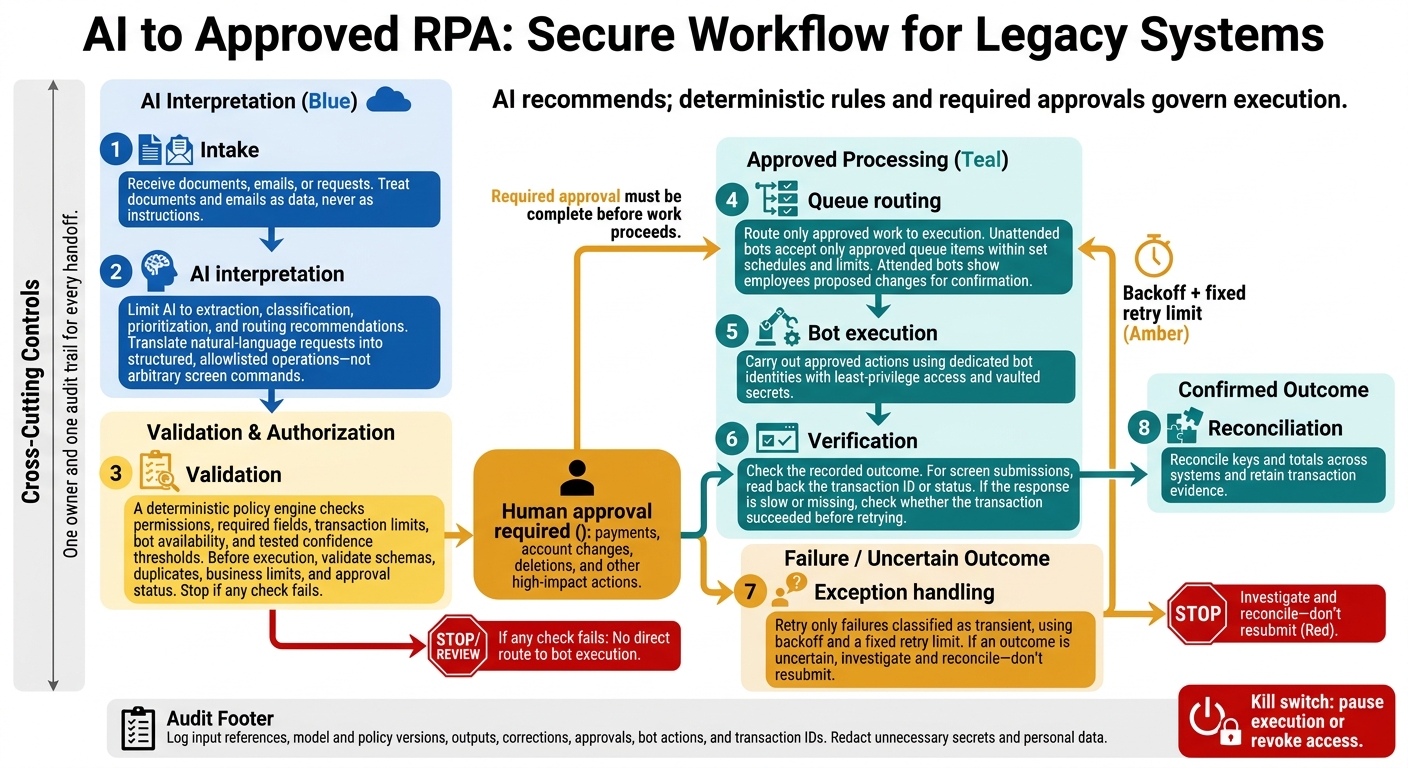
AI + RPA Workflow: From Intake to Reconciliation
Once you've chosen an integration method, define how AI requests become approved bot work.
Map each legacy transaction from trigger to reconciliation: intake, AI interpretation, validation, queue routing, bot execution, verification, exception handling, and reconciliation. At each step, document the system of record, inputs, outputs, owner, failure condition, service target, and audit evidence. Give every handoff one owner and one audit trail.
Set AI Decision Limits and Routing Rules
Keep AI's role limited to extraction, classification, prioritization, and routing recommendations. Before assigning work, a deterministic policy engine must check permissions, required fields, transaction limits, bot availability, and tested confidence thresholds. Calibrate those thresholds against historical results, then track false approvals, unnecessary escalations, and queue age.
Attended bots should show employees the proposed changes for confirmation. Unattended bots should accept only approved queue items within set schedules and limits. Translate natural-language requests into structured, allowlisted operations - not arbitrary screen commands. Require explicit human approval for payments, account changes, deletions, and other high-impact actions.
Access Controls, Data Checks, and Audit Logs
Use dedicated bot identities with least-privilege access, vaulted secrets, encryption, separate environments, and restricted access to sensitive data. Before execution, validate schemas, duplicates, business limits, and approval status. Stop if any check fails.
Treat documents and emails as data, never as instructions. Log relevant input references, model and policy versions, outputs, corrections, approvals, bot actions, and transaction IDs. Redact secrets and personal data that isn't needed. Restrict log access and follow documented retention periods.
Failure Recovery, Monitoring, and Risk Controls
Retry only failures classified as transient, using backoff and a fixed retry limit. Pause queues during batch processing windows, respect concurrent-user limits, and use circuit breakers when failures build up. If an outcome is uncertain, investigate and reconcile - don't resubmit.
Assign named owners for each responsibility. Business teams own policy and exceptions; bot operations owns monitoring and queue handling. The model owner approves model changes after regression testing, IAM owns credential rotation, and IT operations owns incidents and continuity. Provide a kill switch that can pause execution or revoke access.
Legacy bots fail in repeatable ways. Map each failure mode to one named owner and one response.
| Risk | Required control and response | Accountable owner |
|---|---|---|
| Data leakage | Minimize and redact inputs and logs; encrypt data; investigate access alerts | Data protection lead |
| Extraction errors | Apply field rules and tested thresholds; route conflicts to review | Business process owner |
| Actions outside permissions | Enforce action allowlists and authorization outside the model; alert on denials | Security and platform owner |
| Duplicate transactions | Use idempotency controls and business-key checks; reconcile uncertain submissions | Bot operations owner |
| Credential misuse | Vault and rotate secrets; revoke compromised identities | IAM owner |
| Interface changes | Run preflight checks; pause affected bots and regression-test repairs | RPA engineering owner |
| Downtime or backlog | Apply backpressure, queue pauses, and continuity procedures; escalate aging work | IT operations owner |
Plan and Measure the Enterprise Rollout
Once controls are defined, move from design to a staged rollout. Use seven phases, name the people accountable, and approve expansion based on results - not the number of bots built.
| Phase | Deliverable | Accountable owner | Gate | Main risk | Pass criterion |
|---|---|---|---|---|---|
| Discovery | Inventory of legacy interfaces and exception paths, data-flow map, baseline plan | Process owner + enterprise architect | Completeness review | Hidden dependencies | At least 95% of in-scope steps and interfaces documented |
| Assessment | Candidate scorecard, risk classification, business case | Automation product owner | Architecture, security, and compliance review | Unstable or high-risk process | Pilot scope and baseline approved |
| Pilot | Screen, OCR, or API-gap workflow; runbook | Automation engineering lead | User acceptance | Excessive exceptions | Agreed accuracy, exception, and cycle-time thresholds met |
| Testing | Selector stability, permission checks, reconciliation evidence, rollback plan | QA lead + process owner | Release readiness | Interface or access failures | No critical defects; recovery and reconciliation pass |
| Shadow run | Comparison with approved processing | Operations lead | Business and control-owner signoff | Misleading comparisons | No live bot updates; variance explained and within tolerance |
| Phased rollout | Wave plan, support model, communications, change record | Release manager | Change approval | Disruption or capacity shortfall | Stable service levels and incident rates per wave |
| Scaling | Reusable components, training, governance dashboard, benefits report | Automation steering committee | Investment decision | License growth, AI drift, support debt, scope creep | Benefits meet business case; controls remain effective |
Inventory Systems and Choose a Pilot
Start with the lowest-risk workflow that can still prove business value. Record application versions, interfaces, access requirements, data flows, process variants, volumes, exceptions, licensing limits, dependencies, and system owners.
Score candidates from 1 to 5 for value, frequency, rule stability, sensitivity, integration difficulty, risk, and reversibility. Favor low-risk work that’s easy to reverse over projects that simply attract attention. Choose one frequent, repeatable workflow with few exceptions.
Before development, collect two to four weeks of baseline data where possible. Extend that window to cover relevant peaks or batch cycles.
Test Failure Scenarios and Deploy in Stages
Test the pilot away from live operations. Use representative inputs and failure scenarios, and check that rollback works.
Next, run in shadow mode. Compare proposed results with approved processing, using shared case IDs and making no live updates.
Before each release wave, require a workable rollback plan, trained support staff, ready monitoring, and change approval. Expand by queue or business unit only after the agreed observation period has passed.
Measure Results and Total Cost
Use the same baseline to compare production performance and cost. Track median and 95th-percentile cycle time, throughput, straight-through processing, transaction accuracy, exceptions, rework, uptime, recovery time, and cost per completed transaction. Measure control violations alongside speed, accuracy, and cost.
Keep denominators consistent: calculate straight-through processing using eligible transactions and rework using completed transactions.
Calculate net value after implementation, licensing, infrastructure, AI usage, maintenance, training, support, and human-review costs. Report freed staff capacity separately from avoided spending and actual cash savings. More available staff time does not equal a payroll reduction.
Assign Internal and Consulting Responsibilities
Keep process policy, security approval, risk acceptance, production authorization, and final acceptance within the business. Name owners for integration engineering, testing, production support, and knowledge transfer.
NAITIVE AI Consulting Agency can support consulting, implementation, and managed automation for legacy integration. Put the scope, deliverables, acceptance tests, and handoff duties in writing. Document access controls, asset ownership, and support duties as well.
Conclusion: Start With a Controlled Pilot
Use APIs first, RPA to fill interface gaps, and AI for interpretation and routing. Keep execution governed by deterministic rules. AI recommendations must never override validation or approvals. Once you’ve chosen the method, rollout takes discipline.
For bot-led legacy transactions, require validated inputs, least-privilege access, audit logs, and tested recovery. Stop when unexplained mismatches, security events, or critical failures occur. Speed targets alone shouldn’t guide rollout decisions.
With those controls in place, start one tightly scoped pilot. This week, inventory one workflow, set its baseline, and assign one accountable team with business, technical, security, and operations responsibilities.
Define the pilot’s requirements before development begins: full bot traceability, no transactions without permission, and recovery from defined failures. Set clear triggers for stopping, revising, and scaling the pilot up front.
FAQs
When should we modernize instead of automate?
Your choice depends on your infrastructure, risk tolerance, and long-term goals. Gradual integration through middleware, APIs, or Robotic Process Automation (RPA) is often a cost-effective way to keep legacy systems running longer without major disruption.
Consider modernization when systems can’t scale, lack the API support you need, or become too costly and fragile to maintain with workarounds. Full replacement is needed when rigid or proprietary architectures can’t support modern connectivity.
How can we protect sensitive data sent to AI?
Use automated data masking and anonymization during ingestion to remove personally identifiable information (PII). Encrypt data both at rest and in transit between legacy systems and AI models.
Apply role-based access control (RBAC) and least privilege to limit AI agents to only the data they need. Maintain detailed audit logs that track data lineage, access, and changes to support compliance. Use red teaming (adversarial testing) to identify risks from prompt injection and data leakage.
How do we detect AI drift after rollout?
Make continuous, automated monitoring your first line of review, rather than relying on manual checks. Use MLOps frameworks and centralized dashboards to track performance metrics in real time. Watch for model decay caused by data drift (changes in input data) or concept drift (shifts in external conditions).
Pair automated alerts with user feedback, including engagement rates and direct ratings, to check accuracy and whether the model still meets business goals. Schedule regular audits as your data changes.