ROI of AI Agents in CRM Integration
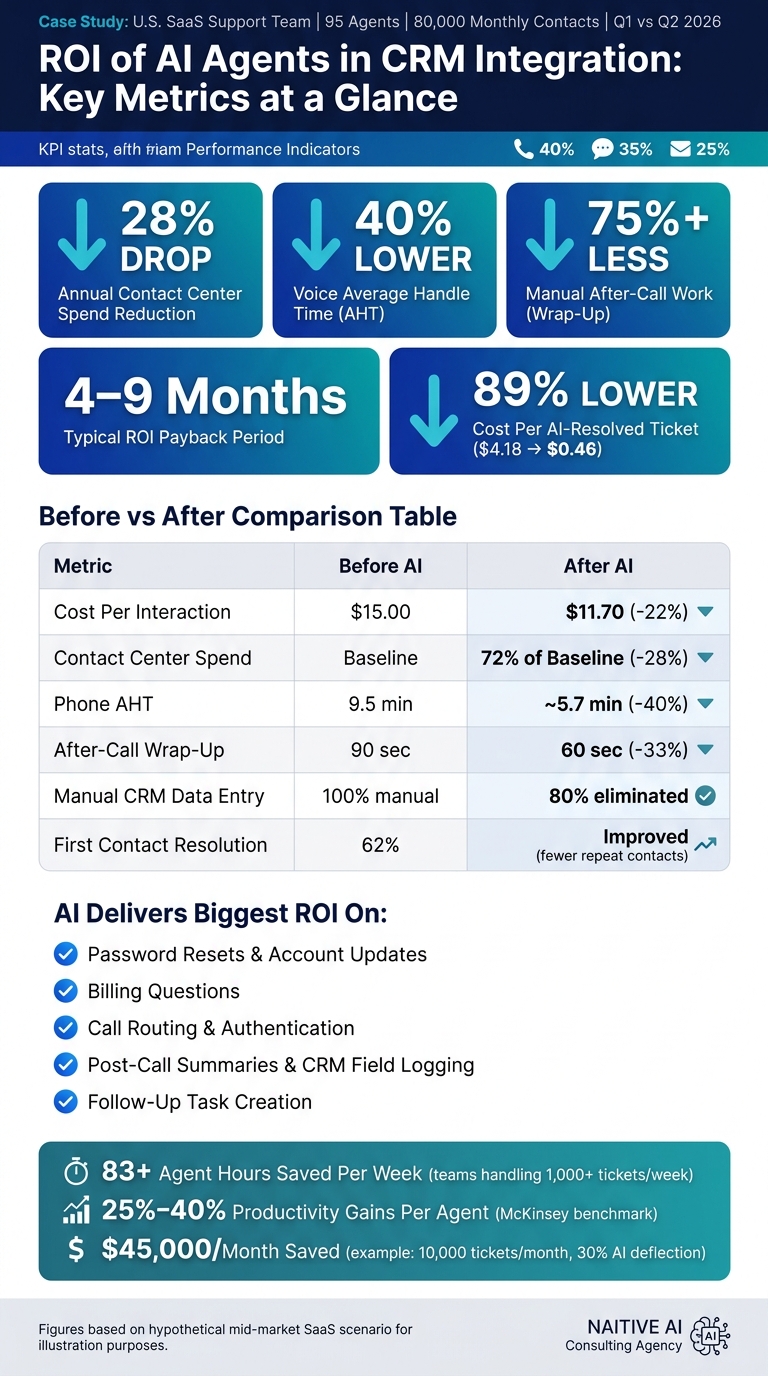
AI agents in CRM cut support costs ~28%, reduce voice AHT up to 40%, slash after-call work 75%+, and deliver 4–9 month payback.

AI agents in CRM can cut support costs, shorten handle time, and lower repeat contacts. In this case, the main ROI came from three places: lower cost per interaction, less after-call work, and fewer routine tickets reaching human agents.
If I boil the article down, here’s the simple answer:
- Cost dropped: contact-center spend fell by about 28%
- Work moved faster: voice handle time fell by as much as 40%
- Admin work shrank: manual after-call work dropped by 75%+
- Data got cleaner: AI filled CRM fields, summaries, and follow-up tasks
- Payback was fast: many AI rollouts recover cost in 4 to 9 months
This article compares Q1 2026 vs. Q2 2026 for a U.S. SaaS support team with 95 agents and 80,000 monthly contacts. It looks at what changed in dollars, team output, and customer results after AI agents were added to CRM, voice, chat, and email workflows.
What matters most? AI had the biggest effect on repeatable work like password resets, billing questions, routing, summaries, and task creation. That’s where teams often lose time and money.
| Area | Before AI | After AI | Main effect |
|---|---|---|---|
| Support cost | Higher labor load | Lower spend | About 28% lower annual spend |
| Voice work | Longer handle time | Shorter calls | Up to 40% lower AHT |
| After-call tasks | Manual notes and logging | Auto summaries and field fill | 75%+ less wrap-up work |
| CRM records | Missing fields, uneven notes | More structured records | Fewer gaps in follow-up |
| ROI timing | Manual-heavy workflow | Lower-cost service flow | Often 4–9 months to payback |
So if you want the short version: AI pays off fastest when it handles high-volume, low-complexity service work inside the CRM and leaves edge cases to people. The rest of the article puts numbers behind that claim.
AI Agent CRM Integration ROI: Key Metrics & Cost Savings
Baseline: Pre-Integration Costs, Service Metrics, and CRM Friction
Cost and Operations Baseline
This pre-integration baseline sets up the ROI comparison. The company in this example is a U.S.-based mid-market SaaS business with a 95-agent Tier-1 support team handling 80,000 customer contacts per month across three channels:
- 40% phone (32,000 calls)
- 35% live chat (28,000 sessions)
- 25% email (20,000 tickets)
Annual labor spend - including wages, benefits, payroll taxes, and overtime - comes to $6.2 million (hypothetical).
Cost per interaction also tells an important story, especially when deciding where AI can make the biggest dent:
| Channel | Monthly Volume | Cost Per Interaction |
|---|---|---|
| Phone | 32,000 | $9.80 |
| Live Chat | 28,000 | $4.50 |
| 20,000 | $3.90 | |
| Blended Average | 80,000 | $6.40 |
All figures are hypothetical and used for illustration.
Phone is the biggest cost driver by a mile. It has the highest cost per contact and takes up the largest share of labor spend. That lines up with industry benchmarks, where phone support in North America often costs $10–$15 per contact, while live chat usually falls around $5–$9, depending on issue complexity.
Baseline average handle time is 9.5 minutes for phone and 7.2 minutes for chat. Both sit above the U.S. contact center average of about 6 minutes 12 seconds. Phone ACW adds another 2.8 minutes per contact (hypothetical), which is well above the usual target of under 2 minutes.
The Tier-1 escalation rate is 27%. Put simply, more than 1 in 4 contacts gets passed to a higher-cost resource. That’s a clear sign of friction in the front-line workflow.
These figures define the starting point before the pilot began.
Customer Experience and CRM Data Baseline
The pre-AI customer experience picture shows clear gaps. First contact resolution (FCR) is 62%, which means about 38% of issues are not solved on the first try. CSAT averages 4.1 out of 5, and NPS stands at +18.
There’s also a quieter cost hiding underneath those topline metrics: 18% of customers contact support again within 7 days for the same issue (hypothetical). That repeat-contact rate adds monthly volume and labor cost, even though it doesn’t always stand out in standard reporting.
CRM data quality is where a lot of avoidable waste piles up. Agents jump between the CRM, billing platform, and knowledge base, spending 20–30% of handle time on context switching and manual copy-paste. That’s time spent moving information around instead of solving the customer’s problem.
The follow-up process has its own cracks. Around 24% of follow-up tasks are created without due dates, and 12% are never completed because they are not linked properly to the customer record (hypothetical). On top of that, notes are mostly written as free text, with uneven tagging and missing disposition codes. That weakens reporting, muddies follow-up, and makes it harder to see what’s actually going on in the queue.
The next section shows how autonomous AI agents changed these metrics.
sbb-itb-f123e37
Implementation: Deploying Autonomous AI Agents Into the CRM Stack
Use Cases Selected for the Pilot
The pilot began with a tight set of workflows. Each one tied back to a clear cost center: live-agent time, rework, or follow-up handling. The team focused on inbound phone, web chat, email, and in-app messaging for common requests like order status checks, billing questions, password resets, and basic account updates. These were repeatable tasks that could be handled with existing CRM records and knowledge base articles, without bringing in cases that needed human judgment. That made them a good fit for measuring deflection, handle time, and documentation accuracy.
The pilot also automated post-interaction summaries, structured note capture, and follow-up task creation. AI agents produced structured summaries, mapped outputs to standard CRM fields such as reason code, category, product line, and sentiment, and created follow-up tasks with due dates and assignees based on conversation context and SLA rules. Instead of writing notes from scratch, agents reviewed and approved them. That cut documentation time by 30–60 seconds per interaction.
Those workflows then moved through a controlled integration layer built to measure impact without interrupting live service.
Integration Design, Controls, and Rollout Stages
The integration used an event-driven API layer between the CRM and contact-center systems. For voice, AI agents were placed into the IVR flow through real-time streaming APIs. They handled authentication, intent detection, and call routing before handing the case to a human agent when needed. For digital channels, webhooks sent messages to the orchestration layer, which pulled CRM context, generated a reply, and logged the interaction back to the case record automatically.
CRM access stayed limited to approved objects and fields, with validation checks before each write was saved. Sensitive data, including payment details and PII, remained read-only. That helped cut the manual copy-paste work and data-quality issues found in the baseline. Every AI action was logged for audit purposes: which agent acted, what data was read or written, confidence scores, and any manual overrides. Latency targets were set at under 1.5 seconds for chat and under 2 seconds for voice turns, with circuit breakers and fallback modes ready if those limits were missed.
NAITIVE AI Consulting Agency can support workflow design, CRM field mapping, and ROI tracking during rollout.
The rollout moved from controlled testing to broader deployment only after each stage hit its service and quality thresholds.
| Rollout Stage | Key Activities | Control Mechanism |
|---|---|---|
| Discovery | Workflow mapping, ROI modeling, compliance review | Scope definition, field governance |
| Limited Pilot | Single queue launch, AI outputs monitored live | Human override, feature flags |
| Expansion | Additional use cases and channels added | Performance thresholds before each stage |
| Full Scale-Up | All queues and channels, agent training updated | Staged traffic rollout, feedback loops |
The next section shows how those controls translated into cost, speed, and customer-impact gains.
Results: Cost Savings, Efficiency Gains, and ROI Payback
Cost Reduction and Payback Period
Compared with the Q1 baseline, the biggest wins showed up in high-volume, repeatable workflows. Annual contact-center spend dropped by about 28% after deployment.
Here’s what that looks like in plain English: if a team handles 10,000 tickets per month and routes 30% of contacts to AI agents, that alone can save about $45,000 per month before you even factor in handle-time gains. On top of that, benchmark data shows payback periods of 4 to 9 months in many deployments, and about 41% of projects hit positive ROI within the first year.
| Metric | Baseline | Post-Deployment | Absolute Change | % Change | Annual Dollar Impact (USD) |
|---|---|---|---|---|---|
| Cost per interaction | $15.00 | $11.70 | -$3.30 | -22% | ≈$396,000 saved at 120,000 tickets/year |
| AI-resolved ticket cost | $4.18 | $0.46 | -$3.72 | -89% | Varies by AI-handled volume |
| Contact center operating spend | Baseline annual spend | 72% of baseline spend | -28% | -28% | Savings equal 28% of baseline annual spend |
Handle Time, Throughput, and CRM Productivity
Handle time also moved in the right direction. Average handle time, or AHT, fell by as much as 40% on voice interactions when AI agents took care of authentication, intent capture, and simple resolution steps before sending the case to a human agent.
But the bigger labor gain came after the call ended. Generative AI removed 75% or more of manual after-call work by writing call notes, assigning dispositions, and creating follow-up tasks inside the CRM automatically. That matters because after-call work is the kind of task that quietly eats up a team’s day.
In one mid-sized IT support example, AI cut after-call work from 90 seconds to 60 seconds per call. Across teams handling more than 1,000 tickets per week, that added up to more than 83 agent hours saved each week.
| Workflow Step | Manual/Baseline | AI-Automated | Improvement/Impact |
|---|---|---|---|
| Triage and routing | Manual triage and assignment | Near-instant AI routing | Several minutes saved per case |
| Wrap-up and summary | 90 sec | 60 sec | 30 sec/call saved; 83+ hours/week recovered |
| CRM field logging | Manual entry | Auto-filled fields | Up to 80% of manual CRM data entry eliminated |
| Follow-up tasks | Manual creation | Automated task generation | Reduced manual after-call work |
When agents spend less time on wrap-up and data entry, the same team can take on more volume without adding headcount. McKinsey’s analysis of AI in customer operations points to 25% to 40% productivity gains per agent.
Customer Experience and Revenue-Side Effects
The upside isn’t only about cost. AI agents also cut repeat contacts and improve first-contact resolution by routing cases to the right place and carrying over full context from the start.
That has a simple effect: agents reply faster, work from cleaner CRM data, and make fewer handoff mistakes. In practice, that improves first-contact resolution and lowers repeat contacts, both of which often drag down CSAT. And when repeat-contact rates fall, service demand drops too, which adds another layer of savings to the numbers above.
Cleaner CRM records also help after the service interaction ends. They improve downstream handoffs and give sales teams a more complete view of each customer’s history.
The AI Advantage: How AI voice transforms customer experience and ROI
Conclusion: What Drives Strong ROI in AI Agent CRM Integration
Taken together, the results point to a clear pattern: AI agents tend to produce the best ROI when they take over high-volume CRM tasks, work from clean data, and follow clear escalation rules. The biggest wins showed up where the starting point was weakest - repetitive tasks, manual logging, and messy CRM data flow.
Key Takeaways for Business and Technology Leaders
The lesson on the operations side is pretty simple: start with one or two high-volume use cases, measure cost per interaction, handle time, FCR, and CSAT, and only scale when the numbers keep looking good.
A hybrid model works best. AI should handle routine work, while people step in for exceptions. And those escalation paths need to be set before launch, not patched in later when edge cases start piling up.
Firms like NAITIVE AI Consulting Agency can help map CRM workflows, pick the right use cases, and set up ROI tracking from day one.
FAQs
Which CRM workflows deliver ROI fastest?
The fastest ROI usually comes from automating high-volume, repetitive CRM workflows.
That often means Tier-1 inquiries like appointment scheduling, order tracking, account balance checks, and password resets. These simple requests can account for 60% to 80% of total interaction volume.
The same pattern shows up in back-office work too. When teams automate lead qualification, data entry, and proactive follow-ups, they can cut payback periods to 60 to 90 days and improve process cycle times by up to 90%.
How much does clean CRM data matter for AI ROI?
Clean CRM data matters if you want AI to pay off.
Here’s why: AI-enhanced systems depend on high-quality inputs to keep workflow success rates above 99% and avoid costly mistakes. If the data going in is messy, the output gets messy too. It’s the old garbage in, garbage out problem.
That gap shows up fast when you compare manual entry with automation. Manual data entry usually comes with a 2% to 3% error rate. Automated systems can cut that down to 0.1%. That difference may look small on paper, but in a CRM, even tiny errors can snowball into failed automations, missed follow-ups, and wasted sales time.
Bad data also brings a quieter cost: rework. Teams end up fixing records, checking workflows, and cleaning up issues that shouldn’t have happened in the first place. Those hidden rework costs can cancel out about 37% to 40% of the time savings AI was supposed to deliver.
What should teams measure during an AI pilot?
Set clear pre-implementation benchmarks with 12 months of historical data. Focus on the numbers that show where you stand before the pilot starts: operating costs, manual processing time, error rates, and customer satisfaction.
During the pilot, track three core areas: financial performance, operational efficiency, and customer experience.
That means watching metrics like:
- Cost per prediction or call
- Revenue per AI interaction
- Operating cost reductions
- Task completion time
- Throughput
- Error frequency
- CSAT or NPS
This gives you a clean before-and-after view, so you can see what’s changing, what’s paying off, and where the pilot still needs work.