Open Source AI Workload Tools: Pros & Cons
Compare Airflow, Azkaban, and Luigi — pros, cons, scalability, integrations, and cost trade-offs for open-source AI workflow orchestration.
Choosing the right tool for managing AI workflows can save time, reduce costs, and improve efficiency. This article breaks down three popular open-source options - Apache Airflow, Azkaban, and Luigi - highlighting their features, limitations, and ideal use cases.
- Apache Airflow: Best for large-scale, complex workflows with extensive integrations. Requires DevOps expertise but offers advanced scheduling and flexibility.
- Azkaban: Designed for Hadoop-based workflows. Simple setup, but limited in modern integrations and scalability.
- Luigi: Great for small, Python-based projects. Lightweight and easy to use but struggles with scaling and lacks built-in distributed execution.
Quick Overview:
- Airflow is the most feature-rich but resource-intensive.
- Azkaban suits legacy systems but has limited modern support.
- Luigi is lightweight but not ideal for large-scale or real-time tasks.
Quick Comparison:
| Feature | Apache Airflow | Azkaban | Luigi |
|---|---|---|---|
| Cost | Free (Open Source) | Free (Open Source) | Free (Open Source) |
| Scalability | High (Distributed) | Moderate (Hadoop-based) | Low to Moderate |
| Integration | Extensive | Limited (Hadoop-focused) | Moderate |
| Scheduling | Advanced | Built-in | Minimal (External) |
Each tool has its strengths and weaknesses. Your choice should align with your infrastructure, team expertise, and project scale.
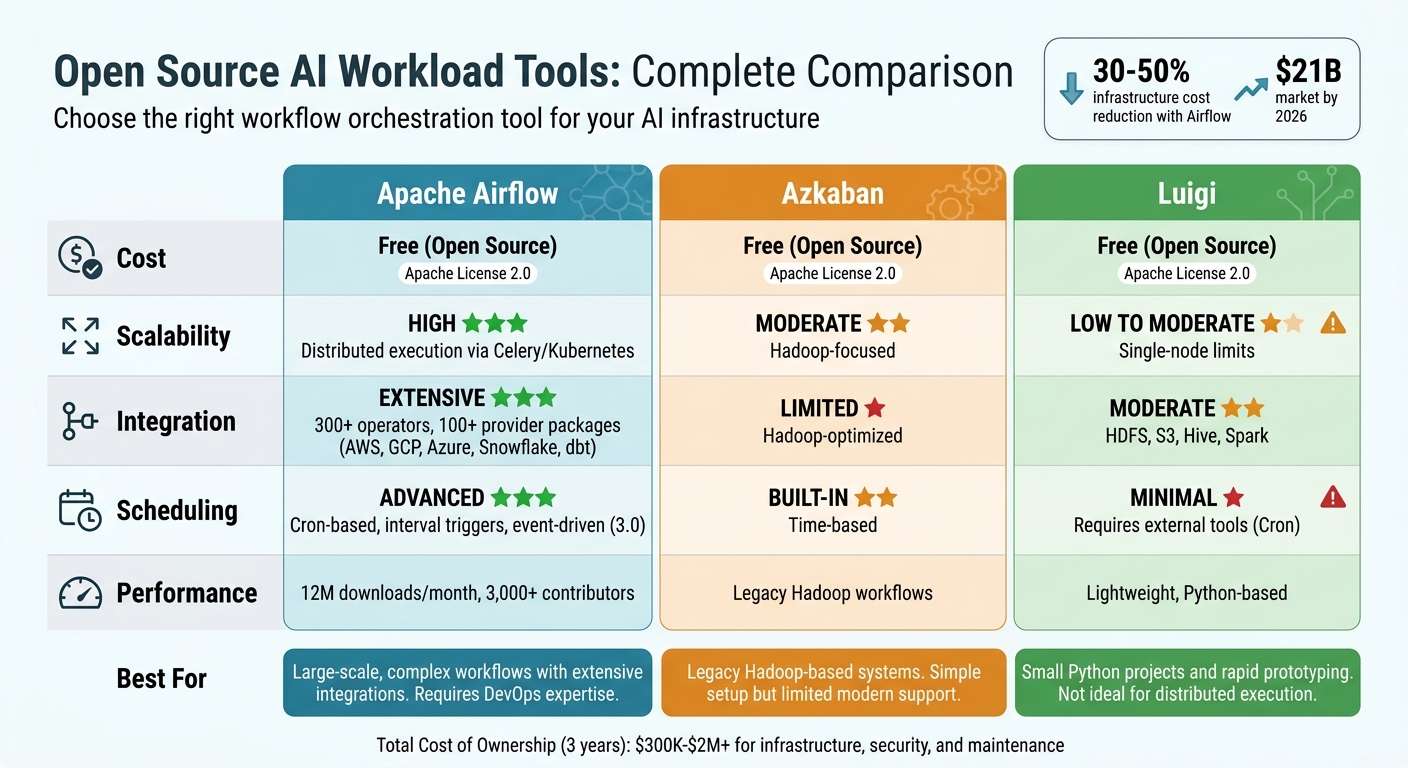
Apache Airflow vs Azkaban vs Luigi: Open Source AI Workflow Tools Comparison
I automated my day to day workflows with this Opensource platform | From Scheduling to Monitoring.
sbb-itb-f123e37
1. Apache Airflow
Apache Airflow stands out as a leader in the open-source workflow orchestration space, with an impressive 12 million downloads per month and a thriving community of over 3,000 contributors. Its approach focuses on coding for dynamic dependency management, making it a go-to choice for teams managing complex AI pipelines. This philosophy aligns with its creator Maxime Beauchemin’s belief: "Pipelines are code, not configuration".
Cost and Resource Efficiency
For enterprises with strong DevOps capabilities, Airflow can cut infrastructure costs by 30–50%. With no license fee, the total cost of ownership over three years ranges from $300,000 to over $2 million - much lower than commercial platforms, which charge $50,000 to over $1 million annually for licensing alone.
Airflow's KubernetesExecutor ensures efficient resource use by assigning each task to its own pod. Teams can allocate GPUs for training tasks and stick to CPU-only pods for evaluations, avoiding unnecessary resource consumption. The introduction of event-driven scheduling in Airflow 3.0 allows jobs to start based on data events, like S3 uploads or Kafka messages, reducing delays. Additionally, the "reschedule" mode for sensors frees up worker slots while waiting for external triggers, preventing tasks from being blocked. These features make Airflow a cost-effective option for managing diverse AI workflows.
Flexibility for AI Workflows
Airflow's ecosystem is packed with over 300 operators and more than 100 official provider packages, enabling seamless integration with platforms like AWS, GCP, Azure, Snowflake, and dbt. Recent updates expanded multi-language support, including Python, Go, Java, TypeScript, and Rust, allowing teams to use their existing codebases without expensive refactoring. This flexibility makes it easier to orchestrate advanced AI systems that combine multiple models to handle complex tasks more reliably than standalone agents.
Enterprise Integration and Support
A standout example of Airflow's enterprise application is its use by the Texas Rangers Baseball Club in April 2025. The team, led by full-stack data engineer Oliver Dykstra, used Airflow (hosted on Astronomer's Astro platform) as the backbone of their data operations. Tasks like player development, contract management, and analytics were all orchestrated through Airflow. The upgrade to Airflow 3.0 improved pipeline reliability, showcasing its ability to handle mission-critical operations. Reflecting on these advancements, Vikram Koka, Apache Airflow PMC member and Chief Strategy Officer at Astronomer, said:
"Airflow 3 is a new beginning... This is almost a complete refactor based on what enterprises told us they needed for the next level of mission-critical adoption".
Scalability and Performance
Airflow is built to scale, managing thousands of DAGs for Fortune 500 companies. However, as deployments grow, performance bottlenecks can emerge. Its centralized scheduler architecture can slow things down, with the "scheduler tax" (caused by parsing all DAG files during each refresh) delaying processing by 30–90 seconds in large setups. For instance, a deployment running 500 DAGs and 5,000 daily tasks can generate 2–5GB of metadata per month. Inefficient resource allocation often forces teams to provision 30–50% more worker capacity than needed. To maintain performance, it’s recommended to avoid placing resource-heavy operations (like model loading or database queries) at the module level in a DAG file, as the scheduler executes this code every 30 seconds, potentially causing significant slowdowns.
2. Azkaban
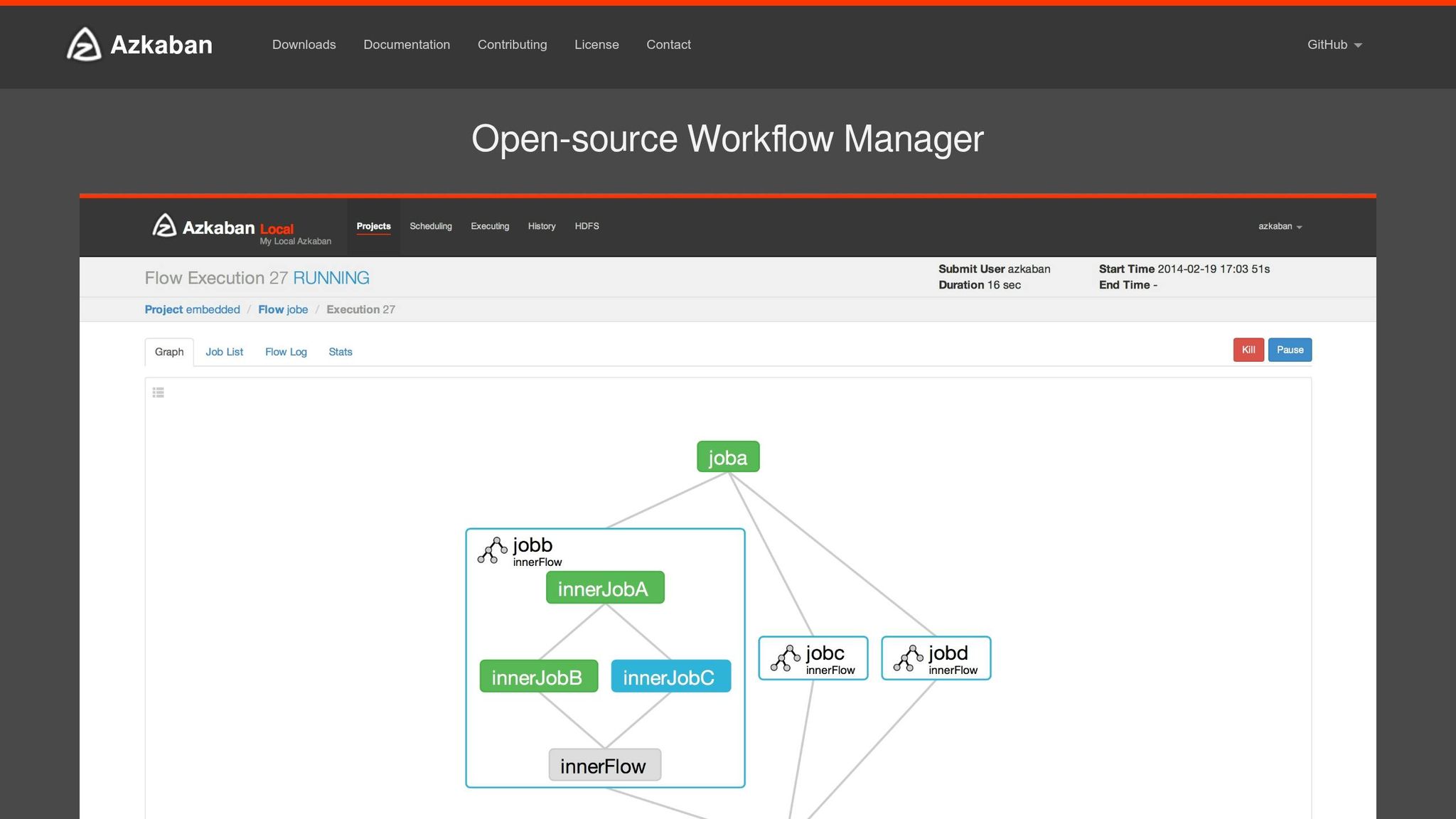
Shifting from Airflow's dynamic dependency management, Azkaban takes a simpler approach, focusing on scheduling workflows in legacy Hadoop environments. Developed by LinkedIn's data engineering team, Azkaban was purpose-built for orchestrating Hadoop and data warehouse operations. It’s particularly well-suited for Java-based infrastructures and is available under the Apache License 2.0, meaning there are no licensing fees.
Cost and Resource Efficiency
Azkaban's modern, containerized architecture addresses the inefficiencies of older systems. In traditional bare-metal setups, idle executor processes could linger for days to meet SLAs, leading to memory issues and even system crashes. Azkaban avoids this by using a "Disposable Container" model, where a new Kubernetes Pod is launched for each workflow. This eliminates idle processes and prevents resource contention between workflows.
The platform also supports linear scaling in cloud environments, enabling teams to allocate resources as needed instead of maintaining oversized server clusters. Its built-in SLA alerting feature automatically terminates jobs that exceed predefined time limits, helping to keep resource usage and costs under control. For organizations managing variable AI workloads, this approach can result in significant savings, often supported by AI consulting services to optimize infrastructure. These features make Azkaban an effective tool for efficiently managing AI workflows.
Flexibility for AI Workflows
Azkaban's Job Type model provides the ability to inject custom code for tasks like model training and data preprocessing. It also uses init containers to dynamically fetch the required binary versions of tools like Hadoop, Spark, and Hive at runtime. This "version-set" concept ensures consistent environments, making it easier to debug failed workflows.
However, Azkaban's roots in Hadoop ecosystems come with some trade-offs. While its Kubernetes integration supports modern cloud deployments, the platform has fewer pre-built operators compared to other tools. This means teams working with diverse AI infrastructures - such as AWS SageMaker or on-premises GPU clusters - might need to write additional integration code. Despite this, its adaptability aligns well with enterprise requirements, particularly in terms of security and integration.
Enterprise Integration and Support
Azkaban caters to enterprise needs with a modular plugin architecture that includes OAuth single sign-on, TLS-encrypted communication, and role-based access control. For high availability, it offers a "Distributed Multiple Executor" mode, which distributes workloads across multiple executor nodes to minimize single points of failure. Additionally, its Image Management APIs enable canary rollouts, allowing teams to test new Spark versions on a limited set of workflows before full deployment. These features provide enterprises with the tools to maintain control and keep costs manageable, similar to Airflow.
Support for Azkaban is primarily community-driven, with resources available on GitHub, Gitter, and Google Groups. However, for organizations that require formal SLAs or 24/7 support, this might be a drawback. The platform has minimal hardware requirements, needing at least 4 GB of RAM, 10 GB of disk space, and PostgreSQL or MySQL for metadata storage.
3. Luigi
Luigi, created by Spotify in 2011, was designed to simplify workflow orchestration, particularly for tasks like music streaming and personalized recommendations. It’s a Python-based framework where workflows are built using a "Tasks and Targets" model, defined as Python classes. This code-first approach makes it a solid choice for Python-savvy teams, and installation is as simple as running pip install.
Cost and Resource Efficiency
Luigi is open-source under the Apache License 2.0, which means it’s entirely free to use. However, since there are no managed cloud options, organizations must manage their own infrastructure. While Luigi’s single-threaded scheduler is easy to debug, it may struggle with scalability as task volumes grow.
"Luigi doesn't give you scalability for free. In practice this is not a problem until you start running thousands of tasks." - Luigi Documentation
Unlike Kubernetes-native tools that distribute workloads automatically, Luigi requires manual configuration for scaling across multiple nodes. This can influence its ability to meet the demands of projects with varying levels of complexity.
Flexibility for AI Workflows
Luigi integrates well with major enterprise data sources like HDFS, Amazon S3, Redshift, and Hive, making it a good fit for Hadoop-based environments. Its Parameter class allows tasks to be reused with different inputs, which is useful for batch processing. However, it’s important to note that Luigi is designed exclusively for batch processing and doesn’t support real-time or streaming data.
Another limitation is Luigi’s lack of a native Directed Acyclic Graph (DAG) structure. Instead, it uses recursive dependencies, which can complicate the design of more intricate pipelines. Additionally, error handling, retries, and triggering workflows are not built-in and require external tools like crontab. Despite these challenges, its ability to integrate with various data sources makes it a solid option for specific scenarios.
Enterprise Integration and Support
Luigi includes a simple web-based visualizer for monitoring task dependencies, though it lacks the interactivity of more modern tools. While users appreciate its code-first design and straightforward debugging, common criticisms include limited scalability and reliance on external triggers.
Spotify, Luigi’s original creator, has since transitioned to Flyte for better visibility and reduced maintenance - a move that reflects a broader shift toward Kubernetes-native solutions for large-scale AI workflows. For teams focused on rapid prototyping or smaller Python-driven projects, Luigi remains a practical option. However, enterprises handling thousands of tasks or requiring distributed execution should weigh its limitations carefully before committing to it.
Pros and Cons
When it comes to open-source tools for AI workflow orchestration, each option brings its own strengths and challenges. Let’s break down the key players: Apache Airflow, Luigi, and Azkaban.
Apache Airflow stands out as the most feature-packed option. Its comprehensive web interface, robust scheduling, and extensive integrations with platforms like AWS, GCP, Azure, and Slack make it a popular choice. With a G2 rating of 4.3/5, users appreciate its flexibility and clear task logs. However, Airflow's complexity can be a hurdle - it requires multiple components (webserver, scheduler, workers, and a database), consumes significant system resources, and demands DevOps expertise to manage. Performance-wise, Airflow isn't the fastest; benchmarks show it took 56 seconds to complete 40 lightweight tasks, which is slower compared to newer tools.
On the other hand, Luigi offers a simpler, more lightweight approach, especially for smaller teams. Built on Python, it’s easy to set up with a simple pip install. Users rate its ease of use at 6.7/10 and its features at 7.3/10. Luigi excels at handling sequential batch jobs without requiring complex infrastructure.
"Luigi takes care of a lot of workflow management so that users can focus on tasks themselves and their dependencies" - Predictive Analytics Today
Despite its simplicity, Luigi has its limitations. It doesn’t natively support distributed workloads, scales only up to medium-sized tasks, and relies on external tools like Cron for scheduling. Additionally, its API can be challenging for beginners, and the web UI offers limited interactivity.
Finally, Azkaban, which was originally designed for Hadoop-centric workflows, has become less prominent. While it still suits batch-oriented tasks, it has been largely overshadowed by Airflow's versatility and Luigi's straightforwardness for Python-heavy projects.
Here’s a quick comparison of their features:
| Feature | Apache Airflow | Azkaban | Luigi |
|---|---|---|---|
| Cost | Free (Open Source) | Free (Open Source) | Free (Open Source) |
| Scalability | High; distributed execution via Celery/Kubernetes | Moderate; Hadoop-focused | Low to Moderate; single-node limits |
| Flexibility | High; supports complex DAGs and parallel tasks | Moderate; batch-oriented | Moderate; sequential tasks, file-based dependencies |
| Integration | Extensive; AWS, GCP, Azure, Slack | Strong; Hadoop-optimized | Moderate; HDFS, S3, Hive, Spark |
| Scheduling | Robust; cron-based and interval triggers | Built-in; time-based | Minimal; relies on external tools |
While all three tools are free, the hidden costs vary. Airflow requires substantial DevOps resources for setup and maintenance, while Luigi’s simplicity may lead to additional expenses if workloads outgrow its single-node capabilities. Selecting the right tool depends on your team’s needs, and AI cloud consulting can help navigate these choices. For enterprises managing thousands of tasks with distributed execution, Airflow’s complexity might be worth it. But for smaller Python projects or quick prototypes, Luigi’s ease of use is hard to beat.
Conclusion
Selecting the right open-source AI workload scheduling tool comes down to aligning your enterprise's specific requirements with the capabilities of each platform. Apache Airflow is a strong choice for managing intricate, large-scale workflows across multiple cloud environments, especially when a dedicated DevOps team is in place. For smaller teams focused on Python and simpler batch jobs, Luigi is often a better fit. Meanwhile, Azkaban continues to cater to Hadoop-centric workflows with its focused design.
Beyond these established tools, Kubernetes-native schedulers are reshaping AI workload orchestration. These emerging tools are particularly well-suited for enterprises operating hybrid cloud and on-premise AI infrastructures. For example, KAI-Scheduler stands out for its compatibility with both dynamic cloud setups and static on-premise deployments, making it ideal for managing GPU clusters in mixed environments. Similarly, Volcano is evolving into a unified scheduling platform, handling everything from training and inference to bursty AI agent sessions on a single cluster. As maintainer Jesse Stutler explains, "Volcano is moving beyond the batch to becoming a unified scheduling platform today".
However, the cost of deploying these tools goes far beyond their free download. While the tools themselves may account for just 20% of production deployment costs, the remaining 80% often involves expenses like security hardening, monitoring, and ongoing maintenance. Meeting governance standards, such as SOC 2 Type II or GDPR compliance, can also be a significant hurdle, as most open-source options lack built-in support for these requirements.
To address these challenges, NAITIVE AI Consulting Agency offers tailored solutions. They assess technical maturity, infrastructure constraints, and compliance needs to help businesses choose the right scheduling tool. Whether it's deploying Airflow for complex MLOps pipelines, leveraging KAI-Scheduler for GPU cluster management, or designing custom orchestration for autonomous AI agents with Autogen, NAITIVE ensures your solution aligns with your enterprise goals and operates seamlessly.
With the workload scheduling and automation market projected to reach $21 billion by 2026, driven by the need to reduce costs and avoid vendor lock-in, selecting a tool that meets your current needs while scaling with your AI initiatives is more important than ever.
FAQs
Which tool is best for GPU-heavy AI workflows?
The KAI Scheduler is a powerful solution designed for managing GPU resources in Kubernetes environments. It streamlines GPU allocation, making it a perfect fit for AI workflows that demand heavy computational power. From handling smaller tasks to managing large-scale training and inference jobs, it ensures resources are distributed efficiently and fairly. Its ability to scale and prioritize GPU management makes it an excellent choice for tackling complex, large-scale AI workloads.
What hidden costs come with “free” open-source schedulers?
While open-source schedulers may seem like a cost-effective choice at first glance, they often come with hidden expenses that can catch organizations off guard. These include costs for governance, audits, ongoing maintenance, and scaling efforts.
Beyond the financial aspect, there are operational challenges too. Organizations may find themselves dealing with fragile services that require constant attention or facing the unexpected responsibility of full system ownership. Together, these factors can make managing these "free" tools far more expensive and complicated than originally expected.
How do I choose between Airflow, Azkaban, and Luigi for my team?
When choosing between Airflow, Azkaban, and Luigi, it's essential to weigh their strengths against your team's specific requirements:
- Airflow: Best for managing complex and scalable workflows, thanks to its extensive ecosystem and flexibility.
- Luigi: A great fit for smaller projects or teams that prioritize simplicity and prefer Python-based solutions.
- Azkaban: Shines in batch job scheduling, especially in big data scenarios.
The right tool will depend on factors like your team's expertise, existing infrastructure, and the complexity of your workflows.