AI Workload Distribution Platforms: Comparative Guide
Compare AWS SageMaker, Azure ML, Vertex AI, Apache Airflow and Anyscale on features, pricing, scalability and best use cases.
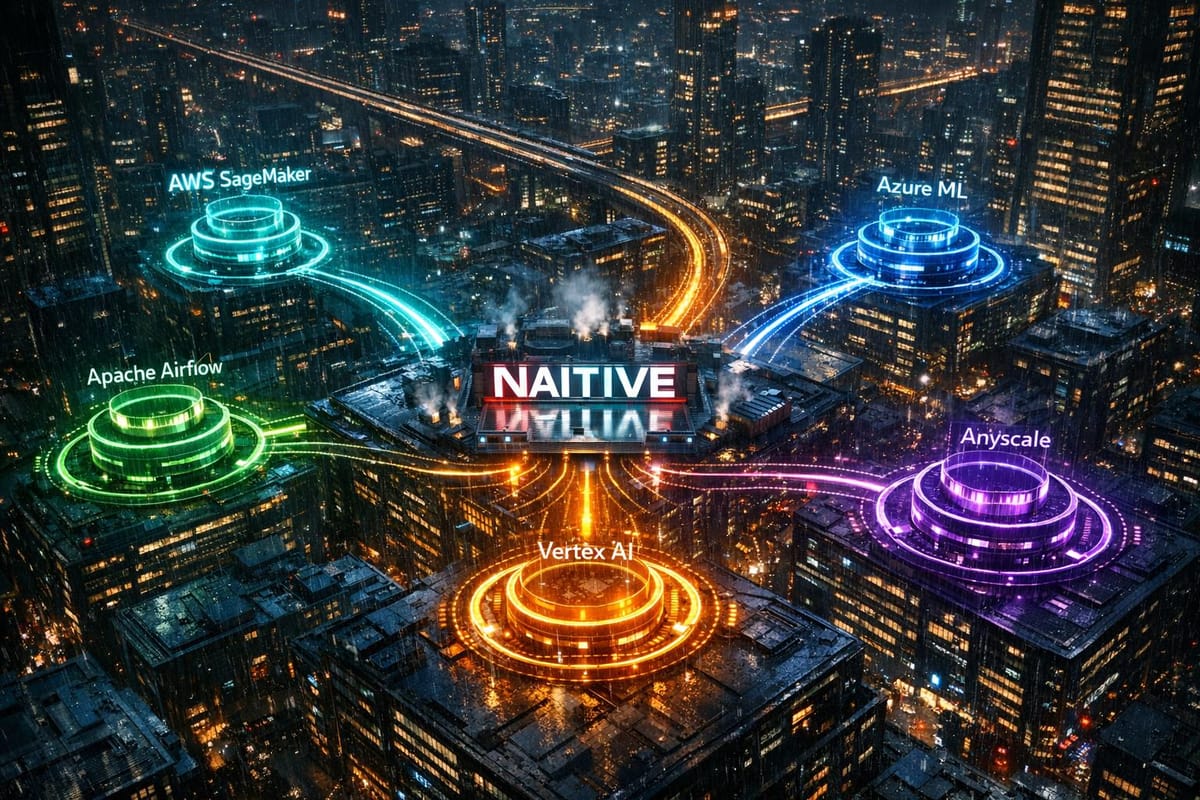
AI workload distribution platforms are essential tools for managing and scaling AI operations. They handle tasks like GPU orchestration, auto-scaling, and model deployment, ensuring AI models run efficiently and reliably. However, choosing the right platform can be challenging, which is why many organizations seek AI consulting, especially when 95% of generative AI pilots fail to reach production due to platform limitations.
This guide compares five leading platforms - AWS SageMaker, Azure Machine Learning, Google Vertex AI, Apache Airflow, and Anyscale (Ray). Each platform is assessed based on features, pricing, scalability, and suitability for different business needs.
Key Highlights:
- AWS SageMaker: Strong integration with AWS services; ideal for enterprises with complex AI workflows. Costs can be high due to persistent resource usage.
- Azure Machine Learning: Perfect for Microsoft-centric organizations; offers hybrid deployments and robust security. Pricing is straightforward but requires familiarity with Azure tools.
- Google Vertex AI: Best for data-heavy tasks; integrates deeply with Google Cloud. However, steep learning curve for non-GCP users.
- Apache Airflow: Open-source and highly customizable for Python teams. Requires significant DevOps expertise.
- Anyscale (Ray): Exceptional for distributed Python workloads; supports multi-cloud execution. Pricing can be unpredictable for new users.
Quick Comparison
| Platform | Key Strengths | Main Weaknesses | Best For |
|---|---|---|---|
| AWS SageMaker | Advanced security, AWS-native tools | High costs, steep learning curve | Enterprises with AWS infrastructure |
| Azure ML | Microsoft integration, hybrid deployments | Complex UI, dependency on Azure ecosystem | Microsoft-aligned organizations |
| Google Vertex AI | Data-intensive tasks, cost-effective GPUs | Complex onboarding for non-GCP users | GCP-aligned enterprises |
| Apache Airflow | Customizable workflows, open-source | Requires strong DevOps skills | Python teams with technical expertise |
| Anyscale (Ray) | Distributed workloads, multi-cloud support | Learning curve, unpredictable pricing | High-compute ML research and enterprises |
Each platform has unique strengths and trade-offs. Your choice depends on your team's expertise, infrastructure, and workload requirements. Read on for a detailed breakdown of each platform.
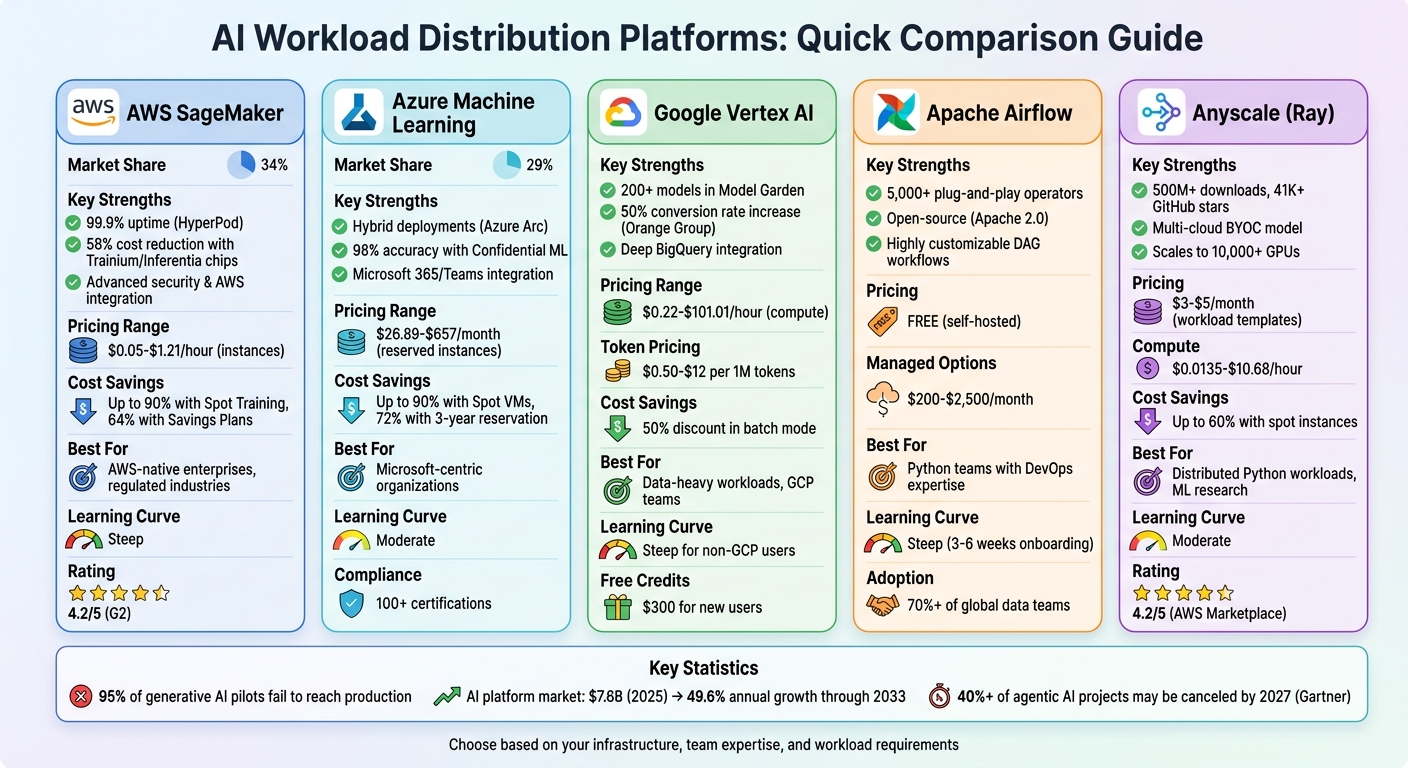
AI Workload Distribution Platforms Comparison: Features, Pricing & Best Use Cases
1. AWS SageMaker
Core Features
AWS SageMaker commands a 34% market share as of February 2025, offering a robust platform for handling distributed AI workloads. One standout feature is SageMaker HyperPod, which ensures 99.9% uptime during extended training cycles for models with over 100 billion parameters. It achieves this by automatically monitoring node health and replacing faulty instances, resuming training seamlessly from checkpoints.
The platform supports popular frameworks like PyTorch DDP and TensorFlow tf.distribute through managed libraries in pre-configured containers. For cost-conscious users, SageMaker leverages custom AWS Trainium and Inferentia chips, which can slash LLM inference costs by up to 58% compared to traditional GPU instances. Additionally, hybrid deployments are made possible with SageMaker Edge Manager and Amazon EKS integration, enabling workloads to span both cloud and on-premise environments. These capabilities make SageMaker a flexible yet powerful option for AI development.
Pricing (USD)
SageMaker follows a consumption-based pricing model with no upfront fees, though it carries a 20–25% premium over standard EC2 pricing due to its managed MLOps features. Here are some examples of instance rates:
ml.t3.medium: ~$0.05/hourml.m5.xlarge: ~$0.23/hourml.g5.xlarge(NVIDIA A10G): ~$1.212/hour- SageMaker Canvas: $1.90/hour during active sessions.
New users can take advantage of a generous free tier for the first two months, which includes 250 hours/month of notebook instances and 50 hours of training on m4.xlarge or m5.xlarge. For further savings, the platform offers Savings Plans with discounts of up to 64% for 1- or 3-year commitments, and Managed Spot Training can cut costs by as much as 90%.
However, there are hidden costs to watch out for. As Morten Andersen, Co-Founder of Redress Compliance, points out:
"The most significant and frequently underestimated SageMaker cost is persistent inference endpoints... regardless of whether it is receiving traffic".
Scalability
SageMaker's scalability is another key strength. It can handle everything from serverless inference, which scales down to zero when idle, to distributed training clusters designed for massive models exceeding 100 billion parameters. Companies like SuccessKPI and Deloitte Consulting have reported 30–40% productivity gains by using tools like SageMaker Canvas and Data Wrangler to streamline their workflows.
Business Size Suitability
SageMaker is designed for organizations with complex, large-scale AI needs. It’s particularly suited for AWS-native enterprises that require advanced ML systems with strong governance capabilities. Typical enterprise deployments range from $7,000 to $15,000 monthly, reflecting the platform’s extensive MLOps and management tools.
User reviews highlight both the strengths and challenges of SageMaker. It holds a 4.2/5 rating on G2 and 4.5/5 on Capterra, with many praising its "compliance-in-a-box" features. However, some users criticize its steep learning curve and opaque pricing, which can lead to unexpected expenses like "zombie resource" costs from forgotten EBS volumes. As one Senior ML Engineer shared in a G2 review:
"The ability to spin up a distributed training cluster without touching Kubernetes manifests is the primary reason we stay".
sbb-itb-f123e37
2. Azure Machine Learning
Core Features
Azure Machine Learning holds a 29% market share, making it a top pick for organizations that rely on Microsoft technologies. One of its standout features is its ability to handle hybrid compute deployments. With Azure Arc-enabled Kubernetes, users can run workloads across cloud, on-premises, and edge environments, all while keeping existing infrastructure as compute targets - no need to migrate data to the cloud.
The platform offers various tools for different user groups. Developers can leverage the Python SDK, DevOps teams can use the CLI, and non-coders have access to an intuitive drag-and-drop Designer. For industries with strict regulations, Azure ML's Confidential ML, powered by Intel SGX v4, ensures data security. In fact, it achieved 98% accuracy in trials involving encrypted health data. Swift adopted this federated learning approach in 2026, sending models to participants' local compute environments instead of centralizing sensitive data. Johan Bryssinck, AI/ML Product and Program Management Lead at Swift, described it this way:
"Using Azure Machine Learning, we can train a model on multiple distributed datasets. Rather than bringing the data to a central point, we do the opposite. We send the model for training to the participants' local compute and datasets at the edge and fuse the training results in a foundation model."
These capabilities, combined with flexible pricing options, make Azure ML a versatile tool for a wide range of use cases.
Pricing (USD)
Azure ML's pricing is straightforward - you only pay for compute, storage, and related services. For example:
- Entry-level instances: The D2 v3 (2 vCPUs, 8 GiB RAM) costs $70.08 per month on a pay-as-you-go plan, or $26.89 per month with a 3-year reservation, offering 72% savings.
- GPU instances: The NC6 (1× K80) is priced at $657 per month.
- High-performance units: The NDisrH100v5 costs $12.29 per hour.
In 2026, Azure ML introduced Agent Commit Units (ACUs) for enterprise users with high-volume AI workloads. Starting at $5,000 per month, ACUs provide tiered discounts on model tokens and tool usage, making them ideal for large-scale deployments. For cost-conscious users, Spot VMs can slash expenses by 60–90% for fault-tolerant training, though keeping an eye on idle resources is essential.
Scalability
Azure ML is built to grow with your needs. It caters to small teams using its visual Designer as well as large enterprises deploying massive AKS clusters across over 60 global regions. The platform also includes serverless compute, which scales down to zero when idle, helping to avoid unnecessary costs. Marks & Spencer, for instance, utilized Azure ML to serve over 30 million customers by processing large datasets and delivering tailored offers. This flexibility makes Azure ML suitable for organizations of all sizes.
Business Size Suitability
Azure ML is particularly well-suited for organizations already invested in Microsoft's ecosystem. It seamlessly integrates with Active Directory and offers unified governance tools. Its Confidential Computing capabilities make it a strong choice for regulated industries, backed by Microsoft's robust security measures, including 34,000 full-time engineers and over 100 compliance certifications. While users appreciate the drag-and-drop Designer for its simplicity, some have mentioned challenges when switching between the Foundry and Studio interfaces. This mix of strengths and occasional quirks highlights Azure ML's appeal to a wide range of businesses.
3. Google Vertex AI
Core Features
Google Vertex AI brings together data engineering, data science, and machine learning workflows, covering everything from initial prototyping to full-scale production. Its Model Garden offers access to over 200 enterprise-level models, including Google's own Gemini models and third-party options like Claude 3.7 and Llama 4.
For workload management, Vertex AI supports hybrid deployments using custom Docker containers. It also features a Reduction Server that enhances throughput and reduces latency with a proprietary all-reduce algorithm. A standout example of its application is Orange Group, a telecom giant with over 120,000 employees, which used Vertex AI in February 2026 to launch autonomous customer onboarding agents. These agents went live in just four weeks across several European markets, boosting conversion rates by 50% and generating over $4 million in additional annual revenue.
Security is a priority for Vertex AI, offering features like VPC Service Controls to prevent data exfiltration and Customer-Managed Encryption Keys (CMEK) for compliance with regulations. Developers can also take advantage of the Agent Development Kit (ADK), an open-source toolkit introduced in 2026, to build agents locally and deploy them to any container runtime. This flexibility supports self-hosted solutions.
Pricing (USD)
Vertex AI employs a multi-tiered pricing model that factors in compute, tokens, and specialized services. Here are some examples of its pricing structure:
- n1-standard-4 instance: $0.22/hr
- a3-highgpu-8g instance: $101.01/hr
- NVIDIA A100: $2.93/hr
- H100 80GB: $9.80/hr
When it comes to generative AI, the Gemini 3.1 Pro model costs $2 per 1 million input tokens (up to 200K context) and $12 per 1 million output tokens. For a more economical choice, the Gemini 3.1 Flash model is priced at $0.50 and $3.00 per million tokens, respectively. Additionally, batch mode offers a 50% discount for workloads that aren't time-sensitive.
Unlike some competitors, Vertex AI doesn’t provide a permanent free tier. A minimum Google Cloud Platform (GCP) commitment of $0.10+ is required to run workloads. However, new users receive $300 in free credits, though scaling production workloads often results in monthly costs in the hundreds or thousands of dollars.
Scalability
Vertex AI is designed to handle scaling effortlessly. It automatically provisions and decommissions virtual machines for training jobs, managing tasks like logging, queuing, and monitoring without requiring user intervention. Users can configure single-node or multi-node training setups, specifying machine types, GPUs, or TPUs for large-scale tasks. Once models are deployed, they can scale automatically to meet real-time traffic demands.
Real-world use cases highlight its scalability. In 2025, the Wisconsin Department of Workforce Development used Vertex AI's Doc AI to process a backlog of 777,000 insurance claims. Similarly, Deloitte implemented a "Care Finder" agent that reduced provider search times from 5–8 minutes to under one minute. These examples underscore the platform's ability to handle both large batch processing and real-time applications.
Business Size Suitability
Vertex AI's extensive features and pricing flexibility make it an excellent choice for larger enterprises, especially those with established data science teams and significant investments in Google Cloud. Its AutoML tools also offer no-code solutions, making it accessible for teams with limited machine learning expertise. Xun Wang, CTO of Bloomreach, shared their decision to switch from OpenAI to Vertex AI, stating:
"Google's platform delivers clear advantages in performance, scalability, reliability and cost optimization".
Despite its strengths, some users have criticized the platform's steep learning curve and complex pricing structure. It’s particularly well-suited for data-heavy tasks and integrates seamlessly with tools like BigQuery and Dataflow. However, businesses looking for more flexibility may find the high level of Google Cloud dependency less appealing. For cost-conscious users, managed endpoints require a minimum of about $7 per day ($210 per month) even with no traffic, making serverless options a better fit for low-volume workloads. Overall, Vertex AI’s integrations and pricing are well-aligned with the needs of data-intensive enterprises.
4. Apache Airflow
Core Features
Apache Airflow approaches AI workload management by defining workflows as Directed Acyclic Graphs (DAGs), all crafted in pure Python. This setup allows teams to design dynamic pipelines, complete with loops and intricate logic, making it particularly effective for tasks like iterative machine learning models. As of April 2026, Airflow includes built-in support for LLMs and AI Agents, enabling observable, retryable, and auditable workflows for agent-based tasks. Its extensive integration library - featuring over 5,000 plug-and-play operators - allows seamless task execution across AWS, Google Cloud, Azure, and a variety of third-party AI tools.
The platform’s modular design uses a message queue to coordinate workers, making it capable of handling large-scale AI compute demands. The 2026 LTS version added features like smart scheduling, automatic task retries, and advanced failure recovery, ensuring high reliability for critical AI pipelines. On top of that, its web-based UI provides detailed insights into logs and task statuses. For enterprises, features like fine-grained Role-Based Access Control (RBAC) and audit logging help meet governance and compliance needs in industries like finance and healthcare.
Pricing (USD)
Apache Airflow’s core platform is free under the Apache 2.0 license. However, many organizations turn to managed services to reduce operational complexity. For example:
- AWS Managed Workflows (MWAA) starts at about $0.48 per hour, translating to roughly $350 per month for smaller setups.
- Astronomer’s managed enterprise plans typically begin at $2,500 per month.
- Azure Airflow offerings range from $200 to $500 per month, depending on node specifications.
In one case from April 2026, a fintech company running over 340 DAGs on Astronomer reported monthly infrastructure costs of approximately $1,200. Their team of eight data engineers noted that maintenance tasks, like upgrades and managing provider package compatibility, took up about 15% of one engineer’s time.
Scalability
Airflow’s pluggable executor model allows it to scale from simple setups on a single machine to large clusters capable of handling thousands of tasks. The KubernetesExecutor, which isolates each task in its own pod, is particularly effective for hybrid cloud or on-premise environments. Version 3.4 introduced adaptive executors, which dynamically allocate resources and reroute tasks to avoid bottlenecks.
However, the scheduler can become a limiting factor in deployments with hundreds of DAGs. It routinely parses files (every 30 seconds), which can slow performance as DAG counts rise. For instance, after reaching 200 concurrent DAGs, one organization needed to fine-tune settings like max_active_runs and parallelism to maintain efficiency. It’s also worth noting that Airflow is primarily designed for batch processing and doesn’t natively support real-time streaming or event-driven workflows.
Business Size Suitability
Airflow is ideal for large enterprises and Fortune 500 firms with established DAG-based workflows and skilled Python teams. Over 70% of global data teams rely on the platform, cementing its reputation as a standard for orchestration. Priya Malhotra, Head of ML Platform Engineering at a Fortune 500 fintech, highlighted its importance:
"The orchestration layer is no longer just a backend tool - it's the command center for AI-driven business".
Its strong audit trails and enterprise-grade RBAC make it particularly appealing for regulated industries like finance and healthcare. However, the platform’s steep learning curve - requiring 3–6 weeks of onboarding - and the operational demands of managing self-hosted clusters can be challenging. Smaller teams or those looking for simpler deployment options might find the infrastructure requirements daunting, as it involves maintaining a metadata database (commonly PostgreSQL), a scheduler, a web server, and workers.
5. Anyscale (Ray)
Core Features
Anyscale is powered by Ray, an open-source framework boasting over 500 million downloads and 41,000+ GitHub stars. It supports a Bring Your Own Cloud (BYOC) model, allowing users to deploy Ray clusters within their own VPCs on AWS, Azure, Google Cloud, or even on-premise hardware. This setup keeps data within your infrastructure and utilizes existing GPU reservations, eliminating the hassle of capacity planning.
The platform simplifies the management of distributed Python workloads, such as multimodal data processing, GPU-based training, and batch inference. Unlike managing Ray on Kubernetes, Anyscale handles cluster setup, autoscaling, and maintenance, reducing operational headaches. As of May 2026, it supports high-performance hardware like NVIDIA H200 and H100 GPUs. Its Pooled GPUs feature lets teams share resources and reallocate them dynamically as workload demands shift.
Anastasis Germanidis, Co-Founder and CTO at Runway, highlighted the platform's capabilities:
"Anyscale enables us to push the boundaries of what's possible in generative AI by giving us the flexibility to scale workloads seamlessly. This removes the risk around our infrastructure and allows our team to focus on innovation".
Pricing (USD)
Anyscale operates on a usage-based billing model without fixed monthly fees for its pay-as-you-go tier. As of May 2026, workload templates start at $3 per month for multimodal AI and $5 per month for LLM training and inference. Compute costs depend on the instance type: CPU-only instances cost $0.0135 per hour, while GPU instances range from $0.5682 per hour for an NVIDIA T4 to $10.6812 per hour for an NVIDIA H200. New users can access a $100 credit to experiment with workloads.
Enterprise customers can negotiate contracts for volume discounts, which include benefits like 24/7 support and unlimited case submissions. Additionally, the BYOC model helps reduce expenses by leveraging existing GPU reservations, potentially cutting costs by up to 60% through spot instances with built-in fault tolerance.
Scalability
Anyscale is designed to handle diverse workloads, scaling from a single machine to clusters with thousands of CPUs and GPUs. Its intelligent autoscaling and resilient head node ensure resources are allocated efficiently, while shared GPUs help optimize utilization and prevent unexpected costs. One engineering team reported a 13x faster model loading time and a fourfold increase in experimentation speed when using Anyscale for visual language models.
Ross Morrow, Principal Engineer at an enterprise using the platform, shared his experience:
"One of our applied AI engineers said, 'we should use this model,' and the next day it was running in production. Before Anyscale, that would've taken a week or more".
The platform supports multi-cloud execution, enabling the same code to run across AWS, GCP, Azure, and CoreWeave without requiring cloud-specific adjustments. However, some users find the pricing structure less predictable and note a learning curve for teams new to Ray concepts.
Business Size Suitability
Anyscale is best suited for medium to large enterprises with complex ML pipelines and dedicated MLOps teams. It's particularly valuable for organizations focused on Ray-based distributed Python workloads. Smaller teams or individual developers needing basic serverless functions may find the platform more than they require.
For smaller operations, the Hosted deployment option offers a quick start with no setup needed. Meanwhile, the BYOC model is ideal for production environments with strict data residency requirements. Industries like finance and healthcare, which often have compliance demands, can deploy within their own VPCs while benefiting from managed Ray orchestration. The platform holds a 4.2 out of 5 rating on AWS Marketplace, with users praising its ability to scale Ray workloads without code rewrites, though some mention challenges with understanding its pricing.
Strengths and Weaknesses
Here's a quick breakdown of the strengths and weaknesses of each platform, summarizing the earlier detailed analyses. Each platform offers distinct advantages and trade-offs depending on factors like workload type, team size, and infrastructure setup.
AWS SageMaker is a standout choice for regulated industries due to its strong security features like VPC and PrivateLink. However, it comes with a steep learning curve and requires advanced AWS expertise. Azure Machine Learning integrates seamlessly with the Microsoft ecosystem, including Microsoft 365 and Teams, but this tight integration can lead to dependency issues and a more complex user interface. Google Vertex AI offers excellent observability and integrates deeply with BigQuery, but teams unfamiliar with Google Cloud may face a challenging onboarding process.
Apache Airflow is unmatched in flexibility for creating custom orchestration workflows and can run on any infrastructure. That said, it demands significant DevOps expertise. Anyscale (Ray) is ideal for high-compute, distributed Python workloads, scaling to over 10,000 GPUs. However, it lacks built-in collaboration tools and requires strong infrastructure management capabilities.
Differences in pricing, model accessibility, and developer experience can significantly impact overall costs - sometimes by as much as 40–60%. Below is a table summarizing each platform's key strengths, weaknesses, and ideal use cases:
| Platform | Key Strengths | Main Weaknesses | Best For |
|---|---|---|---|
| AWS SageMaker | Strong AWS integration, Spot instance savings, advanced security | Requires AWS expertise, complex setup | Regulated industries, AWS-native enterprises |
| Azure ML | Seamless Microsoft 365/Teams integration, no platform fees, Reserved Instance savings | Integration dependency, complex UI | Microsoft-centric organizations |
| Google Vertex AI | Excellent observability, cost-effective GPU options, 30-second billing increments | Learning curve for non-GCP users | Data-heavy workloads, GCP-aligned teams |
| Apache Airflow | Highly customizable, works on any infrastructure, open-source | Requires advanced DevOps skills | Teams with strong DevOps capabilities |
| Anyscale (Ray) | Exceptional scalability for Python workloads, supports distributed computing | Lacks collaboration tools, requires robust infrastructure | High-compute ML research |
This table encapsulates the earlier discussions on pricing, scalability, and business alignment for each platform. For more detailed pricing and cost examples, refer back to the individual platform sections.
Considerations by Business Size
- Small enterprises benefit from lower operational complexity and free credits, which help reduce initial barriers to entry.
- Medium enterprises should prioritize platforms that align with data residency requirements to avoid egress fees, which typically range from $0.087 to $0.12 per GB.
- Large enterprises might find AWS SageMaker ideal for managing complex multi-model strategies, while Azure ML is better suited for regulated industries requiring confidential computing.
Conclusion
This guide has explored how features, pricing, and scalability play a role in choosing the right AI platform for various organizational needs. The decision ultimately depends on factors like company size, technical expertise, and existing cloud infrastructure. For instance, AWS SageMaker, Azure Machine Learning, and Google Vertex AI are well-suited for larger, specialized teams, while Apache Airflow and Anyscale (Ray) cater to organizations with strong DevOps capabilities and distributed workload requirements.
- AWS SageMaker: A great choice for enterprises already using AWS, especially those in regulated industries that require top-tier security measures.
- Azure Machine Learning: Best for companies deeply integrated into the Microsoft ecosystem, offering seamless compatibility and tools.
- Google Vertex AI: Ideal for managing data-heavy workloads, particularly for teams already leveraging BigQuery and other GCP services.
For teams with advanced DevOps skills, Apache Airflow provides the tools to build custom orchestration workflows across different environments. On the other hand, Anyscale (Ray) stands out for its ability to handle distributed Python workloads, making it a strong option for high-compute machine learning research and training.
"The platform you pick determines what your team can ship in the next 12 months, what it costs at scale, and how deeply you're locked in." – Arahi AI
When choosing a platform, consider how it aligns with your business's scale and operational priorities. Small businesses often need simplicity and low upfront costs, while medium-sized enterprises look for flexibility and options for data residency. Large organizations, however, prioritize integrated governance and compliance features.
The AI platform market is on a steep growth trajectory, valued at $7.6 billion in 2025 and expected to grow by 49.6% annually through 2033. However, Gartner warns that over 40% of agentic AI projects may be canceled by 2027 due to rising costs or inadequate risk management. These projections underscore the importance of making thoughtful, strategic decisions when selecting an AI platform.
FAQs
How do I pick the right platform for my team size and skills?
Choosing the right AI workload distribution platform comes down to your team’s size, skill set, and deployment goals.
- Smaller or non-technical teams might find no-code or low-code platforms ideal since they simplify the process and minimize the need for technical expertise.
- Engineering teams often lean toward open-source frameworks, which allow for greater customization and flexibility.
- Enterprise teams typically need managed platforms that offer built-in governance tools and scalability to handle larger, more complex operations.
The key is to align the platform’s level of complexity with your team’s capabilities and operational needs to ensure a smooth and efficient implementation.
What costs are easiest to miss when scaling to production?
When scaling to production, two often-overlooked expenses are LLM API call costs and platform fees. Many vendors either hide or fail to fully disclose these details in their pricing, which can cause teams to underestimate the actual costs involved. To avoid surprises, it's crucial to thoroughly analyze pricing structures and keep a close eye on usage metrics.
How can I reduce cloud lock-in and data-egress fees?
To avoid being tied to a single cloud provider and to keep data egress fees under control, look for platforms that offer predictable, flat-rate pricing or explore self-hosting options. Open-source tools or self-hosted solutions give you more control over your data and infrastructure, making it easier to reduce reliance on specific providers. Another smart approach is using Bring Your Own Key (BYOK) platforms, which let you manage your own API keys. This way, you can sidestep vendor lock-in and limit the need for frequent data transfers to cloud services.