On-Premise vs Cloud AI Workflow Platforms
Compare on-premise, cloud, and hybrid AI platforms for cost, security, latency, and deployment over 12–36 months.
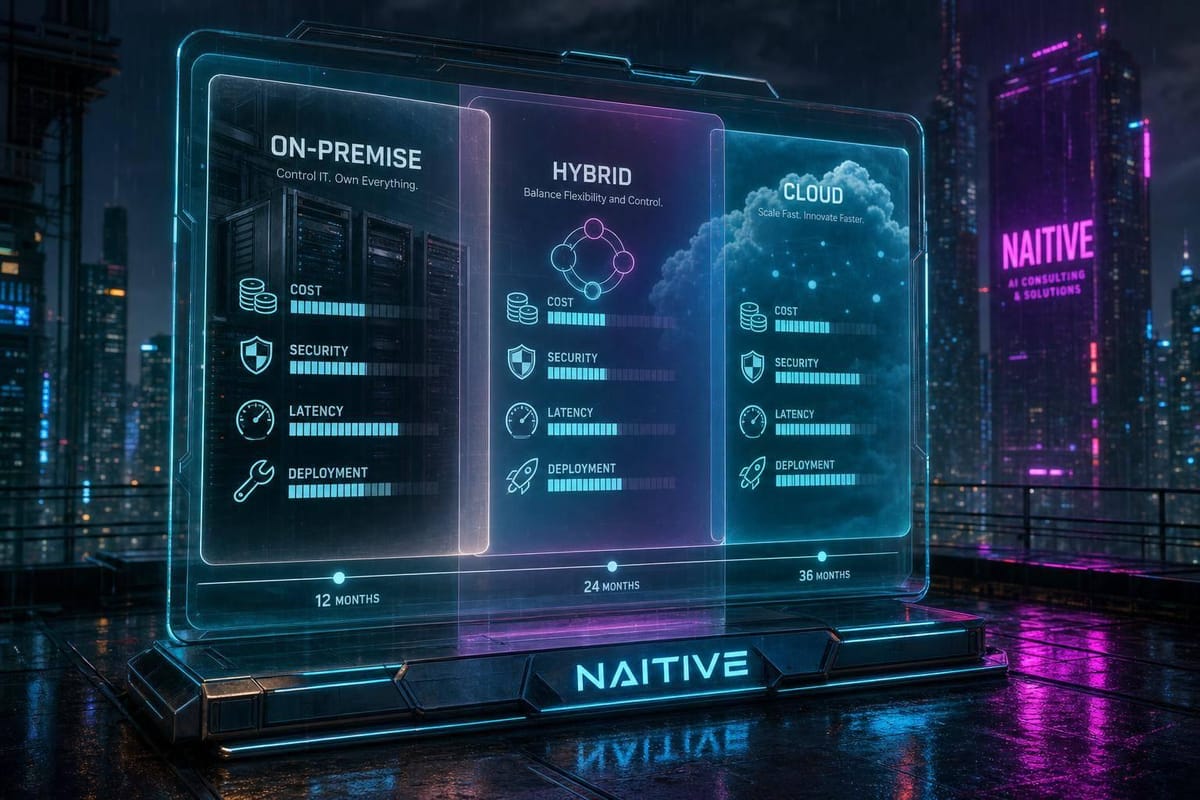
If your AI workloads handle sensitive data, need tight latency, or run near full capacity, on-premise often makes more sense. If demand changes a lot, rollout speed matters, or you want lower upfront spend, cloud is usually the better pick. Over a 12- to 36-month window, the choice often comes down to risk, workload shape, team capacity, and cost structure.
Here’s the short version:
- On-premise gives you more direct control over data, logs, hardware, and network boundaries.
- Cloud gives you faster setup, easier burst scaling, and lower upfront cost.
- Hybrid fits teams that need both: keep sensitive or low-latency work local, and send burst or test workloads to the cloud.
- Security is often the deciding factor for healthcare, finance, defense, and other regulated settings.
- Cost depends less on the first bill and more on utilization over time.
A few numbers stand out:
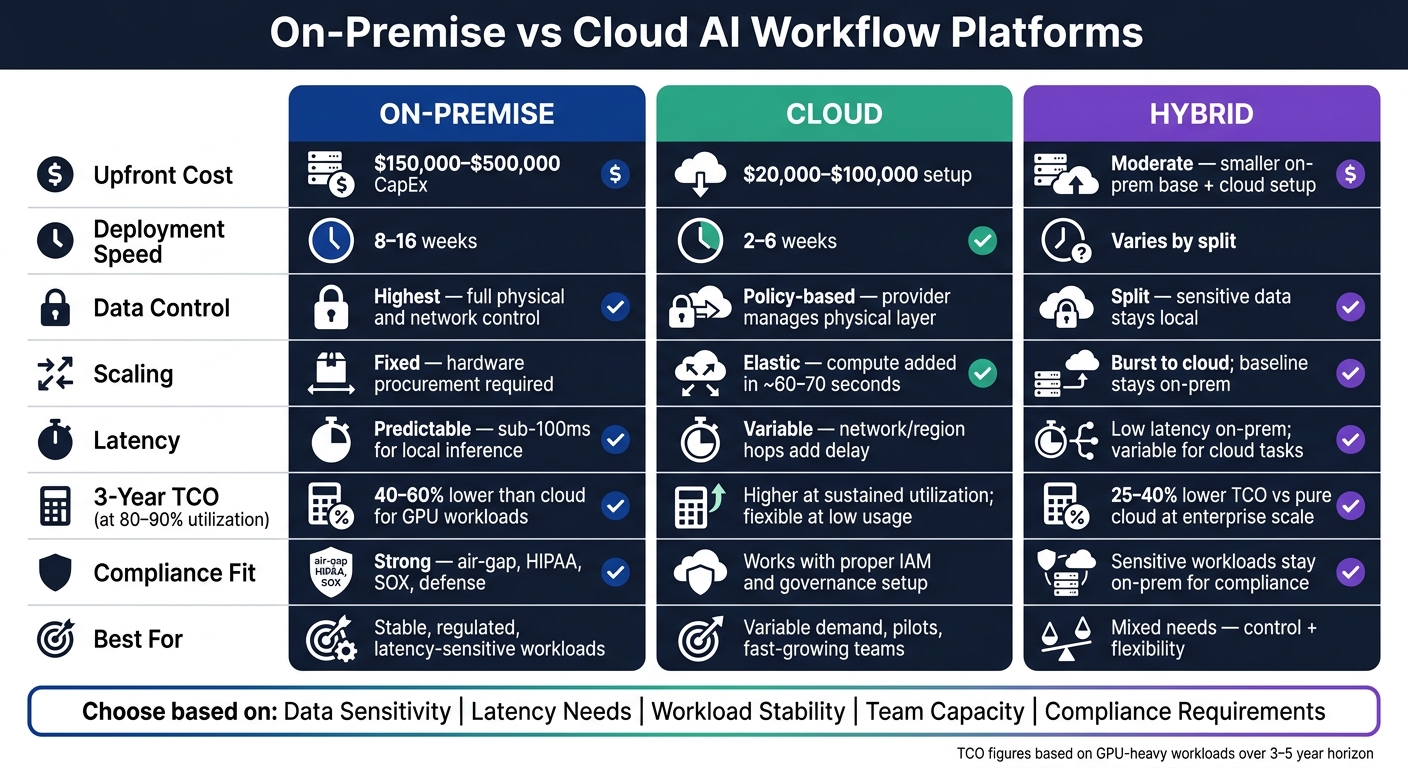
- On-premise deployment often takes 8 to 16 weeks
- Cloud deployment often takes 2 to 6 weeks
- On-premise cluster build cost often starts around $150,000 to $500,000
- Early cloud setup often lands around $20,000 to $100,000
- At 80% to 90% utilization, on-premise 3-year TCO can be 40% to 60% lower than cloud for GPU-heavy workloads
If I boil the article down to one point, it’s this: pick the setup that matches your data risk, latency target, usage pattern, and internal support model.
On-Premise vs Cloud AI Platforms: Cost, Speed & Security Compared
AI Cloud vs On-Prem AI Labs: Pros, Cons, and Use Cases
sbb-itb-f123e37
Quick Comparison
| Criteria | On-Premise | Cloud |
|---|---|---|
| Data control | Highest | Lower direct control |
| Rollout speed | Slower | Faster |
| Upfront cost | Higher | Lower |
| Scaling | Fixed until new hardware is added | Elastic |
| Latency | More predictable | Can vary by region and network path |
| Compliance fit | Strong for strict data rules and air-gapped setups | Works if governance is set up well |
| Best for | Stable, sensitive, low-latency workloads | Variable demand, pilots, team growth |
I’d use this article to make one decision: Do you need control first, flexibility first, or a mix of both? Our AI consulting agency helps organizations navigate these architectural decisions.
On-Premise vs Cloud AI Workflow Platforms: A Direct Comparison
The main difference comes down to control. On-premise keeps execution inside your own environment. Cloud hands the infrastructure side to a provider. That one choice shapes rollout speed, day-to-day workload, and how data is accessed.
Here’s the side-by-side view of what usually drives security, scale, and cost decisions:
| Dimension | On-Premise | Cloud |
|---|---|---|
| Infrastructure control | Full control over hardware, data, and configuration | Policy control over data and configuration; provider manages physical infrastructure |
| Deployment effort | 8–16 weeks (hardware procurement, installation, hardening) | 2–6 weeks (self-service provisioning, templated deployment) |
| Operational responsibility | Internal IT manages patching, upgrades, capacity, and incident response | Provider handles physical layer and infrastructure uptime; customer manages access policies and application logic |
| Access boundaries | Corporate network, VLANs, physical access, and VPN access | IAM, VPCs, subnets, security groups, and SSO/federation |
| Best fit | Regulated industries, stable workloads, latency-sensitive operations | Variable or bursty workloads, fast-growing teams, test-and-iterate AI programs |
On-Premise AI Workflow Platforms
With on-premise, your organization runs the full stack. Servers, GPUs, storage arrays, and networking stay inside a facility you control. Your IT and DevOps teams handle every layer, from firmware patches to capacity planning.
The big draw is direct control over data and network boundaries. You can set custom encryption controls, connect with on-premise SIEM systems, and enforce physical access policies. That makes on-premise a strong match for regulated workloads that can't leave a controlled environment.
But there’s a cost to that control. Hardware procurement for a mid-size U.S. enterprise can land in the hundreds of thousands to several million dollars in upfront CapEx, usually depreciated over three to five years. That fixed-capacity setup works best when workloads are steady and utilization remains high. If demand jumps or a new GPU generation shows up, you’re not just flipping a switch - you’re likely starting another capital project and planning a migration.
Cloud AI Workflow Platforms
Cloud platforms change the operating model. Infrastructure is provisioned on demand through APIs or self-service portals, while the provider runs the physical layer and infrastructure uptime. Your team can spend more time on configuration, access policies, and workflow logic.
That usually means a faster rollout and simpler scaling. A proof of concept that might take months to stand up on-premise can often be live in one to two weeks in the cloud. Production environments are often ready in four to six weeks once security and compliance reviews are done. If AI use cases are still shifting across teams, that speed matters. It gives teams room to test, learn, and adjust without waiting on hardware cycles.
The tradeoff is that you depend more on provider uptime, IAM discipline, and network connectivity. Your workflows run on provider-managed infrastructure, so you operate under the cloud provider's shared responsibility model: the provider secures the physical layer, while you remain accountable for data classification, IAM configuration, encryption, and audit logging. For organizations with legacy on-premise systems and limited cloud governance maturity, that setup needs careful planning before production AI workflows go live.
Those gaps start to matter even more once security and compliance enter the picture.
Security and Compliance: Data Control, Auditability, and Access Boundaries
Security often ends up deciding the deployment model. Where data sits, who can touch it, and how you prove all of that in an audit can make or break either on-premise or cloud. That becomes crystal clear when compliance teams stop talking in general terms and start checking where data, logs, and access controls actually live.
| Dimension | On-Premise | Cloud |
|---|---|---|
| Policy enforcement | On-premise enforces controls directly; cloud enforces them through IAM, network policy, and configuration. | Compliance depends on how consistently the customer configures and governs those controls. |
| Data residency | Data stays inside the organization's facilities or private data centers, which makes it easier to satisfy strict residency and sovereignty requirements. | Providers may offer region selection and residency assurances, but the customer is still responsible for ensuring compliance. |
| Audit trails | On-premise controls log storage and retention; cloud reduces infrastructure work but still requires log governance. | Centralized logging and compliance certifications are available, but customers must configure retention and protect log integrity. |
| Shared responsibility | Provider secures infrastructure; customer secures data, identities, access, and logs. | The customer remains accountable for data classification, IAM, encryption, and workflow configuration. |
| Air-gapped / segmented environments | Fully supported; local models can run without external API calls. | Not a fit for strict air-gap requirements because it depends on external connectivity. |
When On-Premise Security Requirements Are Hard to Avoid
Some security limits sit at the architecture level, not the policy level. In plain English: some workloads just can't use external services. Hospitals handling health data, defense contractors working with export-controlled information, manufacturers guarding trade secrets or proprietary process data, and enterprises running highly segmented systems all run into this. When controls have to stay inside the walls, compliance drives the deployment choice - not convenience.
HIPAA requires healthcare organizations to keep audit logs for at least six years, while SOX requires public companies to retain audit logs for a minimum of seven years. That means an organization has to control log storage, access, and integrity in a way it can show to an auditor. On-premise setups make that easier to prove because the organization owns the full storage and retention stack.
Air-gapped setups push this one step further. If a system has to run with no external connectivity - or only tightly controlled outbound access - cloud platforms aren't a workable option. Prompts and data never pass through external APIs, which cuts down exposure for regulated personal data and PHI.
How Cloud Security Works Under the Shared Responsibility Model
Cloud security can work well, but only if ownership is painfully clear. Moving to the cloud shifts compliance work around. It doesn't make it disappear. Specialized AI automation services can help bridge these governance gaps.
In practice, the provider handles the physical data center, hardware, and core infrastructure. Your team still owns data classification, IAM setup, encryption settings, workflow design, and audit logging. That's the core difference: on-premise gives you direct control, while cloud gives you provider-run infrastructure with customer-owned governance.
The biggest cloud risks tend to be simple, but costly: misconfigured permissions, broad service accounts, and weak logging. That's why cloud security isn't "set it and forget it." It needs the same discipline as on-premise, just pointed at a different control layer.
Logs and telemetry add another compliance surface that teams often miss. Cloud platforms produce operational logs, diagnostics, and usage metrics that may include metadata about workflows, connectors, and system behavior. Even if the main data path is encrypted, that metadata can still create exposure for organizations with strict confidentiality rules. Treat telemetry like sensitive data. Control its storage, retention, and access.
Scalability and Performance: Elastic Capacity vs Dedicated Resources
Security decides where your data sits. Scalability decides whether your setup can handle a sudden rush of demand without forcing your team back to the drawing board.
| Dimension | Cloud AI Platforms | On-Premise AI Platforms |
|---|---|---|
| Burst scaling | Elastic; adds compute quickly during traffic spikes | Fixed; adding capacity requires hardware procurement |
| Workflow throughput | High; distributes workloads across regions and can fan out parallel jobs | Consistent but resource-bound; limited to local cluster size |
| Latency | Higher; cross-region or internet hops can add delay | Low; local network keeps latency predictable and tight |
| Hardware utilization | Optimized; idle instances can be terminated or right-sized | Variable; idle hardware is a sunk cost unless workloads are carefully scheduled |
| Performance predictability under load | Variable; autoscaling lag and shared-environment contention can introduce jitter | High; dedicated resources behave consistently within known capacity limits |
Cloud Advantages for Variable and Fast-Growing Workloads
Cloud platforms are built for uneven demand. If traffic jumps, they can add compute in minutes instead of waiting months for new hardware to be bought, shipped, installed, and set up.
One AWS deployment scaled compute in 60–70 seconds and cut infrastructure costs by up to 40% over six months.
That kind of setup also helps teams spread work across regions. People in different places can use the same workflow through IAM-based access controls, while jobs fail over to the nearest healthy region. In plain English: if one region has trouble, work can shift somewhere else with less disruption. A single on-premise site usually can't do that unless you build extra infrastructure to support it.
On-Premise Advantages for Low-Latency and Stable Workloads
The picture changes when demand is steady and response time matters.
If workloads are predictable and low latency is non-negotiable, local dedicated infrastructure often wins. A factory line running machine vision checks is a good example. It needs on-site inference so decisions happen in real time. The inference runs straight on factory networks, where response times stay within sub-100 ms latency that safety and quality systems require.
For a 24/7 operation with known, stable demand, on-premise hardware sized for peak load can deliver steady throughput without the jitter that autoscaling lag may bring. That's the tradeoff: less elasticity, but tighter and more predictable latency.
Cost and Deployment Fit: Choosing the Right Model for Your Organization
Cost and operating fit often decide whether a model still makes sense 12 to 36 months from now.
Cost Tradeoffs Over 12 to 36 Months
Once security and latency needs are clear, utilization becomes the main cost driver. Don’t judge a deployment model by the first invoice. That’s where teams get tripped up.
On-premise usually comes with a much higher upfront spend. For a mid-sized U.S. organization, CapEx often lands between $150,000 and $500,000 for the initial build. Cloud starts lighter, with setup and early integration often in the $20,000 to $100,000 range.
The catch is utilization.
At 80% to 90% utilization, the 3-year TCO for on-premise GPU clusters can be 40% to 60% lower than comparable cloud GPU instances. If the workload runs day and night, that gap can get big. In one five-year comparison, on-premise came in at $411,000, while cloud reached $854,000.
Still, on-premise doesn’t just mean buying hardware. It also means staffing, upkeep, and refresh cycles. Cloud shifts some of that burden away from infrastructure and into governance, vendor oversight, and spend management. In more old-school on-premise setups, personnel can account for 50% to 85% of total application TCO.
A simple side-by-side view helps:
| Cost Category | On-Premise | Cloud | Hybrid |
|---|---|---|---|
| Upfront investment (CapEx) | High - $150,000–$500,000 cluster build | Low - often $20,000–$100,000 in setup and early integration | Moderate - smaller on-prem base plus cloud setup |
| Recurring platform fees (OpEx) | Low variable; mostly fixed depreciation | Usage-based; scales with workload volume | Dual structure: fixed base plus variable cloud usage |
| Compute and storage costs | Amortized over hardware lifecycle (3–5 years) | $1–$6/GPU hour; $0.02–$0.10/GB/month | Mixed - on-prem for baseline, cloud rates for burst |
| Networking and data transfer | Internal network costs; minimal egress fees | $0.05–$0.12/GB egress beyond free thresholds | Egress costs apply when data moves to cloud |
| Staff and support labor | 0.5–1.5 FTEs; $120,000–$180,000/year each | Lower infra headcount; cloud governance skills required | Requires both infrastructure and cloud expertise |
| Upgrade and refresh obligations | Hardware refresh every 3–5 years ($60,000–$150,000) | Provider-managed; no hardware refresh burden | Partial refresh on on-prem side only |
| Utilization sensitivity | High - idle hardware is a sunk cost | Low - unused capacity can be terminated | Moderate - on-prem portion must stay well utilized |
This is the point where hybrid starts to look less like a compromise and more like a practical fit.
When Hybrid Is the Practical Middle Ground
If one environment doesn’t fit every workload, split the work based on sensitivity and demand. That’s the basic idea behind hybrid.
Sensitive data or latency-critical jobs stay on-premise. Burst workloads, test projects, and lower-sensitivity tasks move to the cloud. You keep tighter control where it matters, while still having room to scale when demand jumps. Gartner-cited research says this setup can cut AI infrastructure TCO by 25% to 40% compared with a pure cloud approach at enterprise scale.
The rule is simple: match the deployment model to the workload’s sensitivity, latency budget, and usage pattern. Don’t force every use case into one policy just because it sounds neat on paper.
Conclusion: Choose Based on Risk, Utilization, and Operating Model
No single deployment model fits every case.
On-premise gives you tighter data control, more predictable local performance, and lower long-range cost when workloads are stable and heavily used. Cloud gives you faster rollout, elastic scale, and less financial exposure when workloads are uneven or still being tested. Hybrid often works well for organizations with mixed needs, keeping sensitive or latency-critical work on-premise while using cloud capacity where flexibility matters more than control.
The choice usually comes down to five practical questions:
- How sensitive is your data?
- What audit and compliance duties do you have?
- How much does your workload volume change?
- What latency does the use case need?
- What can your internal team realistically support?
FAQs
How do I choose between on-premise, cloud, and hybrid?
Choose based on data sensitivity, workload predictability, latency, and operational maturity.
Cloud works best when you need to move fast, test new ideas, or handle spiky workloads. On-premise makes more sense for stable, high-volume tasks and sensitive data that need full internal control for compliance. Hybrid sits in the middle: keep sensitive or predictable workloads on-premise, and use the cloud for peak demand or specialized compute.
When does on-premise cost less than cloud?
On-premise often costs less when AI workloads are stable, high-volume, and continuous instead of experimental or seasonal. If your systems stay busy most of the time, the math starts to shift.
A good rule of thumb: on-premise tends to offer better long-term value when utilization remains above 60% to 70% of capacity.
A few common signs point in that direction:
- GPU use runs more than six hours per day
- Workloads exceed 10 million queries per month
- Large datasets make cloud egress fees add 15% to 30% to total spend
At that point, paying for your own setup can make more sense than renting capacity month after month.
What internal team support does each model require?
For cloud-based AI models, the vendor takes care of maintenance. That means less day-to-day work for your internal team and fewer infrastructure headaches.
An on-premise AI model is a different story. Your team needs to handle the infrastructure in-house, which usually calls for about 0.5 to 1.5 full-time employees to keep performance steady and the system stable.
NAITIVE AI Consulting Agency can help your team plan and manage either setup in an efficient way.