No-Code AI Agents: Cost vs. Value
No-code wins short-term on cost and speed; custom wins long-term on control, compliance and cost at scale.

If I had to sum it up in one line: no-code usually wins on day-one cost and launch time, while custom often wins on control and long-term cost once usage, compliance, or system depth grows.
If you’re deciding between the two, I’d look at four things first:
- Upfront spend: no-code can start at a few hundred dollars a year, while custom often starts at $15,000+
- Usage volume: custom often starts to make more sense around 25,000 to 50,000 monthly interactions
- Integration needs: no-code fits common SaaS stacks; custom fits internal, legacy, or on-prem systems
- Rules and risk: if you need tight data handling, audit trails, or strict reviews, custom is often the safer fit
There’s also a timing issue. Gartner says 40% of enterprise apps will include task-based AI agents by the end of 2026, but only 2% of organizations reached scale in 2025. At the same time, 73% of organizations said AI costs went past budget in 2026. So the hard part isn’t just picking or building an AI agent. It’s picking the one that still makes sense after 3 to 5 years.
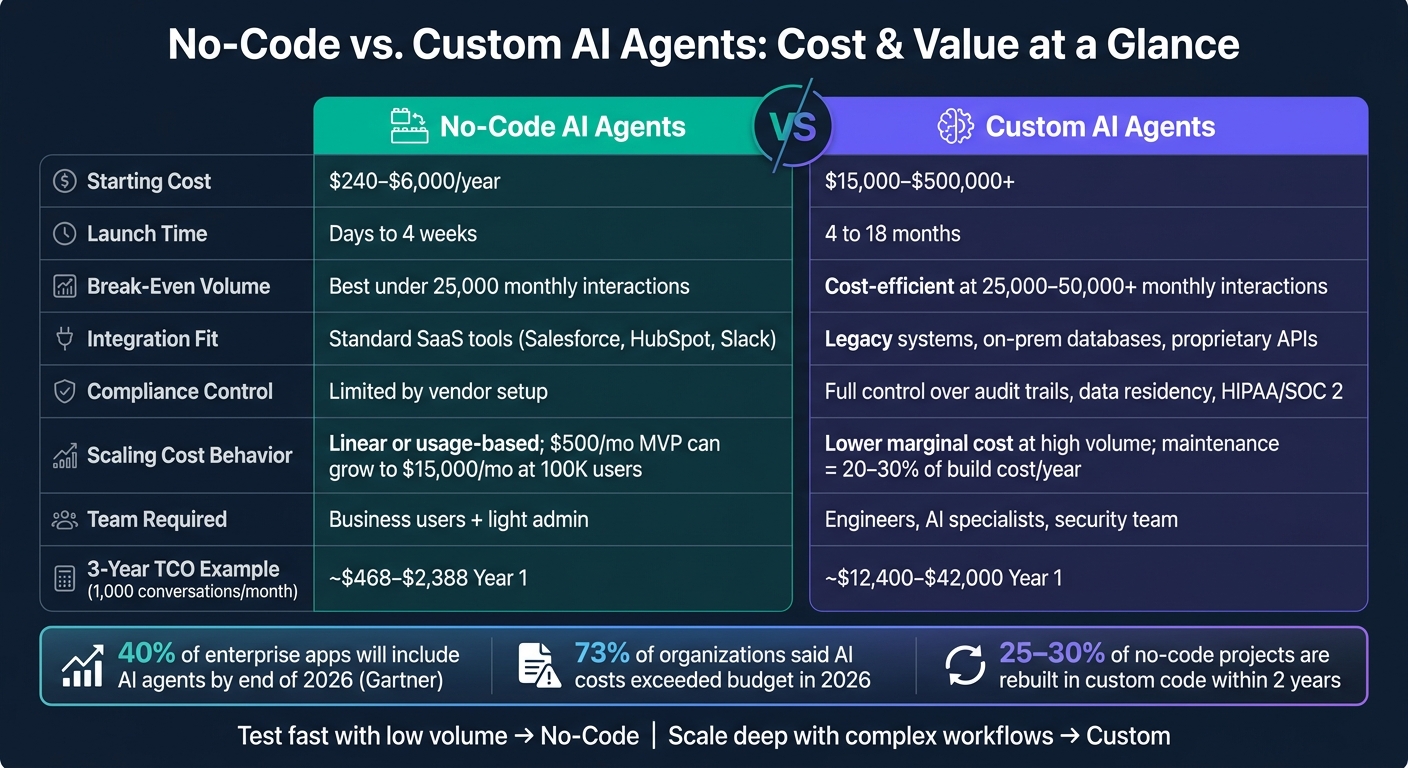
No-Code vs. Custom AI Agents: Cost & Value Comparison
Build AI Agents with Your Data for Under $10 a Month!
sbb-itb-f123e37
Quick comparison
| Factor | No-Code AI Agents | Custom AI Agents |
|---|---|---|
| Starting cost | Low | High |
| Launch time | Days to 4 weeks | 4 to 18 months |
| Best for | Simple, repeatable workflows | High-volume, connected, high-risk workflows |
| Pricing shape | Subscription or per-use fees | Build cost + cloud + support |
| Cost at scale | Can climb fast | Often drops per interaction at higher volume |
| Integrations | Best with common SaaS tools | Best with internal and legacy systems |
| Compliance control | Limited by vendor setup | More direct control |
| Team needed | Business users and light admin help | Engineers, AI consulting, and security support |
My read is simple: if you need to test one workflow fast, no-code is often the lower-cost path. If you expect heavy usage, deeper system links, or tighter governance, custom can cost more up front but less over time.
That’s the lens I’d use for the full comparison: cost now, cost later, and what each option lets your team do without hitting a wall.
No-Code AI Agents vs. Custom AI Agents: What Each Approach Includes
Before you compare costs, it helps to know what you're paying for. These two options are built in different ways, work in different ways, and make sense for different business setups.
What No-Code AI Agent Platforms Offer
No-code platforms let teams build AI workflows with visual, drag-and-drop tools, so they don't need a dedicated engineering team. They usually include prebuilt templates for common use cases like customer service routing, lead qualification, and internal knowledge bases. They also come with native connectors for tools like Salesforce, HubSpot, and Slack, often through OAuth.
The vendor handles the infrastructure side, including hosting, model access, and scaling. The big draw here is speed: teams can go live in days or weeks. But that speed comes from simpler logic and vendor-managed systems.
The downside is that the logic tends to stay rule-based and fairly simple. Once the workflow gets more layered, the platform's limits start to show. In fact, 70% of organizations using no-code platforms hit scalability limits within 18 months of deployment.
No-code is built for speed; custom is built for control and complexity.
What Custom-Developed AI Agents Offer
Custom builds give up speed in exchange for control, deeper integrations, and stronger governance. Developers build them with code, model SDKs, and agent frameworks. That gives teams direct control over the agent's logic, data flow, and system connections.
Where no-code platforms stop at prebuilt connectors, custom agents can plug into legacy systems, on-premises databases, and proprietary APIs that need custom integration. They can also handle more advanced orchestration, such as shared memory, event-triggered actions, and multi-step reasoning.
That extra control matters when workflows are regulated, tightly connected to other systems, or mission-critical. This path is often a better fit for industries like healthcare and finance, especially when data needs to stay inside company-controlled systems or when rules such as HIPAA, SOC 2, or air-gapped deployments apply.
How Consulting Support Changes the Economics
The starting point should be workflow complexity, integration depth, and compliance. A cheaper option on paper isn't always the better choice once the process gets messy.
A discovery and scoping phase helps map how the workflow runs in day-to-day use, including exceptions and edge cases that standard SOPs often miss. That matters more than many teams expect. Gartner predicts that more than 40% of agentic AI projects will be canceled by 2027, with most failures tied to scope and stack mismatches rather than model failures.
NAITIVE AI Consulting Agency helps teams scope the workflow, compliance needs, and ROI before they choose a path.
Direct Cost Comparison: Upfront, Ongoing, and 3-Year TCO
Once the models are clear, the next step is simple: look at what each option costs over time. That means upfront spend, monthly spend, and the full 3-year TCO.
Upfront Implementation Costs
For a no-code build, teams often spend 20 to 80 hours on internal setup and configuration. Annual subscription fees usually fall between $240 and $6,000. Some vendors also charge $0.50 to $1.50 per completed conversation, plus setup fees of $5,000 to $25,000.
Custom builds start much higher. A simple integrated custom agent usually begins at $15,000 to $25,000. More advanced systems can climb to $150,000 to $500,000+ for enterprise-grade builds. One big reason: integration work alone can take up about 60% of a custom AI budget.
Ongoing Operating and Scaling Costs
No-code platforms often bill by seat, by conversation, or by completed conversation. That can be a good deal when usage is low. But as traffic climbs, costs can pile up fast. A $500/month MVP can swell to $15,000/month at 100,000 users. If your usage is spiky or growing fast, this pricing model matters a lot.
Custom solutions come with a different cost mix: cloud hosting, model token usage, and engineering support. Those costs are usually easier to forecast, and the cost per interaction often drops as volume goes up. Break-even often lands around 25,000 to 50,000 monthly interactions. Annual maintenance for custom agents usually runs 20% to 30% of the initial build cost.
| Cost Category | No-Code AI Agent Platform | Custom AI Agent Solution |
|---|---|---|
| Upfront Cost | $240–$6,000 (subscription/setup) | $15,000–$500,000+ (engineering) |
| Monthly Operating Cost | Per-seat, per-conversation, or per completed conversation fees | Cloud hosting, model tokens, engineering support |
| Scaling Cost | Linear or usage-based | Lower marginal cost at high volume |
| Integration Cost | Low for standard SaaS; higher for custom connectors | High upfront; integration can consume about 60% of budget |
| Compliance/Governance Cost | May require upgraded plans, documentation, or audits | Requires technical documentation, security audits, and manual review |
| 3-Year TCO Range | Lower for simple use cases; can spike with volume | Higher upfront; better long-term economics at scale |
How to Calculate Total Cost of Ownership Over 3 to 5 Years
If you want a clean comparison, model the 3-year TCO, not just the first bill. For no-code tools, that means projecting subscription spend based on where usage is headed, not where it sits today. It helps to model 10x and 100x growth so you can spot the break-even point.
For custom builds, start with the initial engineering spend. Then add 20% to 30% per year for maintenance, model updates, and debugging. You also need to account for U.S. senior AI engineer salaries, which sit around $150,000 to $200,000+ in 2026. In plain English, the gap usually comes down to three things: volume, integration depth, and maintenance.
Here’s a simple example. At 1,000 conversations per month, no-code Year 1 TCO is about $468 to $2,388, while a custom solution lands around $12,400 to $42,000 at that same volume. But once you get to 50,000+ monthly interactions, those lines often cross, and the custom route becomes the lower-cost option over several years.
Cost is only one piece of the decision; the next section looks at speed, flexibility, and ROI.
Value Comparison: Speed, Flexibility, ROI, and Business Impact
Cost is only part of the call. The bigger issue is value, and that usually comes down to speed, flexibility, and what the setup does to day-to-day work.
Here’s where the gap shows up beyond price.
| Value Dimension | No-Code AI Agent Platform | Custom AI Agent Solution |
|---|---|---|
| Deployment Speed | Days to 4 weeks | 4 to 18 months |
| Customization Depth | Limited to platform features and connectors | Deep customization of logic, prompts, tools, and workflows |
| Integration Breadth | Strong for supported SaaS apps; limited outside the vendor ecosystem | Broad integration with internal systems, APIs, and legacy platforms |
| Compliance Control | Dependent on vendor controls | Greater control over security, auditability, and data handling |
| Scalability | Good for standard use cases; costs rise with heavy usage | Better fit for large-scale, complex, or multi-agent workloads |
| Business-team control | High; business users can build and adjust flows | Lower; engineering support is usually needed for changes |
| Long-Term Flexibility | Constrained by vendor roadmap and platform limits | Greater ownership and adaptability over time |
Time-to-Value and Early Wins
Speed changes ROI for a simple reason: the value starts sooner.
No-code can get to a working prototype in days to four weeks, which makes it a good fit for pilots and standard workflows. Teams using no-code for standard tasks report average annual savings of about $187,000 versus full custom builds.
Custom development usually needs 4 to 18 months before it’s ready for production because of engineering design, integration work, and performance tuning. That slower path can still make sense when the goal is a tighter fit with how the business runs.
Where ROI Comes From in Real Operations
With no-code deployments, ROI often shows up first in labor savings on routine work. You automate the repetitive stuff, people spend less time on it, and the payback can start within the first few months.
Custom agents tend to pay off more in high-volume setups - above 25,000 to 50,000 monthly interactions - where lower unit costs for tokens and infrastructure can outweigh the up-front engineering spend.
When Flexibility and Control Matter More Than Speed
Custom builds hold more value when compliance, auditability, or legacy integration makes a platform approach hard to use.
In regulated fields such as financial services and healthcare, vendor-controlled governance may fall short of regulatory or internal security rules. A custom build gives teams direct control over data handling, audit trails, and residency requirements.
The same pattern shows up with integration. No-code platforms work well with popular SaaS tools, but they often run into limits with legacy systems, on-premises databases, or non-standard APIs. For routine workflows, that may be fine. But when an agent needs to connect core systems or manage complex multi-step reasoning, custom usually comes out ahead.
These tradeoffs shape ROI. In some cases, the fast launch matters most. In others, long-term control does.
How to Choose the Right Option
After you compare TCO and ROI, the next step is pretty simple: match the build type to the limit that matters most in your workflow.
| Decision Factor | No-Code Better Fit | Custom Better Fit |
|---|---|---|
| Interaction Volume | Moderate volume with manageable usage fees | High volume where usage-based pricing may become costly |
| Integration Depth | Mostly standard SaaS tools | Deep integration with internal or legacy systems |
| Governance/Compliance | Basic controls are sufficient | Strict audit, security, or regulatory requirements |
| Internal Technical Capacity | Limited engineering resources | Strong technical team available |
When No-Code Is the Better Financial Choice
No-code makes the most sense for predictable workflows, like lead routing or HR FAQs. If you need to go live in days and connect common SaaS tools, it’s usually the faster and lower-cost route.
That low upfront cost only holds up when usage stays under control and the workflow doesn’t get too messy. It’s also a good fit when you want to test a workflow in 2–4 weeks before putting more time and money into a larger build.
When Custom Delivers Better Long-Term Value
Custom starts to make more sense when the workflow needs judgment, unstructured data handling, or multi-step reasoning. Once you’re dealing with 500 to 2,000 tasks per day, per-task fees can push no-code costs high enough that a $25,000–$50,000 custom build becomes cheaper within 12 to 18 months.
The higher upfront spend can be worth it when volume climbs, governance gets tighter, or integrations become harder to manage. The math shifts over time. What looks cheaper at the start can cost more once usage grows.
Custom is also the better fit when you have strict compliance rules, legacy system ties, or a need for full data residency control. And there’s a practical reason to think ahead: about 25% to 30% of no-code projects are rebuilt in custom code within two years after they run into these limits.
Key Takeaways for U.S. Business Leaders
Pick the option that keeps total cost down while still fitting your workflow, compliance needs, and integration demands.
FAQs
How do I know when to switch from no-code to custom?
Make the switch when your no-code setup starts getting in the way of how your team works. That usually happens when you need shared state, more involved multi-agent orchestration, or tight integration with proprietary systems.
Custom development also makes sense when you need tighter control over sensitive data, frequent complex changes, or when ownership of your data, infrastructure, and model performance becomes a core business asset.
What hidden costs should I model before choosing?
Don’t stop at the first subscription price or build quote. Look at the total cost of ownership.
With no-code platforms, that means adding more than the monthly fee. Factor in usage-based scaling charges, staff time to set up and watch workflows, and the cost of platform lock-in.
With custom solutions, the bill doesn’t end after launch either. Ongoing maintenance often runs 20–30% of the initial build budget each year. You’ll also need to account for AI talent, infrastructure, and updates tied to model deprecations.
In both cases, set aside budget for prompt engineering, integration maintenance, quality assurance, and human-in-the-loop auditing.
Can I start with no-code and migrate later?
Yes. A no-code platform can be a smart way to test an idea or get early workflows up and running.
The catch is what happens later. Migration is often messy. Many platforms keep logic and setup details in proprietary formats, which means you may have to rebuild everything from scratch when your needs grow.
That’s why it helps to look at your 18-month roadmap early, not just what you need right now. If you expect complex reasoning, proprietary data integration, or strict governance, a hybrid or custom approach may save you a lot of pain down the line.