High Availability in AI: DR Strategies
Set workload-specific RTO/RPO; protect models, data, prompts, indexes, secrets; choose failover patterns and test recovery for AI systems.
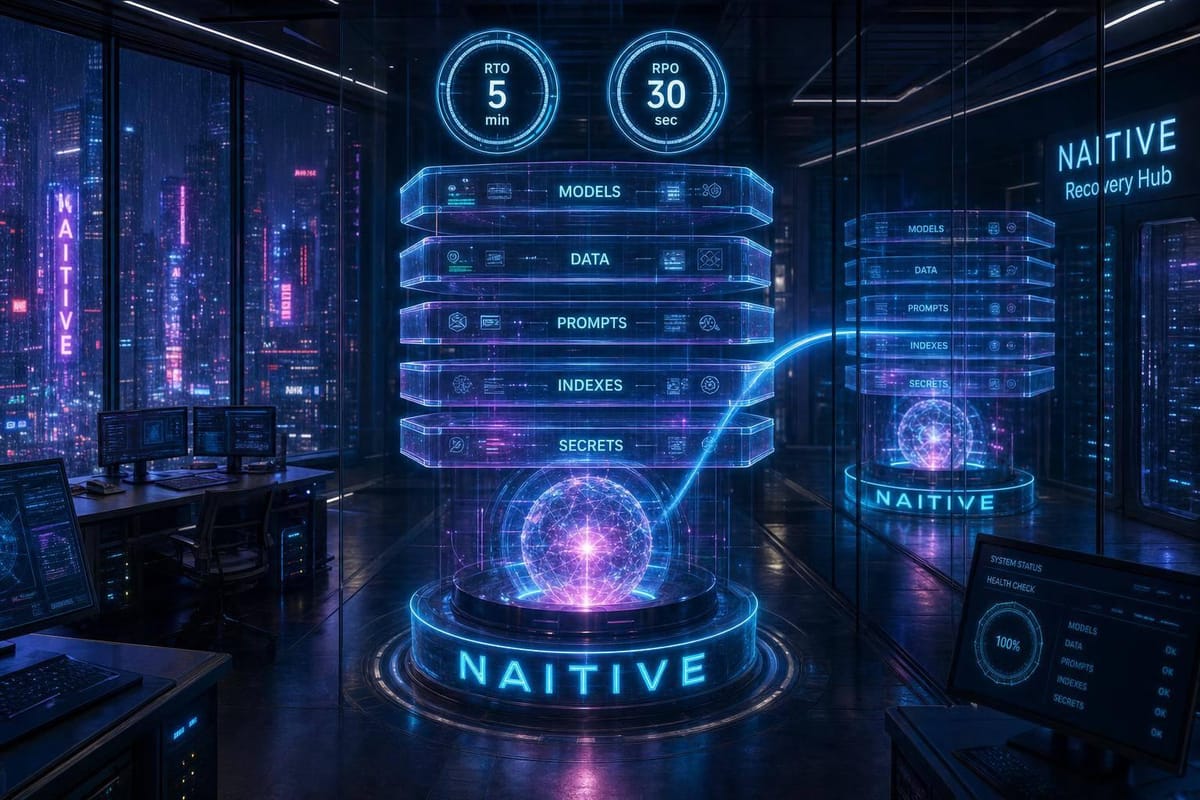
If your AI system can’t recover its model, data, prompts, indexes, secrets, and state together, it’s still down.
I’d sum up the article like this: high availability handles small failures, disaster recovery handles major outages, and business continuity keeps work moving when AI is unavailable. The core job is to set RTO and RPO for each workload, protect every AI asset that can stop service, choose a failover pattern that fits the outage cost, and test recovery until the measured results match the target.
Here’s the article in plain English:
-
HA and DR are not the same
- HA keeps service running during host, process, or zone failures.
- DR restores service after region loss, corruption, ransomware, or other large incidents.
- BC covers fallback work when AI cannot run as normal.
-
RTO and RPO must be set per workload
- A fraud API may need a 5-minute RTO and near-zero RPO.
- A training pipeline may accept a 24-hour RTO and 12-hour RPO.
- One target for every AI service does not work.
-
Your recovery plan must cover more than servers
- Inference services
- Model weights, tokenizers, checkpoints, and metadata
- Training data, labels, feature stores, and schemas
- Embeddings, vector indexes, and source documents
- Prompts, guardrails, tool definitions, and eval sets
- Agent memory, session records, and workflow checkpoints
- IaC, container images, IAM, certs, and keys
- Audit logs, drift reports, and approval history
-
Each asset needs four basics
- An owner
- A backup method
- A retention rule
- A tested restore process
-
Recovery order matters
- Bring back identity, secrets, routing, and policy controls first.
- Then restore databases, queues, model artifacts, feature stores, and vector indexes.
- Then recover inference and orchestration.
-
Replication alone is not enough
- It can copy corruption and deletions too.
- You also need point-in-time recovery, immutable backups, isolated copies, and versioned artifacts.
-
Pick failover based on outage cost and target
- Active-active: near-zero downtime, highest cost, often $20,000–$100,000+ / month
- Hot standby: seconds to minutes, often $10,000–$60,000+ / month
- Warm standby: minutes, often $5,000–$30,000+ / month
- Pilot light: tens of minutes, often $1,000–$15,000+ / month
-
Graceful degradation beats a full stop
- Switch to a smaller approved model
- Reduce context length
- Turn off non-core tools
- Queue jobs
- Hand voice calls to people or callback flows
-
Secondary environments fail when they drift
- GPU type, drivers, CUDA, runtimes, images, schemas, IAM, prompts, indexes, and policies must stay aligned.
- If the backup site is out of sync, failover may start but still break.
-
Testing is the proof
- Drill region loss, GPU shortage, stale features, broken credentials, bad model artifacts, vector-index loss, and security incidents.
- Track timestamps for detection, isolation, promotion, routing, validation, and failback.
- Until you test it, your RTO is still a guess.
A simple way to think about it: AI disaster recovery is not about restarting compute. It’s about restoring the exact working bundle of model, data, rules, and state within the time the business can accept.
That’s the lens I’d use for the rest of the article.
Developing a Disaster Recovery Plan for AI Systems Introduction
sbb-itb-f123e37
Set Recovery Targets by AI Workload
A single recovery target for every system may sound neat on paper. In practice, it falls apart fast. What works for a model training run is nowhere close to what you need for a live phone call. Recovery targets should come from business impact, outage cost, and recovery dependencies - not from how simple it is to restart a server or container.
Use the asset inventory from the previous section to set targets for each workload.
Define RTO and RPO for Each Workload Type
Start with a business question: What does downtime actually cost - in revenue, customer trust, safety risk, or compliance exposure? That answer is usually a better guide than any infra benchmark.
A practical baseline looks like this: mission-critical systems often need about 15 minutes of RTO with near-zero RPO; important systems, about 4 hours of RTO and 2 hours of RPO; lower-priority systems, 8–24 hours. AI workloads don’t fit neatly into those buckets, but the idea still works. Use tighter targets only where the business cost makes that spend worth it.
For each workload, define three targets:
- Data RPO
- Minimum acceptable quality after recovery
- Time to resume active sessions or jobs
| Workload | Illustrative RTO / RPO | Fallback mode | Recovery priority |
|---|---|---|---|
| Real-time inference API | RTO: 1–5 min / RPO: near zero | Smaller approved model, cached features, reduced throughput | Highest |
| Autonomous AI agents | RTO: 1–5 min / RPO: seconds to a few min | Pause new tasks, resume idempotent tasks, restrict high-risk actions | Highest |
| Phone and voice agents | RTO: seconds to 2 min / RPO: near zero for active-call state | Transfer to human operators, scripted IVR, callback queue | Highest |
| Batch scoring | RTO: hours / RPO: last validated input snapshot | Delay or replay from last completed partition | Medium |
| Model training | RTO: hours to 1 day / RPO: last checkpoint | Resume from checkpoint, defer experiments | Medium to low |
| Internal analytics | RTO: 4–24 hours / RPO: hours to 1 day | Stale dashboards, delayed refresh, cached extracts | Low to medium |
Treat these ranges as a starting point, not a rulebook. Test every target in drills. Until recovery has been tested, an RTO is still just an estimate.
Map Failure Modes and Dependency Order
AI services can fail in a lot of different ways, and each one calls for its own response. The failure modes worth mapping on purpose are process or container failure, GPU or host loss, availability-zone outage, regional outage, cloud control plane failure, network or DNS failure, identity or secrets failure, data corruption, ransomware, and model drift or data-quality degradation.
For each failure mode, document:
- The detection signal
- Who’s affected
- The containment action
- The fallback behavior
- The recovery owner
- What recovery means in measurable terms
Recovery order matters too. Bring back identity, secrets, network routing, and policy controls first. Then restore databases, queues, model artifacts, feature stores, and vector indexes. After that, recover inference and orchestration.
Pay close attention to single points of failure that are easy to miss. A model registry in only one region. A vector database with no replica. A telephony provider with no failover route. A deployment process that depends fully on a cloud control plane that you can’t reach during an outage. Those are the weak spots that tend to snap during regional failures.
Once the targets and recovery order are clear, the next step is to design a failover pattern that can actually meet them.
Build Resilience Across Infrastructure, Data, and Models
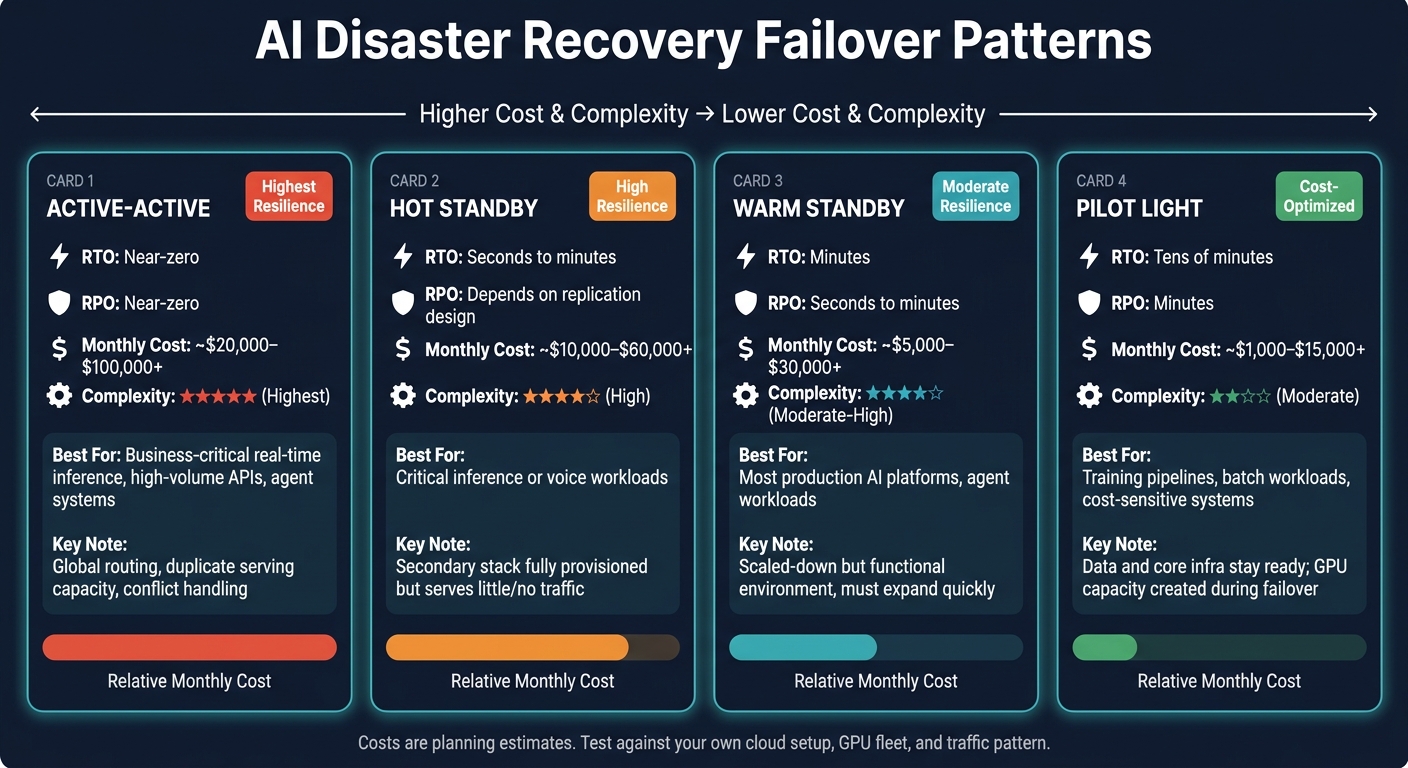
AI Disaster Recovery Failover Patterns: Cost, RTO & Complexity Compared
Once recovery targets and failure maps are in place, the next step is architecture. The goal is simple: keep service running, keep data intact, and keep models behaving the way you approved them to behave when something breaks.
For AI systems, recovery is more than bringing servers back online. The recoverable bundle includes the model version, retrieval state, prompts, policies, and session state. If even one of those pieces comes back in the wrong version or setup, the system may start up but still fail in practice.
Choose the Right HA and Failover Pattern
Choose the pattern that fits the workload's RTO, RPO, and budget. Start with the RTO and RPO set in the previous section, then pick the least complex option that still meets those targets.
These numbers are planning estimates, not promises. You still need to test them against your own cloud setup, GPU fleet, storage layer, and traffic pattern.
| Pattern | Typical RTO / RPO | Illustrative monthly cost | Operational complexity | Best fit |
|---|---|---|---|---|
| Active-active | Near-zero RTO; near-zero RPO with synchronous state replication; highest cost and operational complexity | Approximately $20,000–$100,000+ per month | Highest: global routing, duplicate serving capacity, conflict handling, consistent model versions, and multi-region data design | Business-critical real-time inference, high-volume APIs, agent systems that can't tolerate regional downtime |
| Active-passive (hot standby) | Seconds-to-minutes RTO; RPO depends on replication design; high cost and moderate-to-high complexity | Approximately $10,000–$60,000+ per month | High: the secondary stack is fully provisioned but normally serves little or no traffic | Critical inference or voice workloads where fast recovery matters but active-active cost isn't justified |
| Warm standby | Minutes RTO; seconds-to-minutes RPO; moderate-to-high complexity | Approximately $5,000–$30,000+ per month | Moderate to high: a scaled-down but functional environment must be tested and expanded quickly | Most production AI platforms, including agent workloads with predictable emergency capacity |
| Pilot light | Tens of minutes RTO; minutes RPO; moderate complexity and lowest cost | Approximately $1,000–$15,000+ per month | Moderate: data and core infrastructure remain ready; application and GPU capacity are created during failover | Training pipelines, lower-priority inference, batch workloads, and cost-sensitive systems |
For real-time inference and autonomous agents, warm standby or active-active will often make the most sense. Training jobs usually lean toward pilot light because they can restart from checkpoints instead of from scratch.
That said, the failover pattern is only part of the story. It works only if the model, data, and state can all be restored in the same version and setup.
Protect Data, Model Artifacts, and AI State
AI recovery means restoring a consistent bundle of model, data, policy, and state, not just a disk snapshot. Databases, model weights, prompts, indexes, and workflow definitions all need the same level of care.
| Asset type | System of record | Replication method | Backup frequency | Integrity check | Restoration priority | Acceptable data loss |
|---|---|---|---|---|---|---|
| Training data and labels | Versioned object storage or governed data lake | Cross-region replication plus immutable snapshots | Continuous or daily, depending on ingestion rate | Checksums, object counts, schema validation, sample reconciliation | High for retraining; immediate only if serving depends on it | Minutes to 24 hours, workload-dependent |
| Model weights and tokenizer files | Signed model registry and immutable artifact store | Cross-region artifact replication | Every approved release; retain all production versions | SHA-256 or equivalent hashes, signature verification, load test, benchmark comparison | Critical for inference | Zero loss of approved production versions |
| Prompts, policies, and safety configurations | Git repository and configuration registry | Repository mirroring and encrypted exports | On every change, with daily snapshots | Commit hash, schema validation, policy tests, peer approval | Critical before traffic restoration | Zero or near zero |
| Workflow and agent definitions | Version-controlled orchestration repository | Cross-region replication and immutable releases | On every release and daily backup | Dependency graph validation, dry-run execution, version pinning | Critical for agent services | Zero or near zero |
| Embeddings and vector indexes | Rebuildable vector store plus source documents | Database replication and periodic index snapshots | Continuous database replication; daily or per-release snapshots | Document-count reconciliation, vector-dimension checks, retrieval-quality tests | High if finetuning vs. RAG trade-offs favor retrieval-augmented generation as core | Minutes to hours if rebuildable |
| Operational databases and feature stores | Managed database or feature-store primary | Synchronous or asynchronous cross-region replication, point-in-time recovery | Continuous logs plus daily full snapshots | Replica lag, checksum validation, transaction replay, query-level checks | Critical for stateful applications | Seconds to minutes for critical writes |
| Conversation and agent state | Durable transactional database or event log | Multi-region replication and encrypted point-in-time backups | Continuous or per transaction | Sequence checks, referential-integrity tests, replay validation | Critical for resumable sessions; lower for disposable sessions | Zero to a few minutes |
| Audit logs and safety events | Append-only log store or compliance archive | Cross-region replication and immutable retention | Continuous | Sequence, timestamp, and retention-policy validation | High for compliance; after service restoration operationally | Minutes may be acceptable, subject to policy |
There’s a trap here: replication copies bad changes too. If data is corrupted or deleted, plain replication can spread that problem everywhere. That’s why you need point-in-time recovery, encryption, retention locks or object immutability, separate credentials, and at least one logically isolated backup copy. A backup that lives only inside the same cluster it is supposed to protect is not much of a backup at all.
Recovery is not done just because the files are back. It’s done only when the restored system produces the same approved behavior it produced before the outage.
Design Graceful Degradation Instead of Full Outage
When failure hits, don’t treat the only choices as fully up or fully down. A better plan is graceful degradation.
Protect authentication, safety controls, and core response generation first. After that, you can scale back in controlled ways:
- Switch to a smaller or quantized model
- Reduce context length
- Turn off nonessential tools
- Queue batch jobs
- Serve labeled cached reads
For voice agents, fallback channels like callback, web chat, or SMS can help, but only if identity, consent, privacy, and escalation rules can still be met.
The main rule is blunt: never invent unavailable data or bypass approval controls. If cached content is shown, say so. If an agent cannot finish a payment action, queue it for human approval instead of letting it fail silently. NIST's AI Risk Management Framework explicitly includes safe and graceful degradation as part of resilience.
In other words, degradation is not a workaround you improvise mid-incident. It is a planned operating mode.
Once the architecture is set, the next move is automation: detection, failover, validation, and failback all need to run the way you expect when a real failure shows up.
Multi-Region and Multi-Cloud Recovery Without Hidden Risk
Once you pick a failover pattern, the next step is deciding where recovery will run. That sounds simple. It usually isn't.
Geographic redundancy, by itself, doesn't make an AI system resilient. A backup region or cloud can still fail just as hard as having no backup at all if it hasn't been tested, kept in sync, or set up the right way. The only difference is that the failure is often messier and harder to trace.
Start with the failures you need to survive and the RTO/RPO targets tied to them. That should drive the recovery pattern - not the other way around.
Compare Recovery Patterns by Failure Coverage and Complexity
Each recovery pattern covers a different kind of failure. Pick one that's too light, and you're exposed. Pick one that's too heavy, and you inherit extra moving parts, cost, and maintenance work.
| Recovery pattern | Failure coverage | Replication approach | Key risks and hidden costs |
|---|---|---|---|
| Single-region, multi-zone | Zone, host, and some service failures | Synchronous or near-synchronous replication is often practical; low user latency | Lowest complexity and cost, but no protection against a regional outage |
| Single-cloud, multi-region | Regional outage and many regional service failures | Often asynchronous cross-region replication; replication lag defines part of your RPO | Data-egress costs, GPU quotas, DNS, and regional service gaps |
| Hybrid-cloud | Cloud outage, on-premises failure, or selected connectivity and residency risks | Replication may be asynchronous and constrained by bandwidth; latency can be high | Identity federation, firewall rules, hardware compatibility, and capacity reservations are common failure points |
| Multi-cloud | Provider-wide outage, provider-wide outage, and vendor concentration | Requires cross-provider replication or portable backups; consistency may be difficult | Highest complexity: observability, IAM, security policy, billing, data transfer, and configuration drift require deliberate standardization |
Use the lightest pattern that still meets the workload's RTO and RPO.
With async replication, lag becomes part of the actual recovery window. So don't just check it on a calm day. Measure it during normal conditions and under degraded network conditions too.
And one more hard truth: topology only matters if the secondary site can actually handle production traffic.
Keep Secondary Environments Compatible and Recoverable
The most common reason geographic redundancy breaks isn't the lack of a backup region. It's mismatch.
GPU drivers, CUDA libraries, model-serving runtimes, container images, dependency versions, network routes, firewall policies, IAM roles, certificates, and database schemas all need to line up. If even one piece is off, traffic may reach the secondary environment and still fail through errors, lower output quality, or unsafe results.
AI systems add even more pieces to keep aligned. The recovery environment also needs matching or compatible versions of:
- Vector indexes
- Prompt and policy configurations
- Agent tool definitions
- Feature stores
- Conversation state
- Model registries
- Fine-tuning checkpoints
The fix is simple in concept, even if it takes discipline in practice: build both environments from the same versioned pipeline.
Use the same version-controlled infrastructure definitions, the same signed container images, and the same artifact-promotion process for both the primary and recovery sites. Keep environment-specific values - like region IDs, endpoints, quotas, and secrets - separate from fixed application artifacts, and manage those values through controlled configuration.
It also helps to keep a compatibility matrix that tracks both environments side by side. At a minimum, that matrix should include GPU model and driver version, CUDA or accelerator runtime, model-serving runtime, Python and dependency versions, model weights and tokenizer files, vector-index format, IAM permissions, and network policies.
Then compare the primary and secondary environments on a steady basis for configuration drift. Drift tends to build up quietly. You usually don't spot it until failover day, which is the worst time to find out something no longer matches.
How NAITIVE AI Consulting Agency Supports DR Planning
NAITIVE AI Consulting Agency helps teams map these AI-specific dependencies across autonomous AI agents, phone and voice autonomous agents, model-serving systems, AI automation pipelines, and business-process automation.
That work should end with a recovery sequence, a clear ownership model, and a test schedule tied to measurable RTO and RPO.
Automate, Test, and Govern Recovery Operations
A written recovery plan is just the starting point. If no one runs it, tests it, or updates it, it can create a false sense of security. Use the recovery order already set for identity, data, models, and routing to drive these workflows.
The recovery order from the previous section becomes the runbook order here.
Automate Detection, Failover, Validation, and Failback
Run recovery in a fixed sequence: detect → assess → isolate → promote → route → validate → monitor → fail back. Each step does a specific job. Skip one, and risk goes up fast. AWS guidance says recovery workflows - including failover, failback, and monitoring - should be automated where possible and tested regularly against RTO and RPO goals.
Watch more than basic system health. Track infrastructure health, data freshness, model runtime load and throughput, and AI safety signals. And don’t mix up trigger signals with validation signals - they serve different purposes.
Before promotion, stop primary writes, freeze scheduled jobs, halt autonomous agent actions, block inbound traffic, and isolate compromised credentials. That helps prevent dual-write conflicts, where two active primaries take writes at the same time.
It makes sense to automate low-risk reversals. But high-impact promotions or RPO breaches should need human approval. Every action - whether automated or manual - should create a tamper-evident log entry that records the trigger, decision, operator identity, timestamp, and rollback option.
Treat failback as its own change. Repair the original environment, sync changes from the secondary, confirm the old primary is read-only, and then shift traffic back gradually.
Test Realistic Failure Scenarios and Measure Actual RTO and RPO
Testing only server restarts won’t cut it. AI systems can break in ways that plain infrastructure monitoring may miss: corrupted model artifacts, stale feature data, broken vector indexes, expired credentials, unsafe prompt changes, or a bad deployment that needs rollback.
Use the same failure map to test the scenarios most likely to break AI recovery.
Measure actual RTO and RPO for each workload on its own. Record timestamps at every stage: detection, assessment, isolation, promotion, traffic routing, validation, and the point when the service is back within its agreed availability and quality targets. Actual RPO is the amount of data or state that was in fact lost, measured from the last valid recovery point.
Set pass/fail criteria before the drill starts, not after. For instance, a critical inference workload may need an RTO under 1 hour and an RPO under 15 minutes, while a noncritical batch pipeline may be allowed longer RTO and RPO targets. Published guidance uses those figures for critical workloads and recommends quarterly full failover tests, monthly runbook validation, and continuous component testing.
The table below lays out a practical test plan for the failure scenarios that matter most in AI systems, ordered by the dependency stack: platform, data, model, retrieval, credentials, then security.
| Failure scenario | Trigger | Expected response | Owner | Validation checks | Success criteria |
|---|---|---|---|---|---|
| Availability-zone loss | Health checks fail for the zone and error rate exceeds threshold | Service continues in another zone; drain unhealthy targets, reschedule workloads, rebalance traffic | Platform engineering | Endpoint checks, latency, error rate, GPU capacity | No missed critical requests; recovery within zone-level RTO |
| Regional outage | Regional control-plane and endpoint checks fail across independent probes | Secondary region becomes active; fence primary, promote replicas, route traffic, scale standby | SRE and incident commander | Replication lag, database consistency, model load, safety tests | RTO and RPO met; no dual-write conflicts |
| GPU shortage | Scheduling failures or accelerator capacity below minimum | Inference uses reserved capacity or approved fallback model; shift to secondary pool, reduce concurrency, enable graceful degradation | ML platform team | Throughput, latency, output quality | Critical requests served within degraded-mode objectives |
| Stale feature data | Freshness threshold exceeded | Stop stale-dependent workflows, route to fallback, alert data owner; model uses approved fallback features or pauses affected decisions | Data engineering | Feature timestamps, prediction quality, business rules | No decision uses data beyond its allowed age |
| Corrupted model artifact | Signature mismatch, hash mismatch, or failed load/evaluation | Quarantine artifact, roll back registry pointer, block deployment; last-known-good model is used | ML engineering and security | Signature, provenance, quality, safety, bias checks | Only approved artifact serves traffic |
| Vector-index loss | Query failures or integrity-check mismatch | Restore snapshot, rebuild index, route read traffic when ready; retrieval service rebuilds or uses a validated snapshot | Retrieval/platform team | Recall sample, document counts, checksums, access controls | Search quality and index freshness meet thresholds |
| Broken credentials | Authentication failures or impending certificate expiry | Retrieve approved secret, rotate or revoke compromised credentials; recovery workflow uses rotated, scoped credentials | Security and platform teams | Authentication, authorization, audit logs | No broad or hard-coded credentials; service restored |
| Cybersecurity incident | Anomalous access, malware alert, or unauthorized model change | Disable autonomous actions, preserve evidence, restore from signed, approved artifacts | Security incident commander | Forensics, hashes, provenance, safety and access tests | Recovery is from signed, approved artifacts with documented approval |
After every exercise, assign corrective actions with a named owner and a due date. If a drill finds a gap but no one tracks the fix, the recovery test isn’t finished.
Conclusion: Core Principles of AI Disaster Recovery
Once recovery is automated and tested, governance is what keeps it dependable over time.
Resilient AI systems come from decisions made before an incident happens: define workload-specific RTO and RPO targets, remove single points of failure across identity, secrets, data stores, model artifacts, vector indexes, and orchestration, protect model integrity with signed artifacts and provenance records, use multi-region or multi-cloud patterns only when the workload is worth the added complexity, automate failover with isolation and gradual traffic shifts, and test degraded modes as seriously as full recovery.
Recovery also needs steady governance - version-controlled runbooks, approval records for model and prompt changes, tamper-evident audit logs, scheduled drills, and blameless after-action reviews that lead to actual fixes. NIST's AI Risk Management Framework treats recovery as a continuous lifecycle activity, not a one-time backup task. The teams that recover fastest are usually the ones that practiced, measured, and fixed what they found.
FAQs
How do I set RTO and RPO for each AI workload?
Start with each workload’s business impact and how critical it is. Then set the maximum downtime you can accept (RTO) and the amount of data loss you can accept (RPO).
From there, tie RPO to how often you back up data or replicate it. Tie RTO to how fast you can move over to a standby system and how much of that failover process is automated.
Then test both in failover drills. What looks good on paper can fall apart under pressure, so use actual drill results to update your runbooks.
What should be backed up in an AI disaster recovery plan?
Back up more than raw data. Cover model registries, deployment manifests, training data, feature stores, vector databases, inference services, and user data or conversation history.
You should also protect the pieces around the model itself: model metadata, feature definitions, transformation logic, routing rules, secrets, configuration files, prompt templates, agent policies, and Infrastructure as Code. That way, you can rebuild the same environment during failover without guessing what changed or piecing it together by hand.
When do multi-region or multi-cloud DR setups make sense?
They make the most sense for mission-critical, customer-facing AI services that can’t tolerate much downtime and need near-zero RTO - often measured in seconds or minutes.
This setup works best for teams that can handle the extra complexity that comes with concurrent writes, replication lag, and conflict resolution. It delivers the highest availability, but it also comes with the highest cost since you need duplicate production-grade GPU capacity and supporting infrastructure.