
Future-Proofing AI: Hybrid Scalability Tips
Set targets, place workloads by latency and data rules, and standardize deployment, monitoring, and cost per outcome across cloud, on‑prem, and edge.

If your AI stack can’t hit latency, uptime, and cost targets at the same time, it won’t scale well. My main takeaway is simple: I’d set targets first, place each workload by latency and data rules, standardize deployment and monitoring across cloud, on-premises, and edge, then review cost per successful outcome each quarter.
Here’s the short version:
-
Set hard targets early
- Web/chat often works at P95: 600–800 ms and P99: ~1,200 ms
- Voice often needs P95: 300–400 ms and P99: 700–800 ms
- Many teams aim for 99.9% availability
- Recovery goals should be written down, such as RTO ≤ 30 minutes and RPO ≤ 15 minutes
-
Place workloads by fit, not habit
- Use cloud for burst compute and large training jobs
- Use on-premises when data is sensitive or close system access matters
- Use edge when round-trip delay breaks the user experience, such as sub-50 ms tasks or sub-10 ms control loops
-
Build for scale from day one
- Keep services stateless
- Use queues and scale on queue depth or token load
- Add a model layer so model swaps don’t break downstream systems
-
Watch tail latency, not averages
- A system can look fine at 150 ms average and still fail users at 1,500 ms P99
- For agents, I’d track fallback rate, escalation rate, and average handle time too
-
Treat governance as part of scaling
- Protect PII and PHI with TLS 1.2+ and AES-256
- Keep lineage, approvals, and audit logs across every environment
- Scope agent access tightly and add stop controls for high-risk actions
-
Review cost the right way
- Don’t stop at infra spend
- Track cost per successful outcome, such as cost per resolved ticket
- Revisit on-prem math when GPU use stays around 70%+ at scale
- Expansion often starts to make sense when power, cooling, network, or GPU use sits near 70%–80%
A short comparison helps:
| Area | What I’d optimize for |
|---|---|
| Cloud | Burst demand, analytics, large training runs |
| On-premises | Sensitive data, lower and steadier latency, internal system access |
| Edge | Very low latency, offline use, data that must stay local |
Bottom line: I wouldn’t treat hybrid AI as just an infrastructure choice. I’d treat it as a latency, governance, reliability, and cost system that needs one set of rules across every location.
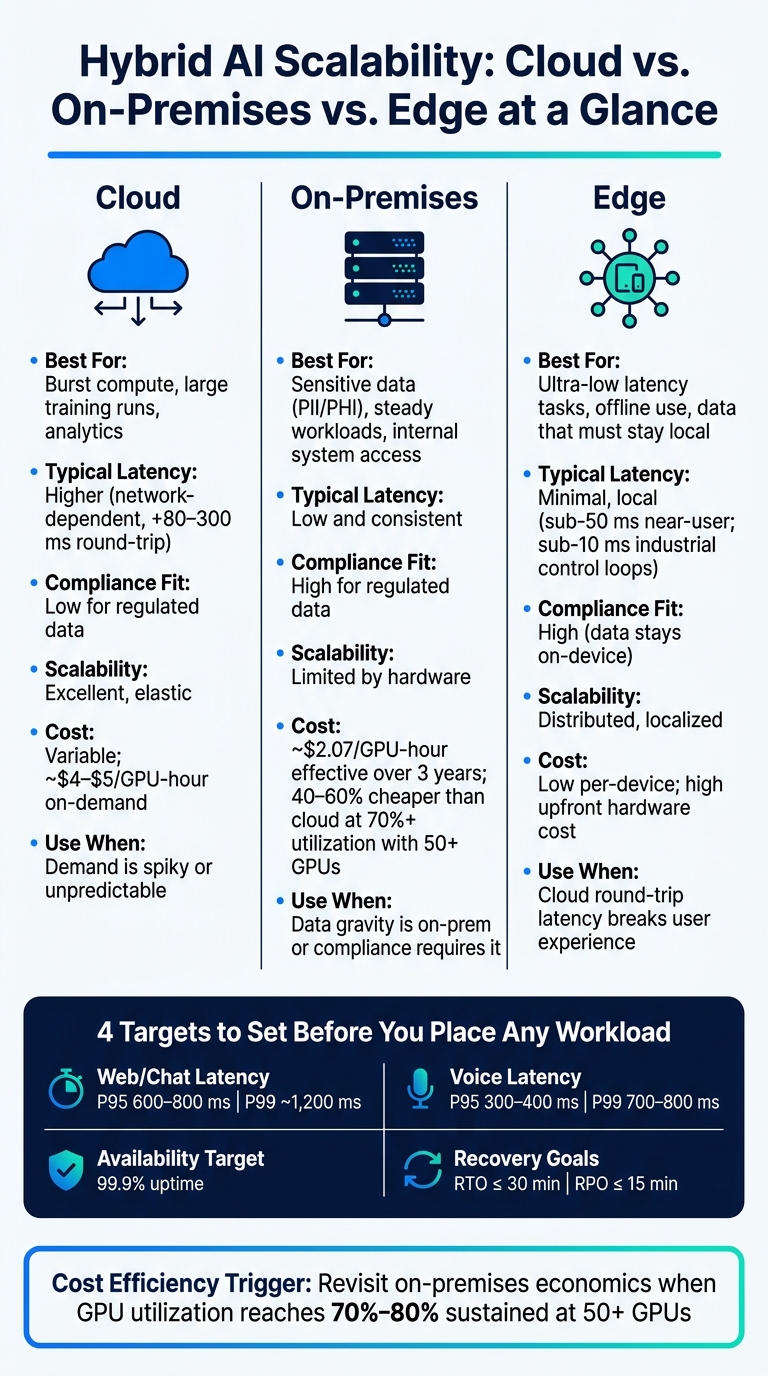
Hybrid AI Workload Placement: Cloud vs. On-Premises vs. Edge
Building And Scaling Hybrid AI Factories With AI Agents And Solutions
sbb-itb-f123e37
Checklist 1: Place Workloads Where Latency, Security, and Cost Make Sense
Once your targets are set, the next step is simple in theory and messy in practice: put each workload where its latency, security, and cost needs line up best.
Classify Workloads Before Choosing Cloud, On-Premises, or Edge
Before you pick cloud, on-premises, or edge, score each workload across four areas:
- Data sensitivity: Does the workload touch PHI, PCI card data, financial records under SOX or GLBA, or anything with export controls? If it does, keep it on-premises or in a private cloud with strict access control and audit trails.
- Latency requirement: What are your P95 and P99 targets? A network round-trip to the cloud usually adds 80–300 ms of latency.
- Traffic pattern: Is demand steady or spiky? Nightly batch scoring is a good fit for reserved on-premises capacity. A campaign-driven inference spike is a clear case for cloud burst.
- Data gravity: If your largest datasets already sit on-premises, move compute to the data. Otherwise, you pile on more latency and egress cost.
In most cases, two hybrid patterns do the job.
Train in cloud, infer on-premises or at the edge fits when training needs large GPU clusters, but inference has to stay close to regulated data. For example, a healthcare provider might fine-tune a diagnostic model in the cloud, then deploy weights to an on-premises cluster so patient imaging data never leaves the facility.
Private core with cloud burst keeps steady workloads on-premises and scales into cloud during peak demand, then scales back after traffic settles.
Edge makes sense when cloud round-trip latency can't hit your targets - sub-50 ms for near-user tasks or sub-10 ms for industrial control loops. It's also the right move when raw data has to stay on-device for compliance or privacy.
After placement, the service layer still needs to scale cleanly across all environments.
Use Architecture Patterns That Scale Horizontally
Build inference APIs and agent orchestrators as stateless services with session state stored outside the service. That way, you can add instances behind a load balancer without extra coordination. It also makes scale-to-zero possible during idle periods, which cuts idle GPU cost for bursty agentic workloads.
Use queue-based orchestration with Kafka, Amazon SQS, or Redis queues to buffer work between pipeline stages. Then tie autoscaling to queue depth or token throughput instead of CPU alone. That’s usually a better signal of actual load.
It also helps to add a model abstraction layer - one serving API backed by a model registry - so swapping or updating models doesn’t force downstream rewrites.
Workload Placement Comparison Table
Use the table below to check the default deployment pattern before you commit.
| Hybrid Pattern | Typical Latency | Compliance Fit | Scalability | Operational Complexity | Cost Pattern |
|---|---|---|---|---|---|
| Cloud-only training + inference | Higher (network-dependent) | Low for regulated data | Excellent, elastic | Low (managed services) | Variable; H100 ~$4–$5/GPU-hour on-demand |
| On-premises training + inference | Low, consistent | High for regulated data | Limited by hardware | Higher (self-managed) | Lower at sustained use; ~$2.07/GPU-hour effective over 3 years |
| Train in cloud, infer on-prem/edge | Low at inference | High | Good; training scales, inference is fixed | Medium | Balanced; cloud cost at training time only |
| Private core with cloud burst | Low baseline, variable at peak | High for core workloads | Very good for peaks | Medium-High | Cost-efficient; cloud spend tied to burst events |
| Edge inference (small/distilled models) | Minimal, local | High (data stays on-device) | Distributed, localized | High | Low per-device; high upfront hardware cost |
At sustained 70% utilization with 50 or more GPUs, on-premises usually costs 40–60% less than cloud over a 3–5 year period. That makes 70% utilization at 50+ GPUs a good trigger point to revisit on-prem economics.
Once placement is locked in, the next job is to standardize deployment and monitoring so every environment scales the same way.
Checklist 2: Standardize MLOps, Observability, and Failure Handling
Once workloads are placed, the next job is making sure every environment deploys, monitors, and recovers in the same way. If workload placement is settled but operations differ across cloud, on-premises, and edge, teams end up with drift, blind spots, and slow incident response.
Run One Deployment and Model Governance Process Across All Environments
Use one lifecycle everywhere: train, validate, register, approve, stage, promote, monitor, rollback. No model should reach production from an unregistered model file.
Each model version in the registry should include the training data version, feature snapshot, evaluation metrics, approver name, and a changelog entry before it moves forward. That becomes even more important at the edge, where devices may stay on older versions due to connectivity limits. The registry needs to track the full deployment footprint across cloud, on-premises, and edge, not just the latest cloud release.
Release checks should enforce automated gates such as:
- Minimum accuracy thresholds
- Maximum tail latency under peak load
- Compliance validations tied to your industry
Rollback paths need to be explicit and tested in staging. AWS Well-Architected guidance recommends configuring pipelines to trigger automated rollbacks when quality thresholds are not met. Rollback should be a metadata change, not a retraining job.
With deployment rules standardized, observability should run on the same metrics everywhere.
Monitor Tail Latency, Throughput, Errors, and Agent Health
Observability is still uneven across hybrid AI estates. The fix is one observability layer with the same metric definitions and dashboard layout in every environment.
Track P50, P95, and P99 latency, throughput, errors, utilization, and queue depth. Averages can hide what users feel. A system may show 150 ms average latency but 1,500 ms at P99 during U.S. lunch hours. For a voice agent, that can make the whole thing feel broken. One AI agent monitoring guide recommends alerting when P95 latency exceeds 2–5 seconds or error rates rise above 0.1%–1%, based on service criticality.
For autonomous agents and voice agents, add task completion, fallback, and escalation rates alongside infrastructure metrics, plus average handle time. High fallback rates during peak U.S. business hours often point to overloaded LLM endpoints or weak context retrieval. A healthy target is fallback usage below 2% and circuit breaker trips below 1 per hour.
Distributed tracing ties the system together. Propagate correlation IDs across every service hop - voice gateway, NLU, model inference, data lookups - so a spike in P99 latency can be traced to a specific on-premises data store instead of getting pinned on the whole stack.
When metrics line up, autoscaling can follow the same signals across cloud, on-premises, and edge.
Autoscaling and Reliability Comparison Table
Predictive autoscaling can cut tail latency in a big way. One study found it reduced P95 latency from 330.73 ms to 192.51 ms and P99 latency from 427.49 ms to 196.68 ms, while eliminating P95 violations entirely in the tested setup. For most hybrid AI estates, the best path is a mix: predictive scaling for known traffic cycles, like U.S. holiday shopping, plus policy-based rules for surprise surges.
| Approach | Responsiveness | Stability | Operational Overhead | Long-term Fit |
|---|---|---|---|---|
| Policy-based autoscaling | High when thresholds are well tuned | Medium; can oscillate if thresholds are noisy | Medium; requires ongoing threshold tuning | Good; adapts to new patterns but may lag long-term trends |
| Predictive autoscaling | Very high for known demand cycles | High when forecasts are accurate | Higher upfront; lower during incidents | Very high; aligns capacity with business growth projections |
| Manual provisioning | Low; requires human intervention during spikes | Medium in steady-state, low under spikes | High; slow to coordinate across hybrid environments | Low; difficult to scale with fluctuating AI workloads |
Checklist 3: Govern Data, Security, and Compliance Across the Hybrid Estate
Once scaling rules are in place, governance rules come next. You need to control the data and the actions your hybrid stack can reach. Autoscaling and standardized MLOps only work over time when data is classified, protected, and tracked the same way across cloud, on-premises, and edge. When governance breaks down, deployments slow and breach risk goes up. In the U.S., the average incident costs $9.36–$9.8 million.
Apply One Governance Model to Cloud, On-Premises, and Edge Data Flows
The aim is simple: use one classification scheme that stays with the data no matter where it sits.
PII and PHI should be handled as restricted data. That means encryption in transit with TLS 1.2+ and at rest with AES-256. It also means storing data only in compliant cloud regions or hardened on-premises setups. At the edge, keep it to transient processing with short-lived encrypted caches. Under HIPAA, PHI needs documented access controls, audit logs, and Business Associate Agreements (BAAs) with any cloud provider that touches it. Under CCPA, consumer PII must support rights to access, deletion, and opt-out. That changes how training datasets are built and how long they stay around.
Internal telemetry - like system logs and model performance metrics - can move more freely across environments. Even so, it should be pseudonymized before it leaves on-premises systems and kept only for the period defined in your data lifecycle policy. Prompts and outputs also need classification based on content and decision risk. Does the prompt include PII? Does the output affect a high-risk or safety-critical decision? Those are the questions that matter.
Lineage is what turns policy into something you can enforce at scale. Every dataset feeding a model should have a documented chain that shows:
- the source system
- preprocessing steps
- the training run
- the model version
- the deployment target
Tools like MLflow can track model lineage, while data catalog platforms manage upstream data provenance. At scale, automated lineage is the only practical way to show auditors how a decision happened and which data produced it. That keeps the focus on compliance evidence, not just general traceability.
Secure Agentic Systems with Scoped Access and Audit Trails
Agent systems need tighter controls because they can act, not just predict. Autonomous agents may trigger actions without a human in the loop, so access scoping has to be narrow and explicit. A customer-support agent, for example, should have read access to the account records it needs and write access to ticketing systems - nothing beyond that. Those limits should be enforced in the orchestration layer, not left sitting in a policy doc nobody checks.
Key management needs the same level of discipline. Centralize API keys, encryption keys, and credentials in a secure vault or cloud KMS. Use HSMs for on-premises environments. Apply strict rotation schedules and scope keys by environment. Agents should never carry long-lived secrets inside prompts, logs, or config files. And when agents need to reach back-end systems, use private connectivity - like private links, VPNs, or zero-trust network access - instead of exposing those systems to the public internet.
For high-risk actions, put approval gates in place. In a healthcare workflow, an agent might draft a recommendation, but a licensed professional should approve it before anything happens. Pair that with real-time monitoring for policy denials, escalations, and odd access patterns, all fed into a SIEM. Audit logs should be tamper-evident, access-controlled, and exportable. They should also include user or service identity plus correlation IDs, so security teams can piece events together across cloud, on-premises, and edge without blind spots. Every hybrid AI deployment should also have a pre-defined emergency stop - a way to limit or halt agent actions fast without shutting down the whole service.
Governance Framework Table
Use the table below to line up controls with data type and risk level.
| Data Type | Allowed Environments | Required Controls | Audit Frequency | Owner |
|---|---|---|---|---|
| Customer PII | Compliant cloud regions, secured on-premises; edge limited to transient processing with short-lived encrypted caches | AES-256 at rest, TLS 1.2+ in transit, RBAC, DLP, CCPA rights support | Quarterly access reviews; annual end-to-end audit | Data Privacy Officer + Customer Systems Lead |
| PHI | HIPAA-compliant cloud regions, hardened on-premises; no persistent edge storage | Encryption, MFA, BAAs, access logging, HIPAA Security Rule safeguards | Monthly access reviews; annual compliance audit | Data Privacy Officer + Compliance Lead |
| Internal Telemetry | Cloud (multi-region), on-premises | Pseudonymization, RBAC, SIEM aggregation, anomaly detection | Semi-annual | Platform Engineering Lead |
| Model Inputs/Outputs | Hybrid (cloud/on-premises); edge only for non-PII, low-risk inference | Lineage tracking, drift detection, tamper-proof logging, impact classification | Continuous monitoring; monthly review | AI Operations Lead |
| Agent Action Logs | On-premises primary | Immutable audit trail, approval gate records, correlation IDs, SIEM export | Real-time alerting; weekly review | Security Specialist + AI Operations Lead |
| Model Artifacts | On-premises or compliant cloud; no edge storage | HSM or KMS key management, key rotation, access logging, version control | Semi-annual | Security Specialist |
A cross-functional AI governance council - legal, compliance, security, data engineering, and business owners - should review this table every quarter and update controls whenever regulations, agent capabilities, or infrastructure change.
Checklist 4: Plan Capacity, Cost, and the Next Scaling Phase
Once governance is in place, the next step is simple: can the stack grow without wrecking latency, power limits, or the budget? Governance shows the system is safe. Capacity planning shows it can keep running as demand climbs.
Forecast Demand Using Business Growth and Infrastructure Constraints
A solid capacity model starts with business numbers. Look at projected daily active users (DAU), average requests per user per day, peak-to-average traffic ratio, and tokens per interaction. Peak traffic often runs at 3–10x the average, so that spike matters more than many teams expect. From there, you can map demand to GPU-hours, CPU-hours, memory, storage growth, and network throughput.
On the infrastructure side, the biggest pressure points are usually rack power and cooling. Traditional data center racks tend to run at 5–20 kW per rack. AI racks often sit in the 30–50 kW range and can hit 142 kW in dense GPU setups. That’s a huge jump. And it changes the math fast.
Air cooling starts to stop making sense above about 30–40 kW per rack. Past that point, direct liquid cooling (DLC) becomes necessary for dense AI racks. If your on-premises site wasn’t built with AI workloads in mind, cooling is often the first wall you hit - not compute.
It also helps to tie phase changes to clear thresholds instead of gut feel. A pilot phase usually covers 50–200 internal users and fewer than 10,000 requests per day. Moving into early-scale should require at least an 80–90% task success rate, stable P95 latency below agreed SLAs, and no critical compliance findings over 60–90 days. Full-scale should wait until autoscaling works across cloud and on-prem, governance has held up in practice, and capacity plans show at least 12–18 months of runway through added racks, higher-density GPUs, or more cloud regions.
Track Cost Per Successful Outcome, Not Only Infrastructure Spend
Raw infrastructure spend tells you what the bill looks like. Cost per successful outcome tells you whether the spend is doing its job.
In customer support, industry benchmarks show AI-handled interactions at about $0.50–$0.70 per interaction, while human-agent-handled contacts average roughly $6.00. A blended hybrid setup, where automation handles part of the work and humans step in when needed, usually lands around $4–$8 per interaction. That gap is hard to ignore.
This is why it makes sense to track cost per successful outcome by business line and by phase. Support, sales, and internal productivity can each show very different patterns. So can pilot and full-scale. When you break it down that way, you can see where hybrid AI is saving money and where it’s just adding complexity.
Use this checklist during quarterly reviews. Expansion starts to make sense when sustained GPU, power, cooling, or network utilization reaches 70%–80%, when P95 latency gets close to SLA limits during peak periods, or when the business expects 2x or more demand growth within the next 6–12 months. A redesign may be the better call when cloud spend climbs faster than business value, when on-premises racks are power-constrained, or when synchronous agent workflows keep causing reliability problems that autoscaling alone can’t solve.
Conclusion: A Short Checklist Leaders Should Review Each Quarter
Each quarter, leadership should check a few core things: whether workloads sit where latency, security, and cost make sense; whether horizontal scaling patterns are in place; whether MLOps and observability are standardized across environments; whether governance covers every data flow; and whether capacity and cost forecasts have been updated before growth forces a rushed decision.
Use the phase table below to turn those quarterly reviews into clear go/no-go calls.
| Phase | Target Milestone | Go/No-Go Criteria | Decision Window |
|---|---|---|---|
| Pilot | Complete updated demand forecast and capacity model for all environments | ≥80% task success rate; P95 latency within SLA; no critical compliance findings over 60–90 days | Next quarterly review |
| Early-Scale | Run load tests for early-scale scenarios and validate tail latency and error budgets | GPU, power, and cooling utilization below 70%–80%; cost per successful outcome (USD) within budget | Next quarterly review |
| Full-Scale Review | Review cost per resolved interaction (USD) vs. targets; decide on model optimization or hardware upgrades | Cost per outcome stable or improving; governance controls validated across all environments | Next quarterly review |
| Scale Decision | Executive decision on moving to full-scale or redesigning architecture | 12–18 months of capacity runway confirmed; autoscaling tuned; data residency requirements met | Next quarterly review |
Treat this table as a living document. Update the milestones each quarter as demand forecasts, regulatory requirements, and model capabilities shift.
FAQs
How do I decide between cloud, on-premises, and edge for AI workloads?
Balance data sensitivity, latency needs, and workload patterns. Go with on-premises when you’re dealing with sensitive data, tight compliance rules, or steady, high-volume workloads that need predictable latency.
Use the cloud when you need to scale fast, keep upfront costs lower, or handle bursty demand without buying extra hardware you may not use most of the time.
In many cases, a hybrid setup works best. Keep sensitive or latency-sensitive tasks on-premises, and use the cloud for compute-heavy processing, testing, or extra capacity during peak demand.
What metrics matter most for scaling hybrid AI?
Focus on metrics across four layers: platform, ML runtime, Kubernetes, and business.
At the platform layer, track GPU utilization, memory, bandwidth, GPU memory, and KV cache usage. These numbers help you spot hardware choke points before they turn into user-facing slowdowns.
For the ML runtime, watch token throughput, inference latency, batch efficiency, TTFT, ITL, and latency across p50, p95, and p99. That mix gives you a clearer read on how the system behaves under normal load and at the tail, where problems often hide.
On the Kubernetes side, keep an eye on pod restarts, pending pods, and disk pressure. If pods are stuck waiting to start or restarting more than they should, the issue may have less to do with the model and more to do with the cluster.
Then there’s the business layer: accuracy drift, cost per inference, and SLA compliance. These are the numbers that tie system behavior back to product and customer impact.
Put simply, you’re not just watching whether the model runs. You’re watching whether it runs fast enough, cheaply enough, and well enough to meet expectations.
When should I move AI infrastructure on-premises?
Move AI infrastructure on-premises when you need strict data sovereignty, tight security, or regulatory compliance, especially in healthcare, finance, or defense.
It also makes sense for stable, high-volume workloads that run nonstop, with utilization above 60% to 70%. The same goes for operations that need steady, low-latency performance, like real-time machine vision on a factory floor.