Generative AI for Legacy Code: ROI and Benefits
Generative AI speeds legacy discovery, cuts modernization costs ~76%, and improves quality—only when paired with human oversight and staged pilots.
Yes: AI-assisted legacy modernization can cut cost, cut delivery time, and lower release risk - but only when people stay in control.
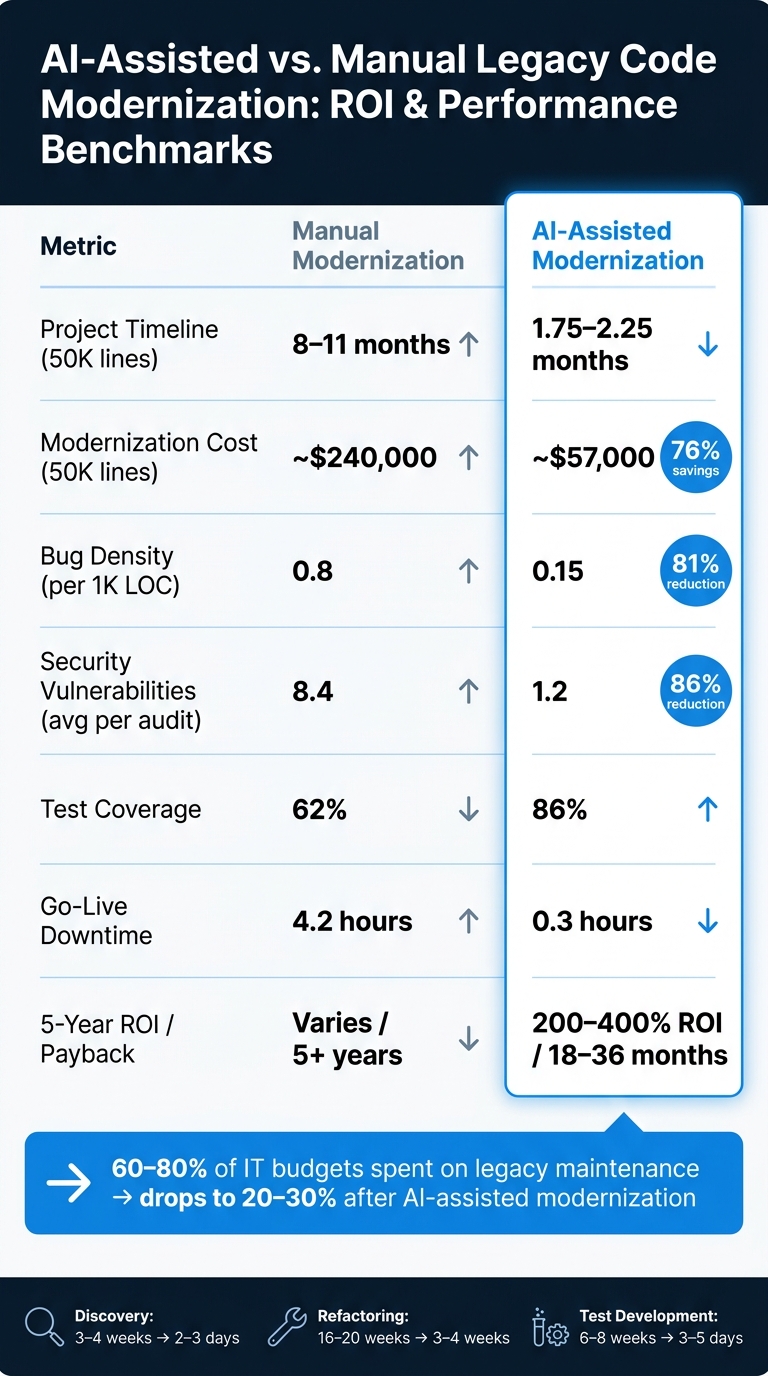
From what I see in the data, the pattern is simple: teams use AI to map old code, draft refactors, write tests, and fill documentation gaps. That can turn a project that might take 8 to 11 months into about 2 months, and cut a $240,000 modernization effort down to about $57,000 for a 50,000-line application. In many cases, reported 5-year ROI lands between 200% and 400%, with payback in 18 to 36 months.
Here’s the short version:
- Legacy systems are expensive: many firms spend 60% to 80% of IT budgets keeping them alive.
- AI helps most with discovery and refactoring: work that took weeks can drop to days.
- Testing still takes a big share of the schedule: often 40% to 50% of total effort.
- Quality can improve too: one benchmark shows bug density falling from 0.8 to 0.15 per 1,000 lines.
- The best results come from bounded pilots: not from fully hands-off migration.
If I had to boil the article down to one point, it would be this: AI improves the math of legacy code work, but the return comes from disciplined review, staged rollout, and hard validation against the old system.
| Area | What the article shows |
|---|---|
| Cost | About 76% lower modernization cost on a 50,000-line app |
| Timeline | About 8–11 months down to 1.75–2.25 months |
| Quality | Higher test coverage, fewer bugs, fewer security issues |
| Risk | Lower go-live downtime and less reliance on aging legacy skill sets |
| Best fit | Discovery, like-for-like migration, test creation, documentation |
So if you’re judging whether generative AI is worth using on legacy code, my read is simple: it can pay off fast, but only if you treat it as a supervised engineering tool, not an automatic rewrite button.
AI-Assisted vs. Manual Legacy Code Modernization: ROI & Performance Benchmarks
What Research Shows About Productivity and Delivery Speed
Developer Productivity Gains in Coding and Refactoring Tasks
The first issue is speed: how much faster AI can make legacy refactoring in practice. Research points to clear gains, both in small task studies and in large migration work.
GitHub says Copilot helps developers work 55% faster on routine coding tasks. McKinsey puts the time cut for refactoring at 20–30%. Those numbers matter, but there's an important catch: they describe isolated tasks, not full program delivery.
When you zoom out to full modernization work, the gains can be much larger. A study of 73 modernization projects found that AI-powered methods led to 4.5x faster timelines than manual approaches. In big enterprise programs, the biggest time savings often show up during discovery and analysis. That shifts developers into more of a validator and architect role, instead of having them do every step by hand.
One documented migration makes that point pretty clearly: AI-assisted agents migrated 52,300 lines in less than half a person-day.
Shorter Modernization Timelines in Enterprise Programs
Named enterprise programs show the same trend at project scale.
PwC reported that discovery work dropped from several weeks to 2.5 days, while RFP drafting fell to 15–20 minutes. Codurance reduced a VB6-to-.NET migration from an estimated 18 months of manual work to just a few months. Utah's ORSIS project tells a similar story: a manual rewrite expected to cost $200 million and take 5–10 years was finished in 18 months with automated refactoring tools.
That said, speed doesn't erase the hard part. Testing and validation still consume 40–50% of the total effort, which makes them the main schedule bottleneck.
Comparison Table: Manual vs. AI-Assisted Refactoring
| Phase | Traditional Manual Duration | AI-Assisted Duration |
|---|---|---|
| Analysis / Discovery | 3–4 weeks | 2–3 days |
| Refactoring / Migration | 16–20 weeks | 3–4 weeks |
| Test Development | 6–8 weeks | 3–5 days |
| Total Timeline | 8–11 months | 1.75–2.25 months |
These are end-to-end timelines, not task-level results.
Those speed gains feed directly into the financial ROI calculations that follow.
sbb-itb-f123e37
Financial ROI: Cost Savings, TCO Reduction, and Payback Periods
Direct Cost Savings from Reduced Engineering Effort
The time savings translate straight into lower engineering, QA, and tooling spend.
For a 50,000-line application, manual modernization costs about $240,000. That breaks down to $120,000 in labor, $40,000 in QA, and $40,000 in contingency. With an AI-assisted approach, that drops to about $57,000: $27,000 in labor, $12,000 in QA, $8,000 in tools and API fees, and $5,000 in contingency.
That means $183,000 saved on one application, or about 76% lower cost.
This isn’t just a one-off estimate. Enterprise programs have reported similar results:
- Heirloom/Riocard saw a 54% cost saving compared with manual modernization.
- NN Group transformed more than 10 million lines of COBOL to Java and reported an 80% drop in IT platform costs, with payback in under three years.
- Codurance said AI made a modernization effort that had been out of reach fit the client’s budget.
And labor is only part of the picture. The full case gets stronger when you add maintenance, risk, and hiring pressure.
How Enterprises Should Model ROI for Legacy Refactoring
AI-assisted refactoring changes the math because it cuts maintenance load, speeds up release cycles, and lowers legacy-system risk. A sound ROI model should factor in maintenance savings, risk reduction, and talent savings.
The maintenance side alone is hard to ignore. Enterprises often spend 60% to 80% of their IT budgets just keeping legacy systems alive. After modernization, that can fall to 20% to 30%, leaving more budget for new product work. In large mainframe setups, yearly operating costs can exceed $30,000,000. So when a project slips by months, the price tag keeps ticking.
Risk and hiring costs add another layer. Conservative estimates put legacy security and compliance exposure at $500,000 to $5,000,000+ over five years. And for a team of 30 engineers, moving off a legacy stack can save more than $500,000 per year.
When companies model all of that together, the numbers tend to move fast. Many see 200% to 400% ROI over five years, with payback in 18 to 36 months. If teams include delivery speed and risk in their NPV models, projected value often comes out 3 to 5 times higher than in infrastructure-only models.
The table below shows how far apart these paths can be.
Financial Comparison Table: Legacy As-Is vs. Manual Modernization vs. AI-Assisted Modernization
| Metric | Legacy As-Is | Manual Modernization | AI-Assisted Modernization |
|---|---|---|---|
| Maintenance Spend | 60–80% of IT budget | Higher during transition | 20–30% of IT budget (post-migration) |
| CapEx (50K lines) | No modernization capex | ~$240,000 | ~$57,000 |
| OpEx (large mainframe) | Ongoing high maintenance cost | Lower after completion | Lower after migration |
| Project Duration (50K lines) | No modernization timeline | 10 months | 2 months |
| Estimated ROI (5-yr) | N/A | Varies by scope | 200–400% |
| Payback Period | N/A | 5+ years (often fails) | 18–36 months |
| Projects Exceeding Budget or Timeline | N/A | 74% | 12% |
CapEx reflects a 50,000-line application. OpEx reflects large enterprise mainframe environments.
Using generative AI for legacy modernization - Thoughtworks Technology Podcast
Technical Outcomes, Quality Improvements, and Risk Controls
Financial ROI only matters if modernization leads to code that’s easier to work with, more stable in production, and safer to release.
Code Quality and Maintainability After AI-Assisted Refactoring
The ROI story stands or falls on code quality. If the code gets cleaner, teams spend less time fixing regressions, chasing defects, and handling support work. That’s where the data stands out.
AI-assisted refactoring cuts bug density by 81.3%, dropping from 0.8 bugs per 1,000 lines in manual modernization to just 0.15. Security issues drop as well. AI-powered projects average 1.2 vulnerabilities per audit, compared with 8.4 in manual efforts, an 85.7% reduction. Maintainability scores improve too: AI-assisted projects usually reach a SQALE "A" rating, while manual modernization more often lands at "B". Documentation jumps from 54% to 94%.
Equal Experts shared a strong example. A global insurance brand used GitHub Copilot and Claude to make sense of a 15-million-line .NET monolith. In just 2.5 days, the team pulled out more system knowledge than earlier manual work had delivered in four weeks.
That sounds great on paper. But code quality only counts if it holds up when teams start testing hard and pushing toward production.
Testing, Compliance, and Reliability After Modernization
Testing is still the biggest validation cost in most modernization work. So the ROI comes from two places at once: faster test creation and better coverage of edge cases. AI-powered projects average 86% test coverage versus 62% for manual modernization, a 38.7% increase.
Go-live performance improves too. AI-powered migrations average just 0.3 hours of downtime during go-live, compared with 4.2 hours for manual methods. In regulated sectors, that lower downtime can also reduce release risk and compliance exposure.
A Grid Dynamics healthcare case shows how this works in practice. The team rewrote 23,000 lines of .NET 4.5 code, moved unit test coverage from 0% to 58%, and kept HIPAA compliance in place the whole time. The result: 9 weeks of engineering value in 3 days. That’s the model many enterprise teams are aiming for: AI handles speed, while people handle review and sign-off.
Teams that do this well usually put guardrails around the process. Common controls include:
- Automated linters
- Static analysis tools like SonarQube
- Test-led validation before production release
In that setup, senior engineers spend less time writing every line by hand and more time reviewing AI output, checking risky paths, and making sure the code behaves the way it should.
The table below shows how these quality metrics stack up across each approach.
Quality Comparison Table: Pre-Modernization vs. Manual Modernization vs. AI-Assisted Modernization
| Metric | Pre-Modernization | Manual Modernization | AI-Assisted Modernization |
|---|---|---|---|
| Maintainability Score | D/E | B | A |
| Test Coverage (%) | 0%–20% | 62% | 86% |
| Bug Density (per 1K LOC) | High | 0.8 | 0.15 |
| Security Vulnerabilities (avg) | High | 8.4 | 1.2 |
| Documentation Completeness | <10% | 54% | 94% |
| Go-Live Downtime | N/A | 4.2 hours | 0.3 hours |
Figures reflect published benchmarks and documented case studies. Individual results vary by codebase complexity, tooling, and team structure.
Case Studies, Implementation Guidance, and Conclusion
Sector Patterns from Financial Services, Insurance, Healthcare, and Retail
Across sectors, the story is pretty consistent: AI tends to pay off first in discovery, then in delivery speed and testing efficiency. These examples point to the same ROI pattern across industries. They aren't one-off wins.
In financial services, JPMorgan Chase's Card platform modernization stands out as a detailed public example. Led by Lana Gluck, Managing Director of Architecture, the team built a two-phase GenAI pipeline to pull business logic from legacy assembly programs with more than 150,000 lines of code. In the Discovery Phase, the team saw a 75–85% speed improvement over manual work. In the Reimagine Phase, the system produced Java code with 35–45% direct reusability.
GFT saw a similar pattern in its work with a global Tier 1 bank. Using the Wynxx GenAI platform to document a 20-year-old Java system, the project produced about €300,000 in estimated value in one day and cut documentation time by 95%.
In insurance, ProAg (Tokio Marine HCC) moved a specialty insurance core process from a projected 6-month manual baseline to 5 weeks with an AI-assisted approach. A custom validation harness confirmed a 100% data match.
In information services and real estate technology, Experian modernized 687,600 lines across seven .NET applications to .NET 8.0, saving about 300 engineering days and cutting developer effort by 40%. Altisource modernized 350,000 lines of legacy Java code, shipped four new applications in four months, and cut code vulnerabilities by 54%.
| Sector | Named Example | Key Outcome |
|---|---|---|
| Financial Services | JPMorgan Chase (2025) | 75–85% faster discovery; 35–45% code reuse |
| Financial Services | GFT / Global Tier 1 Bank (2025) | 95% documentation time reduction; ~€300,000 in value in one day |
| Insurance | NN Group (April 2026) | 80% IT platform cost reduction; payback under three years |
| Insurance | ProAg / Intellias (2025) | 6 months → 5 weeks; 100% data match |
| Information Services | Experian (May 2026) | 300 engineering days saved; 40% effort reduction |
| Real Estate Technology | Altisource (February 2026) | 54% vulnerability reduction; 4 apps in 4 months |
What ties these results together is simple. The gains came less from full automation and more from disciplined discovery, step-by-step migration, and strict validation.
Evidence-Based Best Practices for Enterprise Adoption
The strongest programs used AI as a controlled refactoring aid, not as a rewrite engine left on its own. The case studies above point to the same operating model: discovery first, then incremental migration, then validation.
Architecture-first discovery happened before any code generation. Teams used AI to map dependencies, surface undocumented logic, and create usable specs before writing new code. Chase's Lana Gluck put it plainly:
"Since there is no guarantee that the produced documentation is accurate... we treat the generated documentation as a spec and pass it through an LLM to produce both Java code and corresponding unit tests [to validate against the legacy system]."
- Lana Gluck, Managing Director of Architecture, Chase
Incremental migration, often with the Strangler Fig pattern, helped teams keep the business running while they modernized. Instead of flipping everything over at once, they moved in small chunks. That matters. Big-bang rewrites sound appealing on paper, but they can go sideways fast.
Automated quality gates also showed up again and again. Linters, security scans, and runtime output comparisons helped catch AI mistakes before production. And testing wasn't treated as an afterthought. In NN Group's COBOL migration, 40% of total effort went to validation alone.
Conclusion: Key ROI Signals and the Limits of the Evidence
Generative AI can cut refactoring effort, shorten delivery timelines, and improve code maintainability. But those gains showed up when teams paired AI with strong governance, structured testing, and human oversight at every stage.
At the same time, the evidence does not support fully autonomous, end-to-end modernization. Most of the strong results came from incremental, like-for-like migrations inside a bounded scope. For leaders, that means decisions should rest on pilot-based validation before moving to an enterprise-wide rollout.
The clearest ROI signals came from bounded pilots, human review, and measurable validation against the legacy system.
FAQs
Which legacy systems are best suited for AI-assisted modernization?
AI-assisted modernization works best for mission-critical, stable systems that still matter to the business but carry a lot of technical debt, older frameworks, or thin documentation.
Good fits include legacy systems built in COBOL, RPG, Fortran, Perl, and older Java or .NET stacks that have become hard to maintain or test. In these cases, AI can map complex dependencies and surface buried business logic, which helps teams modernize in a safer, step-by-step way.
What risks should teams watch for when using generative AI on legacy code?
Generative AI often works from partial code, not the whole system. That means it can miss cross-file dependencies, full application context, and the downstream effects of a change. When that happens, you can end up with silent regressions, broken integrations, bad technical details, or even made-up API behavior.
There’s another problem too: it can wipe out undocumented tribal knowledge or hidden constraints that live in a team’s heads, not in the codebase. So teams shouldn’t treat it like an autonomous engineer. Human validation, baseline testing, and small, reviewable pull requests are key if you want to cut down on errors and security risks.
How should companies measure ROI before scaling beyond a pilot?
Before you scale anything, set a clear baseline. Audit your technical debt, integrations, and legacy maintenance costs so you know where you're starting from.
During the pilot, track cost and performance with telemetry. Focus on metrics like refactoring cycle time, developer productivity, and translation accuracy.
Then stack those results against your operating goals, such as lower cloud costs, faster feature delivery, and fewer defects. Standardized, automated reporting helps show that those gains can be repeated instead of being one-off wins.