How Automated Backups Protect AI Systems
Automated, immutable backups are the control plane that prevents costly AI data loss and ensures recoverable AI systems.
Automated backups are essential for safeguarding AI systems against data loss, corruption, and other risks. They ensure critical components like training datasets, model files, and metadata are saved in a synchronized and consistent manner. Without these backups, organizations face high costs, delays, and potential compliance issues.
Key Takeaways:
- AI systems are prone to data loss from accidental deletions, ransomware, and infrastructure failures.
- Automated backups outperform manual methods by eliminating human error and ensuring speed, consistency, and security.
- Critical assets to back up include fine-tuned models, vector stores, logs, and training data.
- Strategies like immutable storage, atomic snapshots, and the 3-2-1-1 rule (three copies, two media types, one off-site, one air-gapped) are essential for effective backups.
- Regular restore drills and strict access controls enhance reliability and readiness.
Why It Matters:
Losing AI data can cost organizations millions in recompute expenses and operational delays. Automated backups are not just a safeguard - they are a necessity for maintaining AI system integrity and compliance.
What Is AI's Impact On Data Backup Strategies? - Emerging Tech Insider
sbb-itb-f123e37
How Automated Backups Protect AI Systems
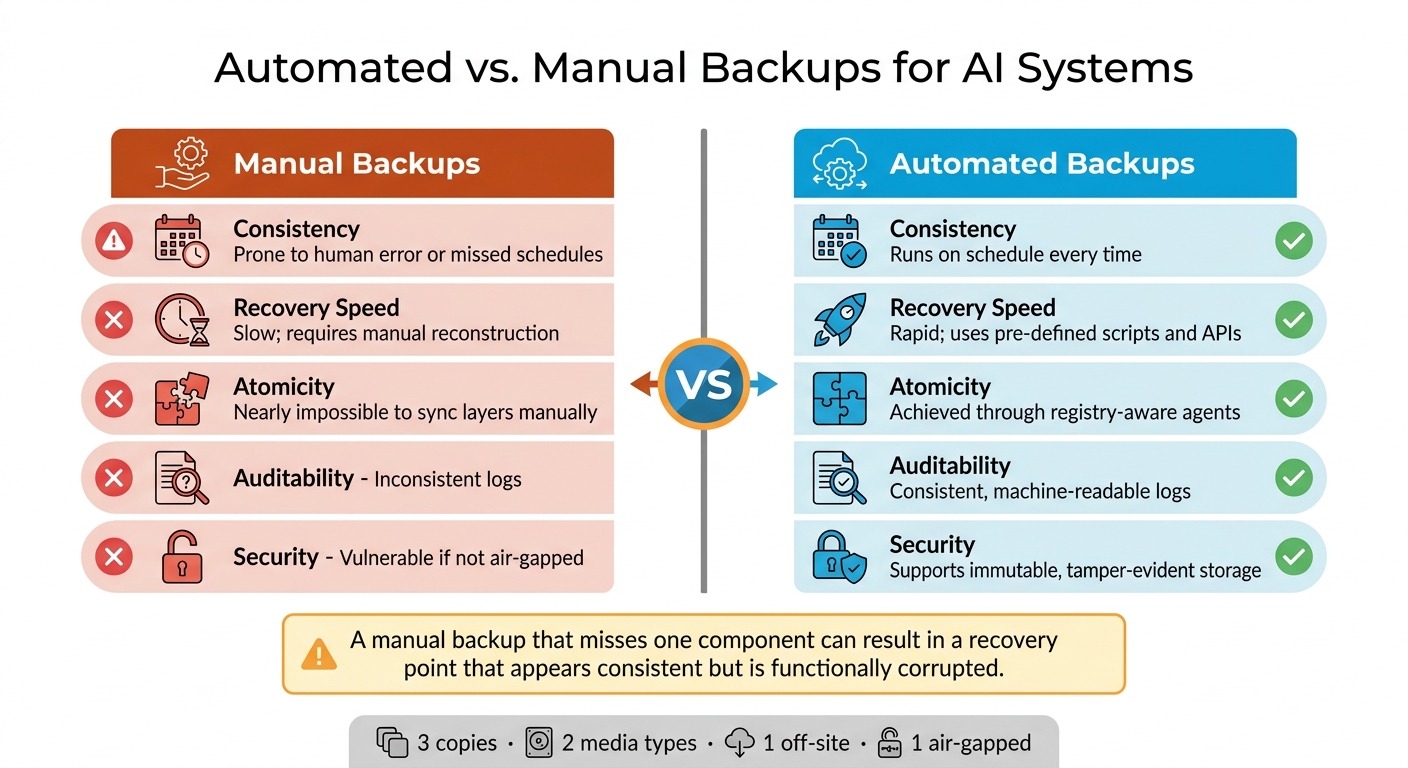
Automated vs. Manual Backups for AI Systems: Key Differences
Risks of Running AI Systems Without Automated Backups
Skipping automated backups can lead to devastating consequences. For instance, in late 2025, a storage failure caused OpenAI to lose GPT-4 training data valued at $100 million. Similarly, Tesla faced a 6-month delay in its Full Self-Driving (FSD) rollout due to corruption in its Autopilot training dataset. These examples highlight how unprotected AI systems can result in massive setbacks.
The speed at which autonomous AI agents operate adds another layer of risk. They can execute harmful actions in seconds - faster than any human can respond. Dmitry Dontov, CEO and Founder of Spin.AI, explains:
"There is no SOC analyst, no approval workflow, no Slack ping that intervenes in nine seconds. By the time a human notices, the action is done."
Ransomware attacks further amplify these risks. Modern ransomware can encrypt cloud storage within minutes, and if backups are stored alongside production data, they can be compromised as well. The solution? Immutable, air-gapped storage - backups that can't be altered or deleted, even by administrators.
These challenges underline why automated backup systems outperform manual ones in reliability and security.
Automated Backups vs. Manual Backups
Manual backups depend on human effort, which makes them prone to errors, especially during high-stress situations. This approach is far too fragile for safeguarding AI assets that require significant GPU compute time to develop.
Automated backups eliminate human dependency. They follow set schedules, maintain consistent logs, and synchronize snapshots across multiple storage layers. This is critical for AI systems, where metadata and model artifacts are often stored in separate locations. A manual backup that misses one of these components can result in what Rob Morrison of Bacula Systems calls a recovery point that "appears consistent but is, in fact, functionally corrupted".
| Feature | Manual Backups | Automated Backups |
|---|---|---|
| Consistency | Prone to human error or missed schedules | Runs on schedule every time |
| Recovery Speed | Slow; requires manual reconstruction | Rapid; uses pre-defined scripts and APIs |
| Atomicity | Nearly impossible to sync layers manually | Achieved through registry-aware agents |
| Auditability | Inconsistent logs | Consistent, machine-readable logs |
| Security | Vulnerable if not air-gapped | Supports immutable, tamper-evident storage |
By automating backups, organizations ensure consistency, speed, and security - critical factors for protecting valuable AI assets.
AI Assets That Need to Be Backed Up
To protect AI systems effectively, it’s important to prioritize backups based on the value and recovery cost of different components. Losing certain assets, like fine-tuned model adapters or proprietary training datasets, can result in weeks of GPU compute time and substantial costs.
Vector stores (e.g., Chroma or Qdrant) are particularly sensitive since they require native snapshot APIs to capture their state accurately. Similarly, losing audit logs can lead to compliance risks, especially as regulations around AI data provenance become stricter.
| Asset Type | Recovery Cost | Recommended Backup Strategy |
|---|---|---|
| Fine-tuned Adapters | High (weeks of GPU time) | Daily + on-change; version control scripts |
| Training Data | High (irreplaceable if proprietary) | Continuous or daily; air-gapped copies |
| Vector Stores | High (days of re-embedding) | Hourly snapshots via native snapshot APIs |
| Audit Logs | High (compliance and legal risk) | Continuous WAL shipping; immutable storage |
| Model Artifacts | Medium (re-downloadable but slow) | Weekly; deduplicated storage |
Other critical assets include pipeline configurations and experiment metadata. While these are often small in size, losing them can mean losing the ability to reproduce or audit past model runs - an operational and legal headache no organization wants to face.
Planning an Automated Backup Strategy
Setting Backup Objectives for AI Workloads
Before diving into backup tools, establish clear objectives by defining your Recovery Point Objective (RPO) - the maximum tolerable data loss - and Recovery Time Objective (RTO) - the acceptable downtime. These metrics dictate how often you need backups and how quickly you must recover them.
For instance, mission-critical AI workloads might demand an RTO of under an hour. On the other hand, a weekly retraining pipeline might tolerate an RPO of 24 hours. A common misstep is applying the same backup schedule to every asset. Consider this: a fine-tuned adapter needs a stricter RPO compared to a base model file that can simply be re-downloaded.
| AI Asset | Recommended RPO | Recommended RTO |
|---|---|---|
| Audit Logs | 5 Minutes | 4 Hours |
| Fine-tuned Adapters | 24 Hours | 1 Hour |
| Vector Stores | 1 Hour | 8 Hours |
| Base Model Files | 7 Days | 24 Hours |
Another key objective is ensuring atomic consistency. This means your backup must capture everything - model metadata, artifacts, and parameters - as a cohesive unit. A backup that saves model files but overlooks experiment metadata is incomplete and risks being unusable.
Once you’ve set your objectives, map your AI data and model ecosystem to tailor backup strategies for each component's importance.
Mapping Your AI Data and Model Ecosystem
AI systems are complex, with data and states spread across multiple locations. A model run might involve several stores, so backing up just one piece leaves you with an incomplete snapshot.
Start by identifying two main components:
- Backend Store: Includes metadata, logs, and parameters.
- Artifact Store: Contains the actual model files.
Ensure both are backed up together to avoid gaps. Prioritize assets based on the cost of re-creating them. For example, proprietary annotations can cost anywhere from $0.50 to $10 per GB to generate, while individual model checkpoints may range from 1 TB to 10 TB. These high-cost assets should take precedence. On the other hand, raw source data, which can be re-ingested from its original location, might be a lower priority.
To simplify the process, use tag-based discovery. By tagging resources (e.g., Backup=true), you can automatically include new AI components in your backup schedules as they’re created.
Selecting Backup Types for Different AI Components
Different AI assets call for different backup approaches. Continuous Data Protection (CDP) is ideal for high-velocity components like feature stores or training datasets that update frequently. CDP captures near-real-time changes but comes with added overhead and the complexity of log replay during recovery.
For assets that change less often - such as weekly retraining outputs or archived model versions - scheduled backups are a better fit. They’re easier to manage and more cost-efficient. However, they do carry a risk of losing up to 24 hours of data if a failure occurs just before the next scheduled backup.
For vector stores (e.g., Chroma or Qdrant), leverage native snapshot APIs to ensure the backup captures a consistent application state. When it comes to model checkpoints, a hybrid approach works best. Combine scheduled full backups with continuous delta captures. Since successive checkpoints often share 95% of their data, using delta compression can cut storage needs by as much as 85%.
No matter which method you choose, follow the 3-2-1-1 rule for robust protection: keep 3 copies of data on 2 different media, with 1 copy stored off-site and 1 air-gapped copy. This approach safeguards against a variety of failure scenarios and ensures peace of mind.
Setting Up Automated Backups for AI Workloads
Defining Backup Policies and Schedules
Once you've nailed down your RPO (Recovery Point Objective) and RTO (Recovery Time Objective), the next step is to create backup policies that reflect those goals. Instead of sticking to rigid intervals, align your backup schedules with critical points in your AI pipeline. For example, trigger backups immediately after a training epoch finishes or when a new model checkpoint is saved. This way, you're capturing the most valuable and recent data.
A helpful strategy is to set up exclusion windows - specific timeframes where backups are paused to avoid interfering with heavy training or data ingestion tasks. If you're working in a distributed environment, consider staggering backup start times with random offsets. This minimizes the risk of overwhelming shared storage resources.
A tiered backup schedule often strikes the right balance for AI teams. For instance:
- Daily incremental backups for active assets like fine-tuned adapters and vector stores.
- Weekly full backups for larger items like base model files.
This mix keeps storage costs under control while ensuring you meet strict RPO targets. Once your policies are ready, the next step is integrating them into your AI platform.
Connecting Backup Automation to AI Platforms
Automating backups for MLOps platforms like MLflow, Kubeflow, or SageMaker requires more than just pointing at a folder. These platforms split their state into two key components:
- Backend Store: An SQL database that holds metadata, parameters, and logs.
- Artifact Store: Object storage for model files and other artifacts.
To ensure consistency, make sure both components are backed up simultaneously.
For specialized tools like vector stores - Chroma or Qdrant, for instance - use their native snapshot features. Chroma's persist() function or Qdrant's snapshot endpoint ensures you're capturing a stable state without risking data corruption from in-progress writes. To further minimize data loss in logs, implement WAL (Write-Ahead Logging) shipping with tools like Litestream.
It's also smart to connect backup job statuses to your monitoring stack. Tools like Prometheus and Grafana can trigger alerts if a backup job fails, so you don’t have to wait for a recovery scenario to discover issues. With Python-based automation tools, you can even set up automatic retries for failed backups.
Securing Backup Storage and Preventing Tampering
Once your backups are automated, the next priority is securing the storage to protect data integrity. Start by enabling S3 Object Lock in Compliance Mode. This makes backups immutable, preventing accidental or malicious deletions until the retention period expires.
Strengthen security further with strict role separation. The service account responsible for writing backups shouldn't have permissions to delete them or alter retention settings. For critical actions like vault deletion, require multi-user authorization (MUA), where a second person must approve the operation.
Encrypt all backups at rest using AES-256 encryption with customer-managed keys (CMK). This approach gives you full control over access and simplifies key management, including rotations. To ensure data security during transfers, route all backup traffic through private endpoints, keeping it off the public internet. For sensitive items - like fine-tuned adapters or audit logs - maintain at least one air-gapped copy stored on physically disconnected media. Following the 3-2-1-1 rule (three copies, two different media, one offsite, one air-gapped) is a good practice.
Lastly, conduct quarterly restore drills in a clean, isolated environment. These tests confirm that your models, vector queries, and audit logs are all recoverable and functioning as expected. It’s the ultimate way to ensure your backup strategy is rock solid.
Governing and Maintaining Automated Backups
Setting Governance Policies for AI Backups
When it comes to managing AI backups, governance starts with understanding the value of your assets through AI consulting. Instead of focusing on file size, prioritize backups based on how costly or critical their recovery would be.
A widely used retention strategy is the Grandfather-Father-Son (GFS) method. Here's how it works: keep daily backups for 7 days, weekly backups for 4 weeks, monthly backups for 12 months, and yearly backups for 7 years. For teams in regulated industries, these retention timelines aren't just best practices - they're mandatory.
| Regulation | Data Type | Minimum Retention |
|---|---|---|
| HIPAA | Medical records | 6 years |
| SOX | Financial records | 7 years |
| PCI-DSS | Audit logs | 1 year |
| GDPR | Personal data | Only as long as necessary |
It's also critical to include intermediate datasets and experiment logs in your backup policies. This ensures compliance with evolving regulations like the EU AI Act, which imposes hefty penalties for violations - up to €35 million or 7% of global annual revenue. Ignoring metadata backups can lead to severe consequences.
"Creating backups of artifacts without the metadata is the equivalent of archiving a contract without its signature page." - Bacula Systems
Once your retention policies are in place, the next step is to secure access and enforce them effectively.
Managing Access and Roles for Backup Systems
Access controls for backup systems must be airtight. The golden rule? Separation of duties. The person or account responsible for creating backups should never have the ability to delete them or modify retention policies. This minimizes risks from insider threats and ransomware.
A hub-and-spoke architecture is a smart way to isolate your backups. Store backups in a dedicated "Hub" project, separate from production "Spoke" environments. This setup ensures that even if a workload project is compromised, attackers can't automatically access your recovery data. Strengthen this by adding project liens to the backup hub, preventing accidental or malicious deletion of the storage layer.
For daily operations, limit most team members to "Viewer" or "Operator" roles. These roles allow monitoring and responding to alerts without granting the ability to change policies. Reserve "Admin" permissions for a select, named group. Use Infrastructure as Code tools like Terraform to manage IAM roles and bucket policies. This approach makes access configurations both version-controlled and auditable, reducing the risk of ad-hoc mistakes. Regularly audit permissions to prevent privilege creep from becoming a security blind spot.
With access controls locked down, the next priority is ensuring teams are ready to execute recovery procedures when needed.
Training Teams on Backup Operations
Even the best backup plans are useless if teams can't implement them under pressure.
"A backup that has never been restored is not a backup. It is a hopeful gesture." - LocalAimaster Research Team
The key to effective training is runbooks with clear, actionable steps. Teams should know how to initiate manual backups, handle missed alerts, and verify restorations. For AI systems, this means confirming that vector store queries work correctly and model weights remain intact.
Schedule quarterly restore drills to practice these skills. Go beyond simple file checks - restore a clean environment, recover from the latest backup, and verify that the entire AI system functions as expected. These drills reinforce your backup policies and access controls, ensuring your team can respond confidently during real incidents. As Nawaz Dhandala from OneUptime aptly puts it: "Your backup strategy should be boring and reliable. If it is exciting, something has gone wrong."
Conclusion
Investing in AI systems comes with hefty costs, and even small mishaps can lead to millions in recompute expenses.
To mitigate these risks, certain backup features are absolutely critical. Automated backups should be atomic, registry-aware, and immutable. Pairing these with strong governance policies, strict access controls, and frequent restore drills creates a backup strategy designed to hold firm when challenges arise.
The risks have grown more complex too. Autonomous AI agents can tamper with or delete production data in mere seconds - far too quickly for human intervention. Adopting a "snapshot-first" mindset, where an unchangeable backup is taken before any agent interacts with production files, has become a non-negotiable standard.
"Deploying agents without a rigorous snapshot-and-immutability program is an invitation to operational risk. Backups are no longer optional - they are the control plane for safe automation." - behind.cloud
FAQs
How do I choose the right RPO and RTO for each AI asset?
To determine the best RPO (Recovery Point Objective) and RTO (Recovery Time Objective) for your AI assets, start by evaluating how critical your data and workloads are. For essential components such as model weights, aim for an RPO as close to zero as possible. On the other hand, less critical assets like datasets can often handle longer RPOs without significant impact.
When setting RTOs, consider how much downtime is acceptable for your operations. The goal is to strike a balance between minimizing downtime and managing costs, while ensuring these objectives align with your overall business and operational requirements.
What makes a backup “atomic” for AI models and metadata?
An atomic backup for AI models and metadata means saving the entire system state as a single, complete entity. It ensures that all relevant artifacts and metadata are captured together - or not at all. This method guarantees consistency and makes recovery possible if something goes wrong, avoiding the risks of partial or incomplete backups that could jeopardize the system's integrity.
How can I make sure ransomware can’t delete my backups?
To safeguard your backups from ransomware, consider using immutable backups - these cannot be changed or deleted during a predefined retention period. Opt for storage solutions that offer immutability features, like cloud storage with retention locks. It's also crucial to regularly test your restore procedures in isolated environments to ensure they work when needed.
Another effective strategy is maintaining offline or air-gapped backups. This creates an additional layer of protection, as these backups are disconnected from your network. To further ensure their reliability, routinely verify backup integrity and conduct recovery tests.