
AI Workload Partitioning: Cloud vs. On-Premise
Compare cloud, on-premise, and hybrid AI trade-offs—costs, latency, compliance, and when to move workloads between environments.

AI workload partitioning is about splitting tasks between cloud, on-premise, and edge environments for better performance and cost efficiency. Businesses often use the cloud for flexible, large-scale tasks like model training, while on-premise systems handle sensitive data or low-latency needs. Here's a quick summary:
- Cloud Pros: Fast deployment, scalability, managed services, ideal for unpredictable workloads.
- Cloud Cons: High costs for steady workloads, data transfer fees, potential latency, and privacy concerns.
- On-Premise Pros: Lower costs for high-volume tasks, better data control, faster response times.
- On-Premise Cons: High upfront costs, complex setup, limited scalability.
Key Takeaway: Most companies opt for hybrid setups, balancing cloud for flexibility and on-premise for cost and compliance. For instance:
- Use the cloud for spikes and experiments.
- Keep predictable or sensitive tasks on-premise.
Quick Comparison
| Factor | Cloud AI | On-Premise AI |
|---|---|---|
| Cost | Pay-as-you-go; higher for steady use | Upfront investment; cheaper long-term |
| Deployment Speed | Minutes to hours | 4–12 weeks |
| Scalability | Instant | Limited, requires planning |
| Latency | 80–500 ms | 5–50 ms |
| Data Control | Shared with vendor | Fully internal |
| Best For | Spiky, experimental tasks | Sensitive, stable tasks |
Hybrid strategies, such as routing by data sensitivity or using the cloud for development and on-premise for production, are popular. Start by auditing workloads, estimating costs, and running pilot tests to find the right balance for your needs.
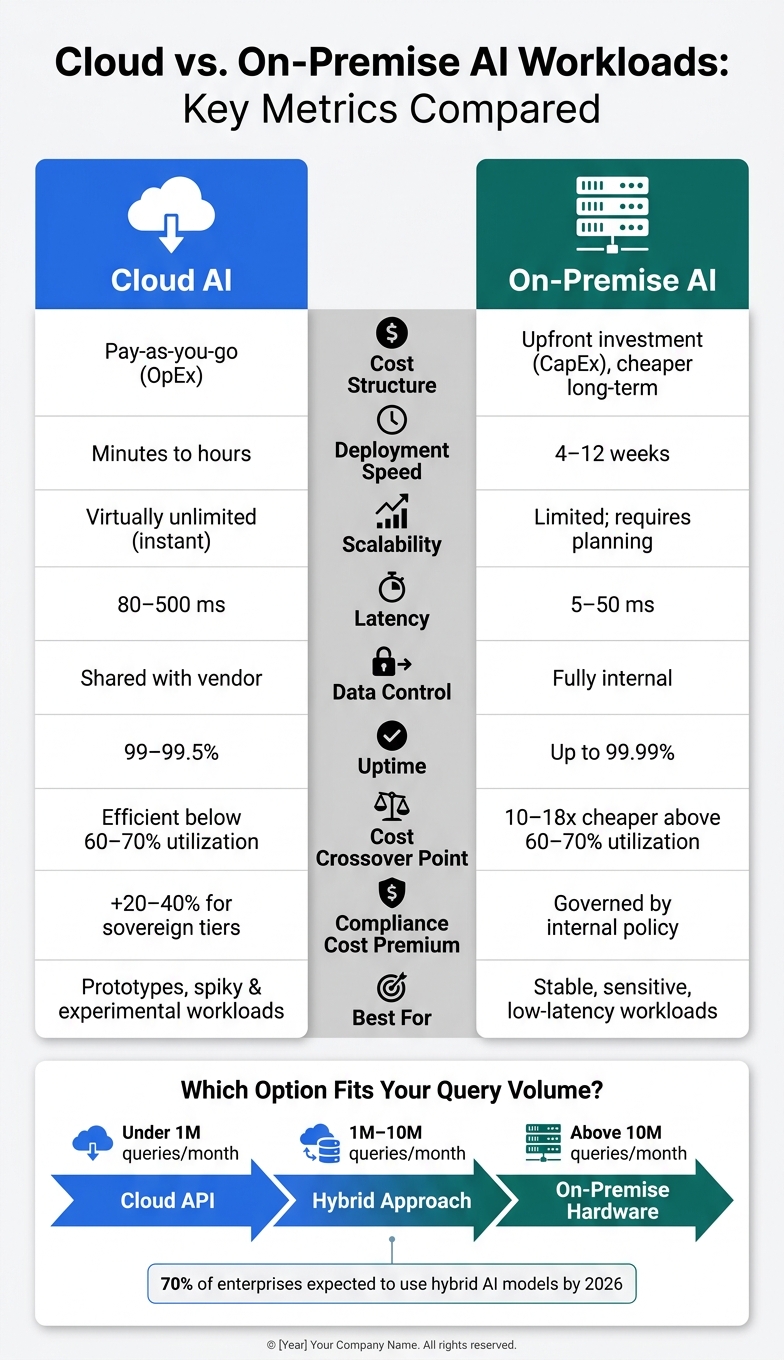
Cloud vs. On-Premise AI: Key Metrics Compared (2026)
Cloud AI Workloads: Pros and Cons
Advantages of Cloud AI Workloads
The cloud makes accessing GPUs like NVIDIA H100 or Blackwell B200 incredibly fast - just minutes compared to the weeks (or even months) it might take to provision them on-premise. This speed can be a game-changer for teams running experiments, handling traffic surges, or launching AI products where demand is unpredictable.
Another big plus? Managed services like AWS Bedrock and Azure AI Foundry take care of the maintenance headaches. This allows teams to stay focused on building and refining models, rather than worrying about infrastructure. Plus, the pay-as-you-go pricing structure is ideal for startups, prototyping, or workloads that aren’t constant.
But while these perks are appealing, they come with their own set of hurdles.
Challenges of Cloud AI Workloads
Despite the convenience, cloud AI workloads bring some tricky challenges, especially around costs and logistics.
The pay-as-you-go model can backfire if you’re not careful. For example, agentic AI systems often generate hundreds of API calls in a single workflow, leading to what’s known as exponential API usage - and costs can balloon quickly as a result.
Data transfer costs are another hidden expense. Most major cloud providers charge around $0.08 to $0.09 per GB for outbound data. Egress costs can be underestimated by as much as 65%, especially when primary data is stored on-premise, like in hospitals or factories. Repeated data transfers for cloud inference can add up fast.
Latency is yet another issue. For instance, APIs for large language models (LLMs) can have P99 latency ranging from 3 to 15 seconds, depending on the load. This lag is unacceptable for applications like real-time voice agents or autonomous systems, which require responses in under 100 milliseconds. On top of that, 57% of enterprises cite data privacy as their biggest concern with cloud AI, and 55% actively avoid certain use cases due to security worries.
"The cloud-vs-on-premise decision is not a one-time choice - it is a portfolio optimization problem that evolves as workload patterns, organizational capabilities, and hardware markets change." - Oleh Ivchenko, AI Economics Series
Requirements for Cloud AI Adoption
Moving to the cloud isn’t just about flipping a switch - it demands both technical and organizational prep to manage costs, ensure compliance, and maintain flexibility.
Cost management is critical. Without clear budgets, alerts, and capacity planning, usage-based pricing can spiral out of control. Tools like AWS Provisioned Throughput and reserved instances (1-year or 3-year commitments) can cut costs by 30–50% compared to on-demand pricing. For batch jobs that can tolerate interruptions, spot instances can offer 60–80% savings.
Compliance is another key factor. Regulations such as HIPAA, GDPR, and the upcoming EU AI Act (effective August 2026) enforce strict data residency rules. To address this, some providers offer specialized options like AWS EU Sovereign Cloud, though these come at a 20–40% premium over standard pricing. Additionally, industries with heavy compliance needs might face extra costs - legal reviews and audits can add an extra 15–22% to deployment budgets.
Finally, portability is essential for avoiding vendor lock-in. By containerizing workloads and using tools like Kubernetes, organizations can switch seamlessly between cloud and on-premise environments as their needs evolve.
On-Premise AI Workloads: Pros and Cons
Advantages of On-Premise AI Workloads
On-premise AI gives organizations complete control over their data pipeline. There's no shared tenancy, no third-party involvement, and no uncertainty about where sensitive data resides. For industries like healthcare, finance, and defense, this level of control isn't optional - it's a requirement.
Performance is another area where on-premise systems shine. Local deployments can deliver sub-millisecond response times, which are critical for applications like manufacturing automation or high-frequency trading. While cloud solutions often boast 99–99.5% uptime, on-premise hardware can exceed 99.99%. Additionally, rate limiting accounts for 60% of all LLM API errors in production environments, a problem that local setups can avoid entirely.
From a cost perspective, on-premise AI becomes far more economical for steady, high-volume workloads. Once utilization surpasses 60–70%, running inference locally can be 10 to 18 times cheaper than using cloud APIs. For example, enterprises investing $1.96 million upfront in on-premise AI infrastructure have reported a four-year return on investment (ROI) of 1,225%.
"Enterprise AI should adapt to your governance structure, not the other way around." - Worqlo
Challenges of On-Premise AI Workloads
These advantages come with significant costs and complexities. For example, a single NVIDIA H100 80GB GPU can cost between $30,000 and $40,000. A full-scale on-premise deployment typically takes 9 to 18 months to move from planning to production. Entry-level CPU-based servers start at around $250,000, while enterprise GPU clusters can exceed $2 million in upfront capital expenses.
Operational costs are often underestimated by as much as 30–40%. These include power consumption, with cooling adding an extra 50–70%, and staffing costs, as senior infrastructure engineers in major U.S. markets earn between $180,000 and $240,000 annually.
Scalability poses another challenge. Unlike the cloud, where additional GPU capacity can be added in minutes, expanding on-premise capacity involves lengthy procurement cycles, often delayed by supply chain issues. The rapid evolution of AI accelerators (every 12–24 months) also creates the risk of stranded capital if hardware isn't refreshed regularly.
Requirements for On-Premise AI Deployment
To navigate these challenges, a successful on-premise deployment requires both cutting-edge hardware and optimized software. The hardware stack typically includes GPU-accelerated systems like NVIDIA H100 or A100, NVMe high-speed storage, and specialized networking solutions such as InfiniBand or 100–400 GbE to handle the immense data throughput AI workloads demand.
On the software side, essential components include an orchestration layer like Kubernetes, inference servers such as vLLM or TGI, vector databases for retrieval-augmented generation (RAG), and observability tools to monitor for model drift. Data governance is equally critical, requiring strict classification and residency protocols before deploying sensitive workloads.
Before committing to significant capital expenditures, it's crucial to measure GPU utilization over at least 60 days. Many organizations running on-premise AI average only 42% GPU utilization, signaling widespread overprovisioning. A smarter approach is to start with edge deployments on employee devices to identify high-value use cases, then scale centralized infrastructure around workloads that are proven and predictable.
These foundational steps are essential for comparing the capabilities of on-premise AI with cloud-based alternatives.
How to Decide: Cloud vs. On-Premise
Key Factors to Weigh
When deciding between cloud and on-premise solutions for AI workloads, several factors come into play. These include data sensitivity, workload predictability, latency requirements, data gravity, and operational maturity. Let’s break them down:
Data sensitivity is often the first consideration. If your workloads involve sensitive information like health records, financial data, or anything regulated under laws like HIPAA or GDPR, on-premise is the default choice. In these cases, compliance requirements outweigh cost concerns.
Workload predictability directly impacts cost efficiency. The cloud works well for unpredictable or seasonal workloads, such as experimental projects or demand spikes. However, for stable, high-volume tasks, on-premise becomes more cost-effective when utilization exceeds 60–70%. For example, if a cloud GPU instance runs over six hours daily, owning hardware often proves cheaper over a five-year period.
Latency requirements can be a dealbreaker. On-premise setups typically provide response times between 5 and 50 milliseconds, while cloud APIs range from 80 to 500 milliseconds. For real-time applications - like fraud detection or voice-activated systems - this difference can be critical.
Data gravity is another cost factor. Moving large datasets to and from the cloud can add 15–30% to your total cloud spend due to egress fees. If your data is already stored locally, keeping compute resources nearby can save money and simplify operations.
Operational maturity determines whether you have the resources for on-premise management. Running on-premise systems requires 0.5 to 1.5 full-time staff for tasks like MLOps and infrastructure management. If your team lacks this capacity, cloud solutions are often the better option.
"Choosing on-premise vs cloud AI is a management decision, not a technical one - it combines compliance, data classes, operating cost and deployment speed." - Kacper Włodarczyk, CEO, ALGORCOMP
These factors often lead companies to adopt hybrid models, blending cloud and on-premise strategies to suit different workloads.
Common Hybrid Partitioning Patterns
Since no single environment fits every need, many organizations combine cloud and on-premise approaches. By 2026, around 70% of enterprises are expected to use hybrid AI models. Here are four popular hybrid strategies:
| Pattern | How It Works | Example Use Case |
|---|---|---|
| Cloud Dev / On-Prem Prod | Use the cloud for prototyping and testing, then deploy on-premise for production workloads requiring strict data control. | Healthcare diagnostic tools |
| Route by Sensitivity | Direct non-sensitive queries to the cloud while keeping regulated data on-premise. | Banking customer support agents |
| On-Prem Core / Cloud Burst | Handle steady workloads on-premise and scale to the cloud during demand spikes. | E-commerce recommendation engines |
| Edge + Cloud | Process real-time data at the edge, then send anonymized data to the cloud for further analysis or retraining. | Autonomous manufacturing robots |
The Route by Sensitivity model is particularly appealing for organizations hesitant to fully commit to on-premise infrastructure. This approach uses a routing layer to classify requests, sending non-sensitive queries to the cloud while keeping sensitive data local. This allows access to cutting-edge models in the cloud while maintaining control over regulated workloads.
Cloud vs. On-Premise: Side-by-Side Comparison
Here’s a quick comparison to help you evaluate cloud and on-premise options under typical 2026 conditions:
| Dimension | Cloud AI | On-Premise AI |
|---|---|---|
| Cost Structure | Operating expense (pay per use) | Capital expense (upfront investment, lower long-term costs) |
| Deployment Speed | Minutes to hours | 4–12 weeks for setup |
| Scalability | Virtually unlimited | Limited by hardware; expansion takes time |
| Latency | 80–500 ms | 5–50 ms |
| Data Control | Shared with vendor | Fully internal |
| Model Access | Latest models via API (e.g., GPT-4o, Claude 3.5) | Open-weight models (e.g., Llama 3, Mistral), often lagging by 6–18 months |
| Compliance | Depends on vendor certifications (sovereign tiers add 20–40% cost) | Governed by internal policies |
| Maintenance | Managed by vendor | Requires internal team (0.5–1.5 FTE) |
| Best For | Prototypes, spiky workloads, cutting-edge models | Stable workloads, sensitive data, low-latency needs |
"The cloud-vs-on-premise decision is not a one-time choice - it is a portfolio optimization problem that evolves as workload patterns, organizational capabilities, and hardware markets change." - Oleh Ivchenko, AI Economics Series
A good rule of thumb: when your monthly cloud AI costs approach 60–70% of the projected on-premise total cost of ownership (TCO), it’s worth running a migration analysis. At this point, owning hardware often provides better long-term value - assuming your workload utilization is high enough to justify the investment.
sbb-itb-f123e37
Conclusion: Picking the Right AI Workload Strategy
Key Takeaways
There’s no one-size-fits-all solution when it comes to deciding between cloud and on-premise AI workloads. Instead, the right choice depends on your specific requirements. Two key factors - data classification and query volume - play a huge role in shaping your strategy. For instance:
- Sensitive or regulated data (like HIPAA, GDPR, or financial records): Often better suited for on-premise setups or tightly controlled private environments.
- Workloads under 1 million queries per month: Cloud APIs are typically the most efficient option.
- 1 million to 10 million queries per month: A hybrid approach tends to strike the best balance.
- Above 10 million queries per month: Dedicated on-premise hardware often becomes the more cost-effective choice compared to usage-based cloud API fees.
This framework helps tackle the challenges of cost, compliance, and latency, ensuring your strategy aligns with your business needs.
"The strategic decision isn't cloud vs. on-prem vs. edge - it's which workloads belong where, and how those assignments shift as your product, user base, and compliance requirements evolve." - Institute of AI PM
To make informed decisions, consider starting with a 90-day roadmap. This phased plan includes:
- First 30 days: Audit token volumes and classify data sensitivity.
- Next 30 days: Model the total cost of ownership for different approaches.
- Final 30 days: Run a side-by-side pilot comparing cloud and on-premise use cases.
This approach ensures you gather meaningful data before committing to a long-term strategy.
How NAITIVE AI Consulting Agency Can Help
Navigating these decisions can be complex, but expert guidance makes the process smoother. NAITIVE AI Consulting Agency specializes in helping businesses evaluate their AI workloads, classify data sensitivity, and design hybrid architectures tailored to their unique needs. Whether you’re setting up your first on-premise GPU system, creating a routing layer to separate regulated and non-regulated workloads, or optimizing costs by transitioning stable production inference off the cloud, NAITIVE provides the technical expertise to guide every step of the way. Their proven methods help balance performance, compliance, and cost with maximum efficiency.
Cloud Vs. On-Prem for Generative AI Systems
FAQs
How do I know when cloud AI is costing more than on-prem?
It's a good idea to start evaluating your cloud AI expenses when they hit around 60-70% of the cost of running similar on-premises hardware over a comparable time frame. Here are a few key indicators that might signal it's time to reassess:
- Extended GPU usage: If your cloud GPU instances are running for more than six hours a day, it could be a sign of inefficiency.
- High GPU utilization: When your on-premises hardware consistently operates at over 60% capacity, it suggests you're pushing those resources to their limits.
- Heavy workloads: If you're handling more than 100,000 to 300,000 requests per month, your workload might be better suited for an on-prem setup.
Don't forget to account for cloud egress fees, which can range from 15-30%, and the staffing requirements for maintaining on-prem hardware, typically around 0.5 to 1.5 full-time employees (FTE). Balancing these factors can help you make a more informed decision about your infrastructure.
What’s the simplest way to route sensitive data on-prem and everything else to the cloud?
To manage AI workloads effectively, implement a deterministic routing layer that evaluates requests based on a well-defined policy framework. Start by classifying data according to its sensitivity - this could involve scanning for personally identifiable information (PII) or analyzing content-type headers. Once classified, establish strict routing rules: send sensitive data to on-premise or private cloud infrastructure, while allowing non-sensitive tasks to be handled in the cloud.
It's crucial to enforce a fail-closed policy. This ensures that sensitive requests are never routed to the cloud by default if local systems are unavailable, maintaining strict data security protocols at all times.
Which AI tasks should run at the edge instead of cloud or on-prem?
Edge computing works well for AI tasks that demand low latency (less than 300ms), data privacy, or offline functionality. Some common use cases include voice wake-word detection, predictive text, camera triggers, and industrial quality inspections. It’s particularly useful for handling sensitive information, such as personal, health, or financial data. For more complex or large-scale operations, a hybrid approach can be effective - using edge computing for initial processing and the cloud for more advanced computations.