
How To Track AI Service Costs Effectively
Monitor token usage, tag expenses, set multi-level alerts, and use dashboards to stop runaway AI bills and optimize model spending.

AI costs can spiral out of control if not managed properly. In 2026, businesses face challenges like unpredictable token-based pricing, hidden expenses, and usage spikes that can turn modest budgets into massive bills. For instance, a misconfigured prompt could result in a $17,000 charge instead of $100. Here's how you can take control:
- Track API usage: Use built-in tools from providers like OpenAI to monitor token counts and identify hidden costs (e.g., system prompts or reasoning tokens).
- Organize expenses: Tag costs by teams, features, or projects to improve accountability.
- Set alerts: Configure multi-level alerts to catch cost anomalies before they escalate.
- Use real-time dashboards: Consolidate data from multiple providers for a unified view of spending.
- Optimize usage: Implement prompt caching, batch processes, and scale models to cut unnecessary expenses.
The Ultimate Guide to Managing AI Agent Costs
Key Cost Components of AI Services
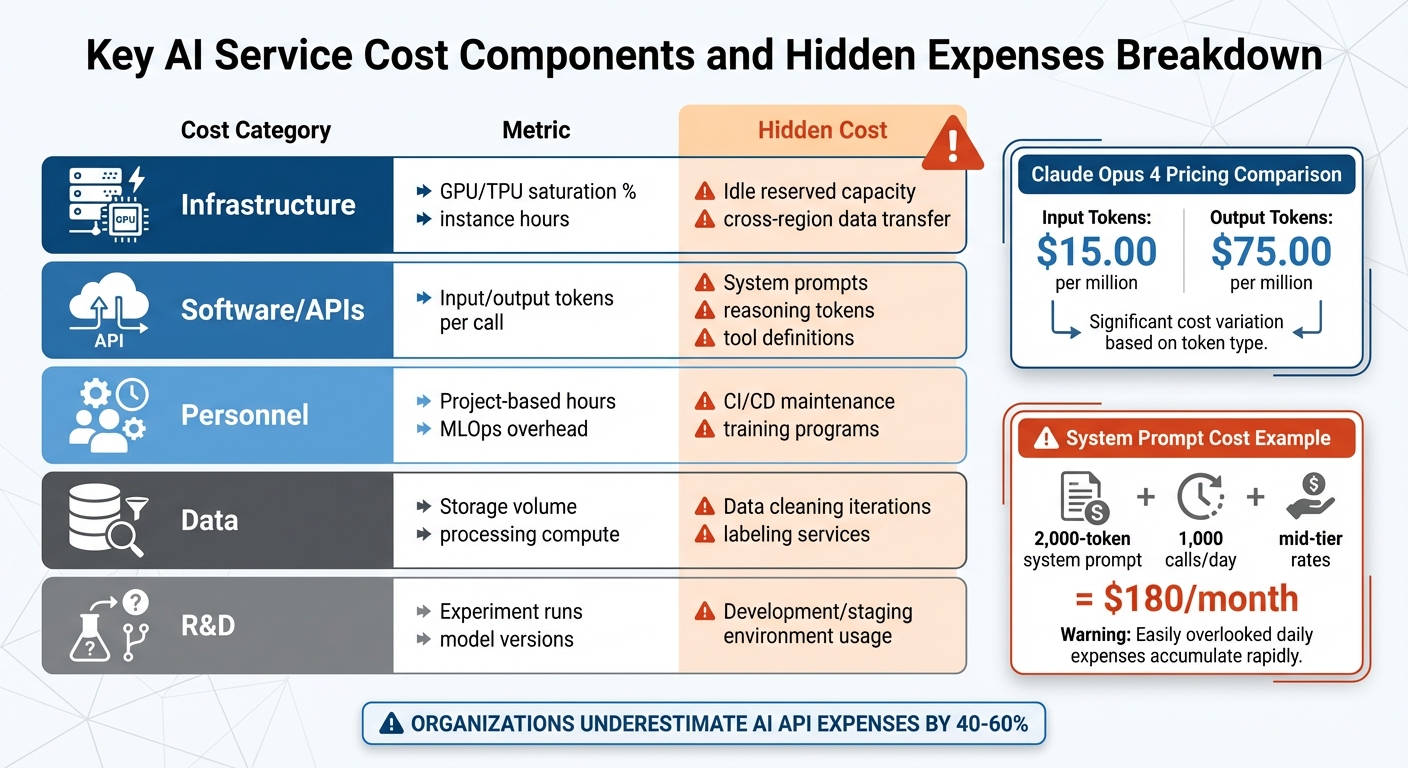
Key AI Service Cost Components and Hidden Expenses Breakdown
Understanding where your AI budget goes is the first step in managing it effectively. AI spending spans multiple areas: API calls, infrastructure, software, personnel, data, and experimentation. Each of these categories comes with its own set of challenges and often-hidden costs that can quietly eat into your budget. Let’s break down these key components and how to monitor them.
Infrastructure Costs
The compute resources that power AI systems are a major expense. This includes GPU and TPU instance hours, memory usage, and the electricity required to run these systems. Monitoring GPU and TPU utilization rates is crucial - underutilized reserved resources can quickly become a financial drain if they’re not being fully leveraged.
Other infrastructure costs include storage and networking. Expenses like vector database input/output (I/O), dataset storage, and data transfer fees (especially when moving large volumes of data across cloud regions) can grow rapidly as your data needs expand.
Software and Licensing Costs
Software costs, particularly those tied to token-based models, deserve close attention. Large language models (LLMs) charge based on token usage, and output tokens often cost significantly more than input tokens. For instance, Claude Opus 4 charges $15.00 per million input tokens but $75.00 per million output tokens.
Hidden costs can sneak in through operational overhead. For example, system prompts are sent with every API call. A 2,000-token prompt issued 1,000 times daily could cost around $180 per month at mid-tier rates (Claude Sonnet) - and that’s before factoring in user interactions. Additionally, conversation history in multi-turn chats grows incrementally, while tool definitions and reasoning tokens (used internally by the model) add further token-based charges.
To manage these costs, some opt for provisioned throughput units (PTUs), which allow for a fixed fee in exchange for reserved capacity. Calculating an "effective per-token rate" based on actual usage can help allocate these expenses to specific use cases.
Personnel and Expertise Costs
Salaries for AI engineers and data scientists form a significant part of the overall budget. But it’s not just about compensation - there are additional costs tied to training, hiring, and maintaining essential tools like CI/CD pipelines, version control systems, and automated testing frameworks. These operational expenses are often underestimated but are critical for keeping projects on track.
Data Acquisition and Processing Costs
Managing data is another costly area. Expenses include purchasing datasets, cleaning raw data, and labeling examples for training purposes. On top of that, the compute power needed to process and store this data adds up. Investing in high-quality data upfront can reduce training costs down the line, making this an area where careful planning pays off.
R&D and Experimentation Costs
Developing and refining AI models is an ongoing process. Costs tied to model development - like prototyping, iterating, and research - are often underestimated. These expenses aren’t limited to production environments; they also occur in development and staging environments. Teams exploring different models, tweaking prompts, or fine-tuning parameters can rack up significant costs even before launching a feature. Keeping a close eye on these activities is essential for allocating resources wisely.
| Cost Category | Metric | Hidden Cost |
|---|---|---|
| Infrastructure | GPU/TPU saturation %, instance hours | Idle reserved capacity, cross-region data transfer |
| Software/APIs | Input/output tokens per call | System prompts, reasoning tokens, tool definitions |
| Personnel | Project-based hours, MLOps overhead | CI/CD maintenance, training programs |
| Data | Storage volume, processing compute | Data cleaning iterations, labeling services |
| R&D | Experiment runs, model versions | Development/staging environment usage |
Setting Up Detailed Cost Tracking Systems
Understanding where your AI budget goes is just the first step. To manage costs effectively, you need to capture data accurately. This is especially important since many organizations underestimate their AI API expenses by 40% to 60%. Here's how you can monitor costs at both the API and model level.
Tracking Costs at the API and Model Level
Major AI providers like OpenAI, Anthropic, and DeepSeek include a usage object in their API responses. This object provides precise token counts for each request, making it the most reliable way to track costs. For streaming APIs, you can enable usage tracking by setting stream_options: {"include_usage": true}.
However, hidden token costs can complicate things. These costs often come from system prompts that are resent with every API call, unused tool definitions that still add tokens, and reasoning tokens that are billed as output tokens but don’t appear in responses. The table below highlights the impact of these hidden token sources:
| Hidden Token Source | Tokens Added Per Request | Monthly Cost Impact (1,000 calls/day) |
|---|---|---|
| 2,000-token system prompt | 2,000 | $180 (Claude Sonnet) |
| Base tool choice configuration | 346 | $31.14 |
| Text editor tool definition | 700 | $63.00 |
| Computer use tool definition | 466–499 | $41.94–$44.91 |
To streamline tracking across multiple providers, a centralized logging system works best. Using a "hub-and-spoke" proxy or a dedicated Python logger allows you to consolidate usage data from OpenAI, Anthropic, and other platforms into a single dashboard. Additionally, API parameters like group_by (available in OpenAI's Usage API) let you break down costs by model, project ID, or specific API keys for more detailed insights.
Implementing Metadata Tracking
While token counts show consumption, metadata provides the context needed to connect costs to specific business functions. Without metadata, it’s impossible to determine which projects or teams are driving costs. Metadata tracking helps answer critical questions like, "What’s the monthly cost of our customer support chatbot?" or "Which team is using the most expensive models?"
Organizations that adopt attribution-based AI billing systems often reduce their AI spending by 18% through better accountability. To capture this data, log identifiers such as project_id, department, user_id, feature_name, session_id, and, for multi-turn conversations, thread_id.
Assign a unique externalRequestId to each LLM call, and reuse it for retries to prevent duplicate logging. Additionally, categorize requests by product features (e.g., checkout.ai_summary) instead of technical API paths. This makes reports more actionable for business teams.
Avoiding Performance Overhead
Cost tracking systems should operate efficiently without slowing down your application. To ensure this, use non-blocking, fire-and-forget telemetry calls with strict timeouts (300–800ms) to keep latency low.
Include try/catch blocks in your tracking layer to prevent logging failures from affecting production. For high-throughput systems, batch and queue telemetry data instead of logging each token separately. To save on storage costs and protect sensitive information, avoid storing raw prompts and outputs in your cost-tracking database.
Organizing and Categorizing AI Costs
Tracking AI expenses is just the first step. To turn those numbers into actionable insights, you need to organize and categorize the data effectively. Raw metrics like token counts or API bills don’t tell you which projects deserve more funding or which teams might need their budgets adjusted. By structuring your cost data, you can transform technical metrics into insights that guide better financial decisions. This approach also lays the groundwork for detailed monitoring and smarter management.
Tagging Costs by Type and Purpose
A consistent tagging system is essential for making sense of AI costs. Start by tagging resources based on lifecycle stages - such as training, inference, and fine-tuning. This helps you set realistic expectations and spot issues quickly. For example, a sudden spike in training costs might signal the need for immediate investigation.
Go a step further by tagging costs according to projects (e.g., project-alpha-chatbot) and specific features or functions (e.g., recommendation-engine or customer-support-bot). This method ties technical expenses directly to their user-facing value. Additionally, include tags that reflect output quality, such as "successful" or "unsuccessful" outputs, to measure inefficiencies caused by issues like AI hallucinations or failed API requests.
"The 'successful output' tag will truly transform your unit cost tracking capabilities. You can use this tag to quantify the cost of inefficiency due to hallucinations or failed processes".
To keep things clear and automation-friendly, use a standardized naming convention, such as lowercase letters with dashes (e.g., project-a-chatbot-inference). If your AI provider doesn’t support native tagging, leverage FinOps platforms that offer “virtual tags” or metadata layers to group costs without direct console access.
Aligning Costs with Business Units and Teams
Once your tagging system is in place, the next step is mapping these costs to the teams or departments responsible for them. This increases accountability and helps clarify who is driving specific expenses. Use tags like business-unit, cost-center, and owner to connect spending to the appropriate teams. For broader tracking, account-based separation works well, while tag-based methods provide more granular details.
To streamline this process, create a shared tagging dictionary and enforce its use through IAM policies. This ensures consistency and automates tag propagation. With this foundation, you can implement systems like showback (giving teams visibility into their spending) and chargeback (formally recovering costs from departments).
Improving Budget Management
Organized cost data doesn’t just help with tracking - it also enhances budget forecasting. When you understand the cost per feature or inference run, you can make more informed decisions about where to invest. This level of detail supports better unit economics and helps prioritize features based on their value and cost.
Companies that adopt attribution-based AI billing systems often see spending reductions of around 18% due to improved accountability. The focus shifts from simply asking, “How much did we spend?” to evaluating, “Was it worth it?” Interestingly, 44% of engineering professionals consider AI explainability a top priority for budgeting. This highlights the need for a shared understanding between finance and engineering teams.
Start small by manually identifying key tags, then gradually automate the process to achieve over 90% coverage.
"You don't need perfect visibility to start getting value from AI cost tracking. But you do need to start".
Implementing Real-Time Monitoring and Alerts
Real-time monitoring takes cost management to the next level, turning what used to be reactive reviews into proactive oversight. By catching bugs or unexpected usage spikes early, it helps prevent costs from spiraling out of control.
Setting Up Real-Time Dashboards
A well-designed dashboard is essential for keeping tabs on daily costs across all your AI providers. Instead of manually checking billing pages, use APIs like OpenAI's /organization/costs or Anthropic's /v1/organizations/cost_report to pull data automatically. This data should include not just dollar amounts but also metrics like token usage, request volume, latency, and error rates. Having this context makes it easier to pinpoint the cause of cost spikes. For instance, a sudden increase in spending might be tied to longer prompts or higher traffic. Since token pricing can vary widely between models, breaking down costs by model and provider helps you see which parts of your system are driving expenses.
If you're running high-volume applications, consider setting a sampling rate for trace analysis. This helps balance the need for visibility with the cost of monitoring itself. Keep in mind, though, that cloud platforms like Google Cloud Cost Explorer often have a delay of up to 24 hours - or sometimes longer - when displaying costs.
Once you have real-time data visibility, the logical next step is to set up alerts to keep costs under control.
Configuring Alerts for Cost Thresholds
Multi-level alerts - set at 50%, 80%, and 100% of your budget - are a smart way to catch cost anomalies before they snowball . For production AI systems, daily alerts are particularly important since they allow you to address runaway costs within a single day.
Beyond basic thresholds, anomaly detection can help you spot unusual spending patterns. For example, Google Cloud's anomaly detection lets you set parameters like a 20% deviation and a minimum dollar impact (e.g., $200) to ignore small, insignificant changes. To avoid excessive notifications, pair percentage-based alerts with a minimum dollar threshold - such as flagging a 20% increase only if it exceeds $50.
You can also automate responses to alerts using tools like Google Cloud Pub/Sub or AWS SNS. These tools enable actions like disabling services, limiting usage, or sending notifications (e.g., to a Slack channel) . Regularly test your alert system to ensure messages aren’t accidentally filtered into spam.
Integrating Monitoring Tools with Cloud Cost Platforms
Bringing monitoring tools and cloud cost platforms together creates a unified view of your expenses. Start by configuring your cloud provider to export detailed billing data to a central location, such as BigQuery for GCP or storage accounts for Azure .
To enhance this integration, push AI-specific data - like token usage, anomaly flags, or feature identifiers - into your cloud monitoring systems via APIs. This allows you to set up native alerts and correlate AI-related costs with infrastructure usage . Tools like Google Cloud Cost Explorer can then combine billing data with utilization metrics, helping you identify underused but expensive resources.
At the infrastructure level, enforce tagging for all AI workloads before deployment using tools like Kubernetes admission controllers. This ensures that every expense is properly attributed, avoiding untracked "dark spend". If you're using machine learning for anomaly detection, start with a 95% confidence interval to reduce false positives, and retrain your models weekly to keep up with changes in your infrastructure.
"AI cost management isn't just about spending less. It's about spending smart - understanding where every dollar goes, catching anomalies early, and making informed trade-offs." - Grafient
Visualizing and Reporting AI Costs
Real-time monitoring is just the start - visual dashboards take raw data and turn it into something you can act on. When paired with detailed tracking systems, these dashboards become the bridge between data and strategic decision-making. Of course, not everyone needs the same level of detail. Executives want to see big-picture trends, finance teams dive into granular cost breakdowns, and engineers focus on metrics they can use to fine-tune operations.
Creating Stakeholder-Specific Dashboards
Dashboards work best when they’re tailored to the audience. For example:
- Executives and finance teams focus on overall spend and burn rate.
- Product managers track metrics like cost per user or project.
- Engineers need operational details, such as cost per request, token efficiency, cache hit rates, and alerts for anomalies.
These dashboards consolidate data from multiple providers - think OpenAI, Anthropic, and AWS - into a single, unified view. This approach eliminates the hassle of manually checking each provider's billing page and allows for cross-provider insights, like answering, "How much did we spend this week?". Given that token pricing can vary significantly between models, breaking down costs by model is essential.
For shared resources like Provisioned Throughput Units (PTUs), you can calculate an "effective rate" based on actual use. This ensures costs are fairly distributed among teams. Additionally, linking spending to performance metrics - like latency or "cost per successful outcome" - helps assess whether higher costs are yielding better results.
Implementing Showback Approaches
Showback systems make costs visible to the teams responsible for them, fostering accountability without requiring inter-departmental fund transfers. The key here is transparency. To make this work, consistent tagging (as discussed earlier) is crucial.
Direct costs can be assigned using tags, while shared costs can be prorated based on consumption metrics like CPU, memory, or I/O operations. For PTUs, you can calculate spending for each use case with this formula:
Spend = PTU Rate * (2 - Utilization Rate) * Mtoken Count.
This accounts for how lower utilization can increase the effective cost per token.
Tracking costs against successful and unsuccessful outputs is another important step. This lets you quantify the financial impact of errors like hallucinations or failed API requests. Thalia Elie from CloudZero emphasizes:
"You don't need perfect visibility to start getting value from AI cost tracking. But you do need to start".
Delivering Timely and Actionable Reports
Good reports don’t just show numbers - they explain cost changes and provide actionable insights. Combining operational metrics (like token counts, GPU usage, and latency) with financial data (such as daily spend, provider breakdowns, and cost per user) creates a complete picture.
It’s also important to uncover hidden cost drivers. For example, a 2,000-token system prompt that’s resent on every call could cost $180 per month if used across 1,000 daily calls at mid-tier rates. Reports should highlight areas like system prompt overhead, growing conversation histories, tool definition tokens, and even OpenAI’s "reasoning tokens", which are billed as output but don’t appear in responses.
Instead of relying on static budgets, set alerts for spending that deviates significantly from the average. Pay special attention to idle resources, such as hosting hours for fine-tuned models or unused PTUs, which can quietly rack up costs. If you’re using Azure, note that cost reports refresh every four hours - something to keep in mind when reviewing near-real-time data. For larger organizations, automate exports to storage accounts rather than downloading manually, especially since cost files over 2 GB can be challenging to manage in tools like Excel.
Conclusion
Keeping AI costs under control requires ongoing attention and smart adjustments. To maintain a balanced AI budget, it's crucial to break down every expense - whether by tracking costs at the model level, implementing prompt caching (which can cut input costs by up to 90%), or identifying idle resources that could silently inflate your spending.
The financial risks are substantial. On average, organizations underestimate their AI API expenses by 40–60%, and many find an 88% gap between their budgeted and actual spending. As Grafient aptly states:
"AI cost management isn't just about spending less. It's about spending smart - understanding where every dollar goes, catching anomalies early, and making informed trade-offs between model quality and budget".
To get started, consider some practical steps: enable prompt caching, set up multi-tiered alerts at 50%, 75%, and 90%, and scale your models appropriately to avoid overspending on basic tasks. Additionally, cutting back on unnecessary system prompts, keeping an eye on idle deployments, and using batch APIs for non-real-time processes can help you save up to 50% on token costs. These strategies can literally be the difference between a $500/month bill and a $50/month one.
This guide highlights the importance of consistent monitoring, clear reporting, and proactive alerts in managing AI expenses. Together, these practices form a strong foundation for keeping AI costs in check. For businesses looking to build cost-effective AI solutions or implement the tracking methods discussed here, NAITIVE AI Consulting Agency offers expertise in creating AI systems with built-in cost management. Their team ensures that every AI deployment is optimized for both performance and budget from the start.
The bottom line? Start tracking today to confidently and sustainably grow your AI initiatives.
FAQs
What’s the fastest way to catch a sudden cost spike?
The fastest way to spot an unexpected cost spike is by using real-time monitoring and alerts to catch anomalies as they happen. Tools like AWS Cost Anomaly Detection or Google Cloud's anomaly detection features are great for this. They can track unusual cost changes, break down expenses by service or resource, and even send alerts through platforms like Slack or email. These tools allow you to act quickly, stopping unexpected costs before they snowball.
How do I attribute token costs to a specific team or feature?
To keep track of token costs for a specific team or feature, include metadata tags (like team or feature IDs) in your API requests. This tagging helps monitor usage more efficiently. You can use tools such as proxies or OpenTelemetry to automate the tagging process and consolidate monitoring efforts. By doing this, you can allocate costs more accurately, making it easier to manage and fine-tune your AI-related expenses.
What hidden token charges should I look for in API usage?
Hidden token charges in API usage often come from factors you might not immediately notice. These include system prompts that are resent with every API call, the accumulation of conversation history, tool definitions that add extra tokens, and reasoning tokens that are billed as output even though they don't appear in the responses you see.
To keep these costs under control, make sure to monitor the usage object in your API responses. This will help you track token consumption accurately. Additionally, setting up alerts can help you identify and address inefficiencies before they become costly.