
How to Optimize AI Frameworks for Scale
Identify bottlenecks, optimize models with quantization/pruning/distillation, use autoscaling, distributed compute, and modular design to scale AI efficiently.

Scaling AI frameworks is all about improving efficiency, saving costs, and ensuring systems perform well under increasing demands. Without proper optimization, businesses risk wasted resources, higher costs, and poor user experiences. Here’s a quick breakdown of how to do it:
- Identify Bottlenecks: Use tools like
nvidia-smior DCGM to monitor GPU usage, latency, and memory issues. Track metrics like queue size, batch size, and token latency to pinpoint inefficiencies. - Optimize Models: Techniques like quantization (reducing precision), pruning (removing unnecessary components), and knowledge distillation (training smaller models) can cut costs and improve performance.
- Load Balancing & Auto-Scaling: Use Kubernetes HPA or advanced algorithms to manage traffic surges. Monitor workload-specific metrics like GPU memory usage and queue thresholds for better scaling.
- Leverage Distributed Computing: Split workloads across GPUs, TPUs, or multiple machines using frameworks like TensorFlow’s
tf.distribute.Strategy. For massive models, explore tensor or pipeline parallelism. - Use Specialized Hardware: Invest in GPUs like NVIDIA H100 or TPUs to handle complex AI tasks. Partition GPUs with MIG technology to maximize usage.
- Build Modular Systems: Break applications into smaller microservices to scale individual components efficiently. Use REST APIs or gRPC for communication and secure systems with RBAC.
Maximizing AI Infrastructure Efficiency at Scale: Insights from LinkedIn’s GPU Fleet
Assess Your Infrastructure and Find Bottlenecks
To scale AI systems effectively, identifying bottlenecks in your infrastructure is crucial. Many challenges stem from underutilized hardware, uneven workloads, or latency spikes. The key is to focus on the right metrics and interpret them to uncover your system's limitations.
Performance Analysis Tools
Start with basic command-line tools like nvidia-smi and htop to get immediate snapshots of system performance. For more detailed insights in production, the Data Center GPU Manager (DCGM) provides granular metrics. For example, it tracks GPU utilization (DCGM_FI_DEV_GPU_UTIL) and framebuffer memory usage (DCGM_FI_DEV_FB_USED), which are critical for managing large key-value cache models.
When it comes to simulating real-world workloads, tools like locust-load-inference, Grafana k6, and Apache JMeter are invaluable for load and stress testing. Pair these with Cloud Trace to identify latency between distributed components and Cloud Profiler to evaluate code performance. Together, these tools help you quickly pinpoint CPU or memory bottlenecks in production environments.
Pay close attention to specific metrics that align with your workload. For example:
- Queue size: Tracks the number of requests waiting in line, which helps optimize throughput.
- Batch size: Monitors the number of requests being processed simultaneously, especially important when minimizing latency.
- Time to First Token (TTFT) and Inter-Token Latency (ITL): These are vital for assessing responsiveness in large language models.
- I/O bottlenecks: Delays in pre-processing, post-processing, or data retrieval can sometimes exceed the time spent on inference itself.
By monitoring these metrics, you can identify inefficiencies and adjust your infrastructure accordingly.
Analyze Workload Distribution
Uneven workload distribution can lead to wasted resources and performance gaps. For instance, a growing prefill or request queue often indicates that incoming requests are overwhelming your processing capacity. This imbalance is frequently caused by GPU fragmentation or underused components, especially in environments with GPUs of varying performance levels.
A practical example of addressing this challenge comes from Turkish Airlines. In December 2025, they adopted Red Hat OpenShift AI to automate GPU provisioning across more than 50 use cases. This change reduced launch times from days to minutes and saved the company an estimated $100 million annually.
Additionally, inefficiencies like over-padding in NLP models can slow down processing. Tokenizers that pad shorter sequences to a fixed maximum length increase computational overhead unnecessarily. To address this, use queue size as your primary indicator when optimizing throughput, and focus on batch size when latency is a concern. For dynamic environments, setting a Kubernetes stabilization window of about five minutes can prevent premature resource removal during temporary traffic dips.
Optimize AI Models for Scale
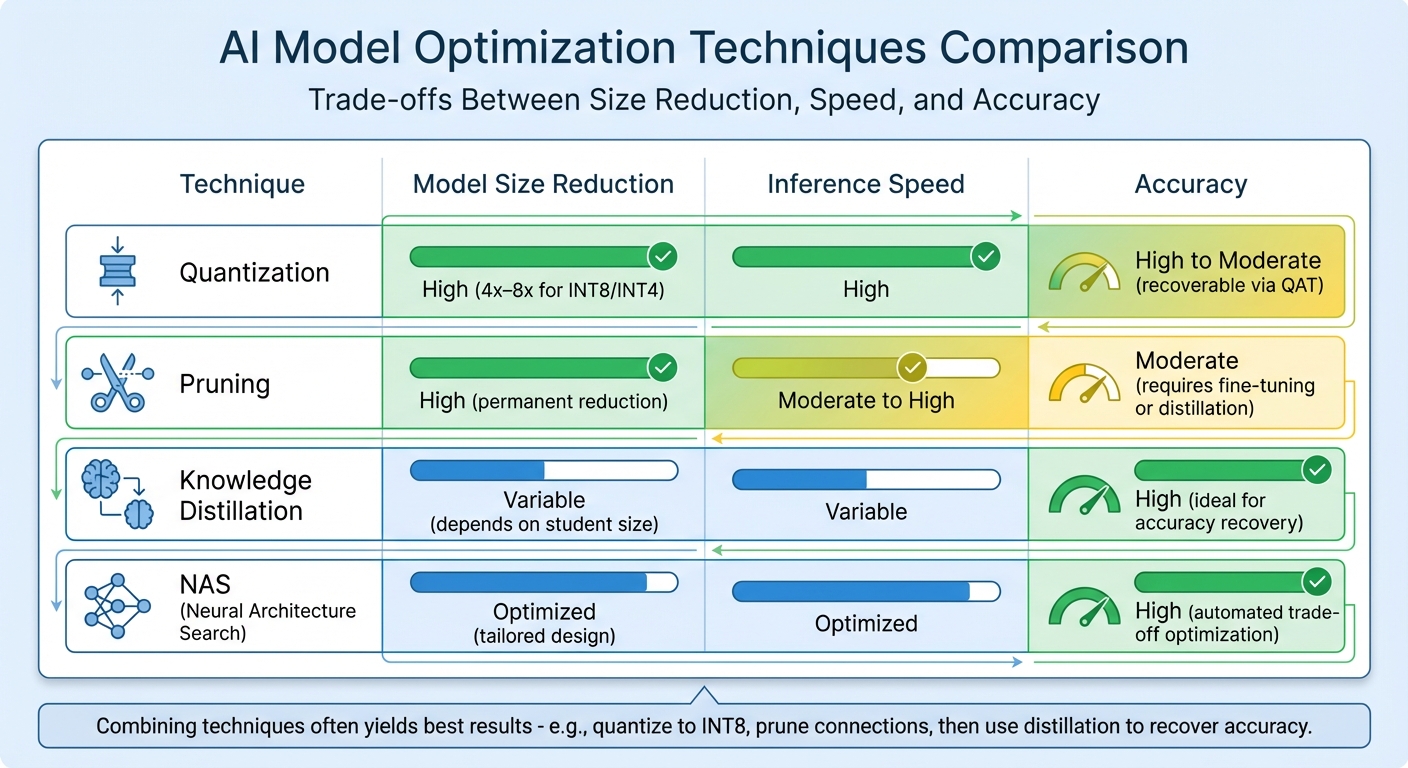
AI Model Optimization Techniques Comparison: Size, Speed, and Accuracy Trade-offs
Scaling AI models effectively requires addressing infrastructure limitations and enhancing model efficiency. Once bottlenecks are identified, optimizing models becomes crucial. By reducing computational demands, you can handle more requests, speed up responses, and minimize hardware needs. Four key techniques - quantization, pruning, knowledge distillation, and neural architecture search (NAS) - each tackle efficiency from a different angle.
"Model optimization is a category of techniques focused on addressing inference service efficiency. These techniques represent the best 'bang for buck' opportunities to optimize cost, improve user experience, and scale." - Eduardo Alvarez, Senior Technical Lead, NVIDIA
Here’s a closer look at these techniques:
Quantization
Quantization simplifies model computations by reducing the precision of weights and activations, often converting from 32-bit floating-point (FP32) to smaller formats like 16-bit (FP16), 8-bit integers (INT8), or even 4-bit. This reduces model size and speeds up inference. Post-Training Quantization (PTQ) is a quick method that compresses models using a calibration dataset without retraining. If accuracy drops too much, Quantization-Aware Training (QAT) can help recover it by simulating quantization effects during training.
For example, Intel's Neural Compressor has shown performance improvements of up to 4.2x on VNNI hardware with minimal accuracy loss. In large language models, the move toward 4-bit formats like GGUF and AWQ has become common to optimize GPU memory usage and handle more simultaneous requests. Additionally, using FP8 formats for key-value caches can significantly cut memory use during large-batch inference.
Start with PTQ for quick gains in latency and throughput. If precision needs improvement, switch to QAT. Choose quantization formats that align with your hardware - formats like GGUF or AWQ are particularly efficient for NVIDIA GPUs and edge devices.
Pruning
Pruning removes unnecessary components - such as weights, layers, or attention heads - from a neural network, reducing computational and memory demands. This technique is often combined with others to maintain accuracy.
In December 2025, NVIDIA highlighted how combining pruning with knowledge distillation allowed teams to fine-tune large models for specific tasks while permanently lowering their computational footprint. This approach enables smaller models to perform like larger ones while staying efficient. However, the success of pruning depends on hardware compatibility, as some accelerators are better suited for sparse matrices than others.
Knowledge Distillation
Knowledge distillation trains a smaller "student" model to mimic a larger "teacher" model. The student not only learns from labeled data but also from the teacher's output probabilities, which capture detailed relationships between classes. This is especially useful for recovering accuracy after aggressive pruning or quantization.
This method allows you to design student models that fit within strict memory or latency limits, making it ideal for deploying on edge devices or mobile platforms with limited resources.
Neural Architecture Search (NAS)
Neural Architecture Search automates the design of optimal network architectures by exploring numerous configurations. NAS tailors architectures to hardware constraints like latency, memory, and energy consumption.
For instance, Google researchers developed MnasNet, achieving 75.2% top-1 accuracy on ImageNet with just 78ms latency on a Pixel phone - 1.8x faster than MobileNetV2, with better accuracy. Similarly, Deci AI used NAS to create YOLO-NAS, an object detection model that surpassed previous YOLO versions in both speed and accuracy.
"Teams using NAS report finding architectures that outperform manually designed models by 15-40% on task-specific metrics while reducing development time from months to weeks." - Emmett Fear, Runpod
NAS involves three main components: search space, strategy, and performance estimation. Techniques like Differentiable Architecture Search (DARTS) make the process faster by treating architecture search as a continuous optimization problem, cutting time by 2x to 4x compared to traditional methods.
Start with proxy tasks using smaller datasets or fewer training epochs to lower costs. Use one-shot NAS with weight sharing to avoid training every candidate model separately. When scaling up, include latency, FLOPs, and memory usage in your optimization criteria alongside accuracy.
"Neural Architecture Search isn't a solution where you can just bring your data and expect a good result without experimentation. It is an experimentation tool." - Google Cloud Documentation
Compare Optimization Techniques
The table below outlines the trade-offs between these techniques and how combining them can yield the best results:
| Technique | Model Size Reduction | Inference Speed | Accuracy |
|---|---|---|---|
| Quantization | High (4x–8x for INT8/INT4) | High | High to Moderate (recoverable via QAT) |
| Pruning | High (permanent reduction) | Moderate to High | Moderate (requires fine-tuning or distillation) |
| Knowledge Distillation | Variable (depends on student size) | Variable | High (ideal for accuracy recovery) |
| NAS | Optimized (tailored design) | Optimized | High (automated trade-off optimization) |
Combining these techniques often yields the best results. For example, you might quantize a model to INT8, prune unnecessary connections, and then use knowledge distillation to recover any lost accuracy. This layered approach ensures maximum efficiency while maintaining performance.
To learn more about scaling your AI models, visit NAITIVE AI Consulting Agency (https://naitive.cloud).
Set Up Load Balancing and Auto-Scaling
After refining your AI model for peak efficiency, it’s essential to ensure your infrastructure can adapt to changing demands. Without dynamic load balancing and auto-scaling, even the best-optimized models can falter under sudden traffic surges. The aim? Keep performance steady during busy periods while cutting costs when demand is low.
Real-Time Load Balancing Methods
Kubernetes Horizontal Pod Autoscaler (HPA) is a powerful tool for managing replicas. It recalculates the number of pods every 15 seconds using the formula:
desiredReplicas = ceil(currentReplicas * (currentMetricValue / desiredMetricValue)).
However, standard metrics like CPU and memory usage aren’t always enough for AI workloads. Instead, fine-tune scaling with workload-specific metrics. For instance, set initial queue thresholds (around 3-5 requests) and monitor batch sizes to meet latency goals.
Another key metric is the GPU Duty Cycle, which provides a workload-agnostic signal for scaling. Keep an eye on GPU memory usage, especially since some frameworks preallocate VRAM, potentially complicating scale-down efforts.
To prevent constant pod adjustments, Kubernetes uses a stabilization window - defaulting to 5 minutes - for scale-down operations. During this time, HPA selects the highest replica count recommendation from recent data. For larger models that take longer to initialize, extend this window to avoid disruptions. These metrics not only guide pod scaling but also help trigger node scaling to keep up with demand.
Auto-Scaling with Kubernetes
Pairing HPA with node autoscaling tools like Karpenter or Cluster Autoscaler ensures hardware is provisioned dynamically. Accurate pod resource requests are critical here - set them too low, and new nodes won’t make a difference; set them too high, and you’ll end up paying for unused infrastructure.
AI models often experience spikes in CPU and GPU usage during startup, as weights load into memory. To address this, use startupProbes or tweak the HPA’s cpu-initialization-period parameter to avoid premature scaling during these initial bursts. The default tolerance of 10% ensures HPA ignores minor metric fluctuations, keeping scaling operations stable.
For TPU-based workloads like JetStream, use the jetstream_slots_used_percentage metric to optimize throughput and enable parallel request processing. Additionally, with GKE version 1.33 or later, enabling the Performance HPA profile supports up to 5,000 HPA objects per cluster.
Advanced Resource Allocation Algorithms
If standard scaling feels too reactive, advanced algorithms can take resource allocation to the next level. Predictive models, for example, can anticipate traffic spikes before they occur. The LSTM-MARL-Ape-X framework is one such approach, combining BiLSTM for demand forecasting with Multi-Agent Reinforcement Learning (MARL) in a distributed setup. This method achieves 94.6% SLA compliance, reduces energy use by 22%, and maintains decision latency under 100ms even at scales of 5,000 nodes.
"Unlike decoupled prediction-action frameworks, our method provides end-to-end optimization, enabling robust and sustainable cloud orchestration at scale." - Nature Scientific Reports
For smaller setups, pairing LSTM for demand forecasting with DQN for scheduling can improve resource utilization by 32.5% and cut average response times by 43.3%. Tools like the Intelligent Pod Autoscaler (IPA) are also emerging. By analyzing application logs and Prometheus metrics, IPA can suggest dynamic scaling strategies - both horizontal and vertical - without the need for manual threshold adjustments.
"Defining thresholds can be tricky, especially when there's little to no understanding of incoming traffic patterns. IPA eliminates this guesswork." - Shafin Hasnat
When exploring advanced techniques, consider bidirectional LSTMs with feature-wise attention to capture both past and future workload patterns. This is especially useful for early detection of traffic spikes. For multi-agent systems, variance-regularization can stabilize learning, ensuring agents work together effectively across distributed nodes. These advanced methods, combined with traditional scaling, create a robust and adaptable scaling strategy.
For more tailored advice on optimizing your AI infrastructure, check out NAITIVE AI Consulting Agency.
Use Distributed Computing and Specialized Hardware
After implementing auto-scaling and load balancing, take it a step further by deploying distributed computing and specialized hardware to handle the intense demands of large-scale AI workloads. These strategies can significantly enhance your AI framework's ability to tackle massive datasets and complex models.
Distributed Computing Frameworks
When dealing with datasets or models that surpass the capacity of a single machine, distributing the workload across multiple machines becomes essential. Frameworks like TensorFlow's tf.distribute.Strategy API make this possible by enabling training across GPUs, TPUs, or multiple machines. By wrapping model creation and optimizers within strategy.scope(), you can effectively distribute tasks.
Depending on your setup, you can choose between synchronous and asynchronous training. Synchronous training keeps all workers in sync, using algorithms like NCCL for gradient aggregation at each step. In contrast, asynchronous training allows workers to operate independently, updating variables through a parameter server architecture.
Start with data parallelism, where the same model is replicated across nodes while large datasets are divided for simultaneous processing. If your model exceeds memory limits even with a batch size of one, switch to model parallelism, which splits the model itself across multiple nodes.
"The goal of 'model scaling' is to be able to increase the number of chips used for training or inference while achieving a proportional, linear increase in throughput." – Jacob Austin, Google DeepMind
For large-scale models, techniques like tensor, pipeline, or expert parallelism can optimize computation distribution. A newer strategy, disaggregated serving, separates the compute-intensive "prefill" phase from the memory-heavy "decode" phase, assigning them to different GPUs. NVIDIA Dynamo demonstrated this in March 2025, achieving 30x more requests served when running DeepSeek-R1 models on Blackwell hardware.
These software strategies, combined with the right hardware, can unlock impressive performance gains.
Specialized Hardware for AI
To handle trillion-parameter models and massive datasets, high-end GPUs like the NVIDIA H100 are indispensable. Equipped with dedicated Transformer Engines, the H100 delivers 1,979 teraFLOPS of FP16 performance and 3.35 TB/s of memory bandwidth, making it a powerhouse for AI workloads. For training tasks, high-speed interconnects like fourth-generation NVLink (900 GB/s) and InfiniBand enable rapid data transfer between GPUs, offering up to 44x performance improvement over CPU-only configurations.
For inference, features like Multi-Instance GPU (MIG) technology allow GPUs like the H100 or A100 to be partitioned into up to seven independent instances. This maximizes utilization and boosts inference speeds for conversational AI models like BERT by up to 249x compared to standard CPUs. To optimize costs, match the hardware to the workload phase - use advanced GPU interconnects for training but avoid InfiniBand for inference when it's unnecessary.
Google's Tensor Processing Units (TPUs) are another excellent option. These custom ASICs are designed for machine learning, leveraging systolic array architectures to accelerate matrix multiplication. By using 4-bit quantized models and formats like GGUF, you can reduce memory requirements, enabling more parallel queries per GPU and minimizing the overall hardware needed.
If you're unsure which hardware setup is right for your needs, NAITIVE AI Consulting Agency offers guidance to help businesses identify the best infrastructure for their specific AI workloads.
Build Modular Architectures for Flexibility
When you’ve set up distributed computing and specialized hardware, the next step is to design your AI system with a modular approach. Breaking large, monolithic applications into smaller, independent components makes it easier to scale, maintain, and update your system without causing disruptions to the entire setup.
Design Microservices-Based Systems
Modular architectures, especially when paired with scalable load-balancing techniques, can significantly improve operational efficiency.
A microservices approach divides your AI application into self-contained units, each responsible for a specific task - such as data preprocessing, model inference, or result aggregation. By keeping these components loosely connected, you ensure that the system’s core services remain functional even if one part experiences an issue or requires an update.
This setup also allows you to scale only the parts of the system experiencing high demand, optimizing resource usage. Stateless designs further simplify autoscaling and recovery processes by ensuring services can scale dynamically without losing in-progress data.
For internal communication between microservices, use standardized interfaces like REST APIs or gRPC with Protocol Buffers. For GPU-based inference workloads, calculate optimal concurrency using this formula: (Number of model instances * parallel queries per model) + (number of model instances * ideal batch size). This calculation helps configure autoscaling triggers effectively, particularly in serverless environments like Cloud Run, where scaling is driven by request concurrency and CPU utilization rather than GPU metrics.
To enhance performance, consider storing machine learning models in container images to leverage streaming infrastructure. Alternatively, use Cloud Storage with Direct VPC and Private Google Access for faster concurrent downloads. Applying quantization techniques to these container images can also help optimize their performance.
Integration with Cloud Platforms
Cloud platforms are essential for managing and scaling modular systems effectively, offering tools and infrastructure that simplify deployment.
For example, Google Cloud AI supports modular AI systems with robust orchestration capabilities. Tools like Cloud Storage FUSE allow you to mount cloud buckets as if they were local file systems, enabling seamless data access without requiring code changes. With proper planning, throughput can exceed 1 TB/s. For multi-regional setups, Anywhere Cache provides up to 1 PiB of SSD-backed zonal read-only cache to minimize read latencies.
When orchestrating microservices, platforms like Google Kubernetes Engine (GKE) or serverless solutions like Cloud Run are excellent options. They support containerized workloads with built-in autoscaling capabilities. For large-scale batch training that requires high-performance GPUs, Google Cloud’s Dynamic Workload Scheduler (DWS) offers flexibility. It supports training runs of up to seven days in Flex-Start mode or allows you to reserve GPUs like H100 or H200 for up to three months in Calendar mode.
Security is another critical consideration in modular design. Use Role-Based Access Control (RBAC) to ensure service accounts have only the permissions they need. Implement VPC Service Controls to define security boundaries around AI resources and prevent data leaks. Automate input and output validation to screen for risks in prompts and responses. Additionally, maintaining data and model lineage is essential for troubleshooting, tracking data provenance, and adhering to compliance requirements.
While modularity offers numerous benefits, it’s important to evaluate performance trade-offs. Increased communication between microservices can lead to latency issues. For performance-critical tasks, a more tightly coupled approach may be necessary. To ensure resilience, use circuit breaker patterns to isolate faulty components. This enables graceful degradation, allowing essential functions to continue operating even if specific modules fail.
Conclusion
Scaling AI frameworks demands a thoughtful, layered approach that focuses on infrastructure, models, and system architecture. Keep a close eye on resource usage to sidestep unnecessary costs. Match your hardware to specific workloads by leveraging specialized accelerators like AWS Inferentia or NVIDIA A3/A4 GPUs. Techniques such as quantization can also help reduce memory requirements while boosting concurrency.
To improve autoscaling, rely on workload-specific metrics. For instance, Horizontal Pod Autoscaling can use indicators like queue size or batch size, with initial thresholds typically set between 3 and 5 for queue-based scaling. Large-scale deployments - those with over 500 nodes - require robust scheduling services. Allocate sufficient resources, such as up to 7GB of memory and 2 CPU requests, to maintain performance. Pair these practices with modular system designs to ensure scalability remains manageable.
When optimizing, align your strategies with measurable business goals. As Google Cloud's Well-Architected Framework advises:
"When a particular performance-optimization strategy doesn't provide incremental business value that's measurable, stop pursuing that strategy".
Whether your focus is on reducing latency for real-time applications or increasing throughput for batch processing, tailor your methods to meet these specific objectives.
Modular architectures also play a key role by enabling independent scaling of system components. However, be mindful of the trade-offs inherent in distributed system designs to maintain a balance between reliability and performance.
Adopting cost-conscious practices early is essential. Start small by testing hypotheses with smaller models and representative datasets before scaling up. For long-term workloads, consider using reservations to cut expenses. By combining resource optimization, intelligent model tuning, and modular architectures, you can build AI systems that scale effectively while keeping performance high and costs under control.
FAQs
How can I identify and fix performance issues in my AI infrastructure?
To tackle performance bottlenecks in your AI infrastructure, start by using AI observability tools to track key metrics such as latency, GPU/CPU usage, and memory consumption. These tools give you real-time data, helping you pinpoint where delays or inefficiencies are happening.
Once you've gathered the data, dig deeper to spot trends - like consistently high GPU usage or long request queues. These patterns often signal resource limitations or uneven traffic distribution. Address these issues by scaling resources up or down as needed, and consider enabling autoscaling to automatically adjust to fluctuations in demand. Combine this with load balancing to distribute traffic evenly, preventing any single instance from being overwhelmed.
To optimize further, focus on streamlining how your models are loaded and processed. Pre-load models into GPU memory or use techniques like model quantization to cut down on compute time. Make it a habit to revisit and refine your setup regularly to ensure it keeps up with evolving traffic and performance requirements.
If you need expert guidance, NAITIVE AI Consulting Agency can help you implement these strategies, ensuring your AI systems are ready to scale efficiently.
What are the advantages of using specialized hardware like NVIDIA H100 for scaling AI systems?
Specialized hardware like the NVIDIA H100 brings impressive advantages when it comes to scaling AI systems. This powerhouse delivers immense computational capability and minimizes latency, making it a top choice for managing demanding AI tasks. With features like high-bandwidth NVLink and DGX SuperPOD architectures, the H100 supports efficient large-scale GPU clustering, providing performance levels that are nearly indistinguishable from bare-metal setups.
These cutting-edge technologies help businesses achieve faster data processing, greater adaptability, and high-density scaling - key factors for fine-tuning and expanding AI frameworks effectively.
How do techniques like quantization and pruning make AI models more efficient?
Quantization simplifies a model's weights and activations by reducing their precision - for example, converting them from FP32 to INT8. This change cuts down memory usage, speeds up inference, and reduces energy consumption, all while keeping accuracy largely intact.
Pruning takes a different approach by trimming away unnecessary neurons or connections. This makes the model smaller and less computationally demanding.
When combined, these methods make AI models faster and more efficient, making them ideal for large-scale applications, particularly in environments where resources are limited.